
ATmega644P CHIP-8/SCHIP interpreter

4,789
3
Advertisement
In an attempt to solve the screen resolution problem issue I've bought a very cheap 320x240 pixel graphical LCD - a PG320240H-P9 on eBay for $24. Part of the reason for its cheapness may be down to its the lack of a controller; you need to constantly refresh the LCD with pixel data yourself (easier to use modules have integrated controllers that refresh the display for you from some on-board RAM). If I manage to get it working I'll have a 128x64 pixel graphical LCD going spare - finding a use for it could make an interesting project.
I have a bit of a soft spot for the CHIP-8 programming language, having previously written an few implementations. The CHIP-8 environment requires just under 3.5KB of RAM, and my recent investment in an ATmega644P boasting 4KB of RAM provided me with a microcontroller that was up to the task.
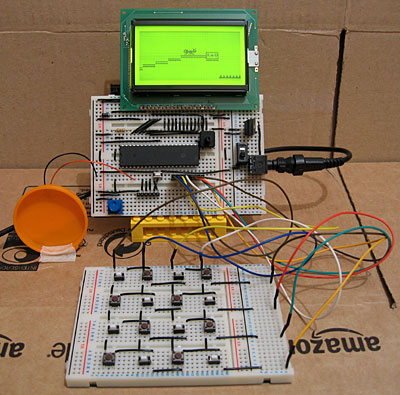
Beyond the ATmega644P and LCD the hardware is pretty simple; a potentiometer is provided to adjust the speed of the interpreter when it's running, from 1/8th speed up to 8x speed. Sound is output using a piezo transducer, which I've taped to the hard plastic lid from a tube of chocolates to amplify it. Games rely on a 4x4 hex keypad for input, and as I do not have a 4x4 keypad - hex or otherwise - I assembled my own on another breadboard. I don't even have sixteen switches of the same type, hence the mixture in the above photo. A schematic of the hardware can be downloaded in PDF format.
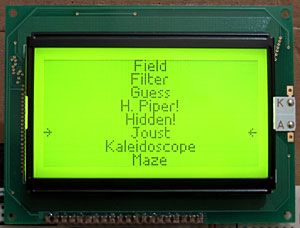
When you reset the circuit a list of all of the programs stored on the microcontroller is shown on the LCD. The 64KB of flash memory on the ATmega644P is enough to store the code for the interpreter and all of the CHIP-8 and SCHIP games available on the Internet. For a change I've decided to have a go at designing a variable width font rather than use one of my existing fixed-width fonts; I don't think it looks too shabby.
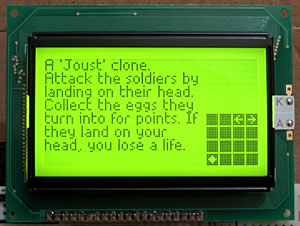
When a game has been selected a (gramatically incorrect) summary of the game is shown. To the right of the screen is a 4x4 grid informing the player which key does what; arrows for directional controls, a diamond for "fire" or confirmation actions and a tick/cross for yes/no input. There doesn't seem to be any particular convention for keypad input in CHIP-8/SCHIP games, which makes this feature invaluable!
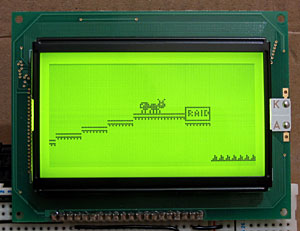
Click here to download the source code.
I have a bit of a soft spot for the CHIP-8 programming language, having previously written an few implementations. The CHIP-8 environment requires just under 3.5KB of RAM, and my recent investment in an ATmega644P boasting 4KB of RAM provided me with a microcontroller that was up to the task.
Beyond the ATmega644P and LCD the hardware is pretty simple; a potentiometer is provided to adjust the speed of the interpreter when it's running, from 1/8th speed up to 8x speed. Sound is output using a piezo transducer, which I've taped to the hard plastic lid from a tube of chocolates to amplify it. Games rely on a 4x4 hex keypad for input, and as I do not have a 4x4 keypad - hex or otherwise - I assembled my own on another breadboard. I don't even have sixteen switches of the same type, hence the mixture in the above photo. A schematic of the hardware can be downloaded in PDF format.
When you reset the circuit a list of all of the programs stored on the microcontroller is shown on the LCD. The 64KB of flash memory on the ATmega644P is enough to store the code for the interpreter and all of the CHIP-8 and SCHIP games available on the Internet. For a change I've decided to have a go at designing a variable width font rather than use one of my existing fixed-width fonts; I don't think it looks too shabby.
When a game has been selected a (gramatically incorrect) summary of the game is shown. To the right of the screen is a 4x4 grid informing the player which key does what; arrows for directional controls, a diamond for "fire" or confirmation actions and a tick/cross for yes/no input. There doesn't seem to be any particular convention for keypad input in CHIP-8/SCHIP games, which makes this feature invaluable!
Click here to download the source code.
Advertisement
Advertisement
Advertisement
Discussion