
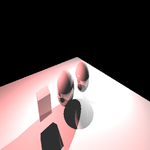
Unity raytracer
2,964
0
Advertisement
Messing about with Unity, wrote a little raytracer - quite easy as Unity does all the hard work!
Have a bash... stick a few spheres, planes, lights in a scene then stick this script on an object:
Have a bash... stick a few spheres, planes, lights in a scene then stick this script on an object:
using UnityEngine;using System.Collections;public class Tracer : MonoBehaviour{ public Color AmbientLight; [Range(0.0f, 1.0f)] public float Reflectivity; private Texture2D Texture; private Light[] Lights; void Start() { float ratio = Screen.height / (float)Screen.width; Texture = new Texture2D(256, (int)(ratio*256)); Lights = GameObject.FindObjectsOfType(); } void OnGUI() { GUILayout.BeginArea(new Rect(16, 8, 256, 64)); if (GUILayout.Button("Trace")) { DoTrace(); Texture.Apply(); } GUILayout.EndArea(); GUI.DrawTexture(new Rect(16, 48, Texture.width, Texture.height), Texture); } private void DoTrace() { float dx = 1/(float)(Texture.width); float dy = 1/(float)(Texture.height); Vector3 vec = new Vector3(); for (int y=0 ; y 0.0f) { var refl = Vector3.Reflect(ray.direction, hit.normal); RaycastHit hit2; if (Physics.Raycast(hit.point, refl, out hit2)) { clr += ColorAtPoint(hit2.point, hit2.normal) * Reflectivity; } } } Texture.SetPixel(x, y, clr); } else { Texture.SetPixel(x, y, Color.black); } } } } private Color ColorAtPoint(Vector3 aPos, Vector3 aNormal) { Color clr = new Color(); foreach (var l in Lights) { if (!l.gameObject.activeInHierarchy) continue; var dirToLight = (l.transform.position - aPos).normalized; float NdotL = Vector3.Dot(aNormal, dirToLight); if (NdotL > 0) { if (!Physics.Raycast(aPos, dirToLight)) { float dist = Vector3.Distance(aPos, l.transform.position); float v = (dist/l.range)+1; float intensity = l.intensity / (v * v); clr += l.color * NdotL * intensity; } } } return clr; }}Advertisement
Advertisement
Advertisement
Discussion