
Week One: Basic Geometry

PRO Tired of ads? Read GameDev.net ad-free and help keep the community independent with GameDev Pro — $3/month.
Week one is done
To start off, I'd like to mention that I have no timeline for this project. This project's purpose is to get me more familiarized with game development and implementing Blender obj's into Unity. Then, eventually teaching myself basic coding for a 3d platformer. Continually, I will teach myself how to rig a character, add animation into Unity, add cut scenes, develop GUI's and a smooth user interface. The list is endless as well as standard. Also with this project, I will feel out the process of developing (and finishing) a game which will then allow me to decide if game development is for me. I've always had the idea in the back of my head, so now is the time to discover the truth! Before I get into my update, I would like to add that I have been using Blender and Unity for a few years, but I never completed a game. I did, however, finish a game using GameMaker https://www.newgrounds.com/portal/view/691738. This game will be different.
Here is what I have accomplished this week:
I was inspired by Ocarina of Time. I saw the buildings, the textures, and the low poly characters and thought "I could totally do something like this with Blender." Mario 64 was always a huge inspiration too, so I revisited some of the levels and noticed that most of the older 64 games used basic geometry and textures to create great games. I'm always hesitant, though, because all the other indie developers are doing unique systems, great art, things that I could not compete with. I thought, "Enough! If I'm ever going to do this, I'm going to have to do it for myself before I could please the masses." My mindset is locked in placed and I'm determined to make a 64-esque platformer.

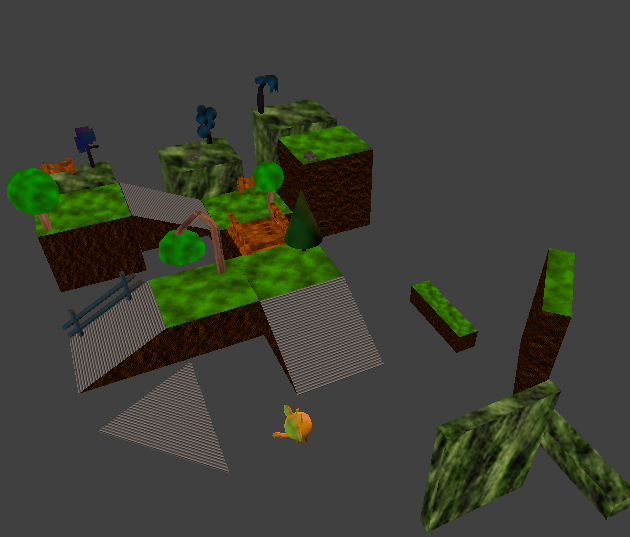
I started by created a prop set for myself. I skipped the concept art and the idea boards and jumped right into designing elements that I wanted in the game. I created cubes and put textures on them. I created ramps like I would imagine Mario 64 would do. I created stylized trees, bridges, fences, rocks, grass, and railings. Then, I put all those objects into Unity and played with the coloring of the textures. The lighting. I want to see if my vision would sustain the transfer. It did. I like how the objects look in Unity.
After I finished transferring my objects, I was going to design a level with the pieces I created, but I couldn't. I needed to know how to scale my level. Which brings me to the end of my week. I just started constructing a main character. I want the player to be a small dragon. I'm in the process of figuring out the best design for him as well as how I think he should be colored. I'm texture painting him because unwrapping him seems too complicated at the moment.


That's where I am at now! Next Sunday I will be back with another update ?
Recommended resources
beginner: recommended books and gear
C++ Game Programming for Beginners: A Practical Guide to Learn C++ from Scratch by Building Fun and Interactive Games
Amazon · Book
A beginner guide to learning C++ by building simple 2D games with SFML. It is aimed at readers with little or no experience who want to learn programming through game projects.
As an Amazon Associate I earn from qualifying purchases.
Unreal Engine 5 Handbook
Amazon · Book
An introductory guide to Unreal Engine 5 focused on core tools, workflows, and basic techniques for building games and interactive experiences. Best suited to developers who are new to Unreal or want a structured refresher.
As an Amazon Associate I earn from qualifying purchases.
Unreal Engine 5 RPG Development: Master Blueprints, C++, Combat, AI & VFX - Build a Full Game from Scratch (Volume 1)
Amazon · Book
A hands-on Unreal Engine 5 guide for building a playable RPG from scratch with Blueprints and C++. It appears to cover combat, AI, and VFX, and is aimed at beginners or developers new to Unreal workflows.
As an Amazon Associate I earn from qualifying purchases.
Modern C# Game Development for Absolute Beginners: A Practical, Project-based Guide to Learning C#, Mastering Unity Basics, and Building Simple 2D and 3D Games from Scratch.
Amazon · Book
A beginner-focused guide to C# game development with Unity basics. It covers core C# concepts, game logic, graphics, controls, enemy AI, physics, and building simple 2D and 3D games from scratch.
As an Amazon Associate I earn from qualifying purchases.
Discussion