
Adding some new stuff to 3D Paint
The need for 2D
After finishing Tower Defence I've just been adding a few much needed things to my 3D Paint app. Although I've greatly reduced efforts on making public releases I'm using it myself quite a bit. Due to my move to linux, one thing I do miss is photoshop. I may make an effort to get it working in Wine, I hear some older versions may work.
The gimp while it can do a lot of stuff, I have always found it awful to use, and am amazed it has ended up as a 'standard' photo editing app (I guess lack of anything better was the problem). I have installed krita too and that seems a lot better than gimp especially after the recent addition of the healing brush, which is pretty much a must have, so I will try and learn that.
In the absence of photoshop though I have found myself wishing I could do 2d editing within 3d paint, and so decided to do another push, and have added a 2d window. Programming 2d editing is *far* easier than 3d, so in theory things should be a doddle, however I had to remember how the rest of the program worked and where to plug things in.
Messy code
While I usually try to be very controlled about software design, 3D paint has turned into a masterclass of how not to do it. This is partly because I first made the first version in a hurry without anticipating it growing into a more longterm project, and partly because I didn't have a clue *how* the program would work (it has been 2/3 experimentation, and about 1/3 useful functionality).
I did do a major refactor when adding PBR workflow, however, looking at the code now, it is still a mess, and would be much better with a plugin architecture. I may get around to this at some point, and a more sensible next public release.
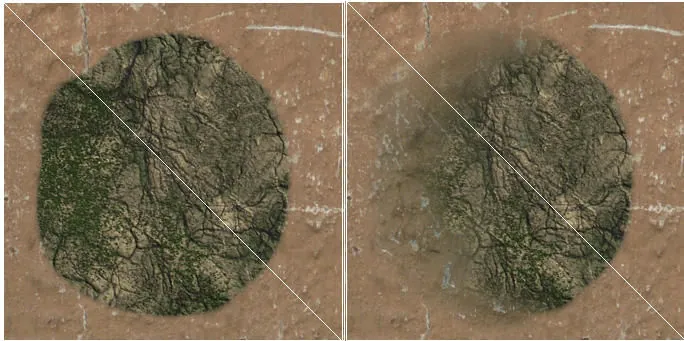
Healing
However rather than trying to rewrite things I've stuck with it and tried to add a reasonably modular 2d editing window. One of the major reasons for this is I wanted to put in a healing brush. Anyone who has used photoshop will know that healing brush is majorly useful for blending between areas, and once you have used it you never want to go back to any of the simple approaches like fading between layers.
I first tried to get healing working in 3d, but I realised there are some fundamental issues with how the algorithm works which would have required a total redesign. So after trying some bodges (healing entire layers), I decided I would have to bite the bullet and put in 2d editing.
2D Window

The 2d window essentially just draws the current composite texture, with a multitexture for a switchable wireframe guide on top. You can move it about and zoom, but not rotate (yet?). Clicking and dragging on the texture enables me to use a plugin like approach to call some similar brushes, the clone brush and healing brush. I still have to add an erase brush but that should be easy. At the moment it also shows the 'bleedout' regions around uv islands but I may mask that out as it is confusing and not necessary for 2d editing.
Clone and healing brush can use either the current layer, or the current loaded brush texture as their source. You can select the source location by control clicking before you start painting.
And then it becomes apparent why 2d is so beautifully simple. A clone brush becomes a case of simply copying pixels from one place to another. No more complex projection like in 3d. Healing is almost as easy.
I also put in some really basic undo functionality for control Z. When you start painting it just copies the current layer before modifying, and when you click undo it reverts. Pretty memory hungry and only good for one undo but better than nothing. I've done multi undo systems before too but it's a bit of a bag of worms and I don't have the strength currently.
The other interesting thing when cloning / healing is that as you are just copying pixels, it is a 1:1 ratio of source pixels to destination. While this usually makes sense when sourcing from a layer, when sourcing from a brush (which can be any size / resolution), the scale won't always match up to what you want. So I've added the ability to select a mipmap of the brush texture as the brush source.
Healing before and after
Future
Now there is a big texture view window the small one is now redundant so I may rejiggle the window arrangements, or make it more customizable, so you can maximize screenspace for a particular workflow. One thing I have always not been sure about is the way the aspect ratio of the 3d window changes with resizing. This was more a historical accident, and can make it easier to line up projection brushes. But I may dispense with this as it is annoying and literally no other app in history takes such a stupid approach.
I am also thinking up loads of new useful things that 2d opens up. Pen tool, for nice bezier curve selections, and / or a bezier mouse smoother for smoother curve drawing. I could very easily get carried away and end up writing most of photoshop (hell I've done it before!). Maybe I'll leave these for another day, and get onto working on another project, once I have ironed out all the many bugs.
Discussion