
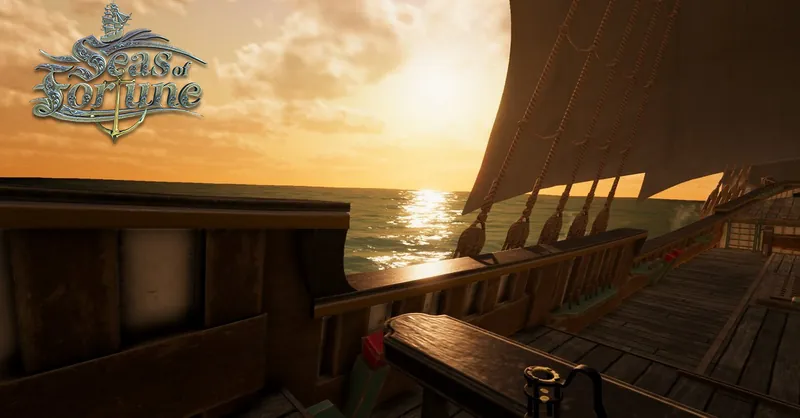
Seas of Fortune - Dev Update #16 - Giganticus Updaticus

Hey All!
Its been a while, these last few months after the summer was rough, and involved a lot of hard work considering we have no budget and we have to keep such an ambitious project alive!
We had our last community build out a while back and used a lot of the feedback we got from the greatest community on earth to fix and tweak things, so here is a list of what we have been up to, lets get straight to it!


Animations:
Our great animator Captain Lee spent a whole lot of time doing animations for us, as you saw in our previous update he spent most of his time on the first person hands. We have now added some of those in the build, after that he spent even more time doing some animations for the crew members, the focus this time was mostly idle animations.

Conversations is always crucial for having "life" on the ship, so constantly finding out what fits is not only a fun progress but challenging.


Having the crew do random idle animations that would make sense on a ship is also very important

Build Notes:
Lets jump to some tech stuff!
-=- Version 0.4.1 Notes -=-
* Implemented TRADING - Players can now buy / sell goods at ports. Each port has its own economy!
* Modified the 'Third-person' camera view (Pressing 'V') with limiters and slightly smoother transitions (WIP)
* Added the Crew System which includes two different behaviors (Deck Scrubbing, Talking). (In the future, Crew members will be able to dynamically switch between tasks)
* Crew Members now have their clothing and beard randomized
* Added a weather system (it can rain, clouds can change, etc.)
* Added a day & night system (currently too fast!)
* Completed Crafting System and UI overhaul
* Added the character customization screen (portrait)
* Added the ability to use a candle ("L") when its dark
* Added the ability to pick up and hold a pipe ("P")
* Added lanterns throughout the ship which can be turned on/off ("E")
* Added cannons that can be fired (X6) ("E")
* Sails are now animated (only an idle cycle for the time being)
* Integrated audio hooks on the character (walking)
* Integrated audio tracks and ambient loops (including a dynamic ambient audio system that is synchronized with ship water movement)
* Added some crafting recipes
* Improved water physics (buoyancy) and ship's navigation controls (WIP)
* When using the whipstaff to navigate, can now lean left/right using "Z" and "C"
* Replaced previous islands with new models, textures and lighting
* Improved the Quest System by adding a new series of new Quest Categories: Craft a good, Buy a good, Sell a good. A new quest relating to crafted is now active by default.
* Added contextual UI callouts -> When nearby an 'interactive station' (Whipstaff, Fiddler, etc.), when close to a Port, etc.
* Multiple improvements to the ship's collisions
* Changed the compass (now using a 2D UI asset) and waypoints
* Added 'water splash' effects for the ship to make it feels a bit more realistic
* Partial reskin of the Quest Book
* Skinned multiple UI elements (popups, callouts)
* Fixed multiple issues relating with 'game context' which resulted in mouse locks and other unwanted behaviors
* Fixed multiple animation quirks and issues
* Fixed multiple critical level shader issues that would prevent the game from working on various tech configurations
* Optimized volumetric light performances
* Optimized and streamlined visual assets to improve performances on lower end systems (GTX 580 / 8gb RAM)
* Added a demo version text overlay to quickly walk through new controls
Character Customization:
Previously this was only tested outside the build. But we also added the option to change beards after some feedback from twitter, once we get more characters this option will be enabled in the build.

I did not have the time to finish the frame in time to get it in the build. But whatever picture you choose here, will be displayed on your Captains table.
Trade:
Whenever you reach a port now, you can buy and sell goods for either making a profit, or for crafting at the workshop.

As the game progresses we will add more and more goods for to sell or buy. The wallpaper will properly display the port you are in as well, creating a unique animation in the different ports.

Sailing:
We have of course worked on the physics, which seems to be a never ending thing. Steering feels a bit heavier now, so does the turn ratio. Also, sailing at night when you cant see anything? Of course, why not!


Crafting:
We have added a few crafting recipes, so harpoons and rum can now be made on the ship. If you run out of items you would have to buy these at port. Harpoons can be sold at outposts for a pretty nice profit. Adding new recipes is also something we will continue to add as we go.

Crew:
We have not added any crew interaction as of right now, except the fiddler (He will play a song if you want him to) But you can watch your crew mates work and talk around the ship.


Cannons:
Of course, firing cannons is the fun part! Later on you will be able to command your crew to do this for you!

Whats next?
As we throttle trough with tweaking and adjusting things on feedback, I have also started a new player ship! Yes, I know, very exciting!
This time its the Cocca Veneta, a 16th century was an unarmed merchant vessel , trading from the Mediterranean, in particular Venice. The term 'Cocca' was applied to small merchant ships sailing from Venice to the east.
Characterized by a high prow and stern and a simple, maneuverable rig with 3 square and 2 lateen sails.
Their length was 20-30 meters and under 2000 tonnes displacement.
This ship also has a different and earlier steering mechanism which provides a new play style.
Take a look at the model I am working from here:


If you want to reach out for whatever reason, you can always send us an email at contact@seasoffortune.com or check out our website at www.seasoffortune.com

Until next time Captains, Have a great Christmas and a happy new year!
- Captain Tommy
Recommended resources
3D Art

3D Environment Design with Blender 5
Amazon · Book
Based on Blender 5, this updated second edition simplifies the complexities by guiding you through clear, practical workflows to overcome those challenges. You’ll start by addressing common modeling and proportion mistakes, then move on to realistic texturing and unwrapping to create stunning scenes based on actual references.
GameDev.net may earn a commission if you purchase through these links. This helps fund the site at no extra cost to you.

Low Poly 3D Modeling in Blender
Amazon · Book
Step into the world of low poly 3D art with Low Poly 3D Modeling in Blender—your entry point into Blender and mastering the fundamentals of 3D art. This beginner-friendly guide ensures that you’re fully prepared for the creative adventure that follows. Through a step-by-step learning process starting with the principles of low poly art, this book gradually immerses you in the intricacies of modeling. As you progress, you’ll gain hands-on experience creating diverse projects ranging from designing a simple 3D crate to rendering complete low poly scenes. The book covers a wide spectrum of topics as you navigate Blender's interface, mastering essential modeling tools and exploring both basic and advanced modeling techniques. Advancing to the final chapters, you’ll find ways to breathe life into your models with material creation and gain practical insights into modeling a variety of low poly objects. From end-to-end scene construction to configuring Blender for rendering high-quality images, you’ll be equipped with the foundational skills to propel your career in 3D modeling and explore the boundless creative possibilities that Blender offers. By the end of this book, you'll have a solid understanding of Blender, 3D modeling, low poly methodologies, material design, 3D rendering techniques, and the broader world of 3D art.
GameDev.net may earn a commission if you purchase through these links. This helps fund the site at no extra cost to you.
Discussion