
Building a save system for level objects in Unity Pt1 - Checkpoints

Building a save system for level objects in Unity Pt1 - Checkpoints
Objectives
- Save and restore states of objects in the scene according to the progress of the player.
- These objects may bE interconnected. (A door opens when pulling a level/ defeating an enemy)
- Let level design decide and modify which objects need to have their state changed when.
Used programming concepts
- JSON serialization https://unity3d.com/learn/tutorials/topics/scripting/loading-game-data-json
Checkpoints
Step 1 - Checkpoints
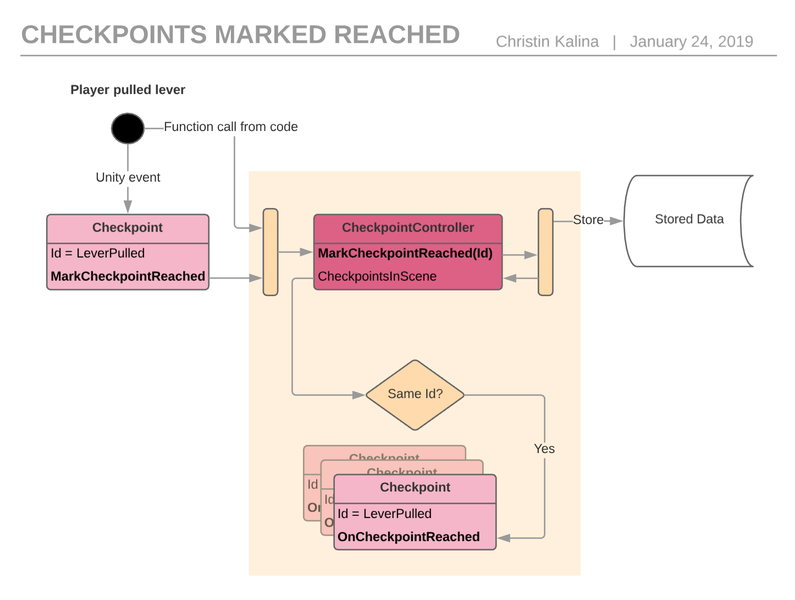
First, we need something that defines what a state change in the game is and when it happens. Let's call this a Checkpoint. When the player does an action to activate the checkpoint let's call that reached the checkpoint.
- This checkpoint needs an ID to be identifiable for saving and restoring.
- This checkpoint also needs something that can be fired off when the checkpoint was reached.
Step 2 - Reaching Checkpoints
So, we have a MonoBehavior called Checkpoint, that has an ID and a UnityEvent. Now, you can attach this to any gameObject in your scene. What will happen? Nothing, because we are not reaching the Checkpoint yet.
Step 3 - CheckpointController
- all the checkpoints in the scene and
- who to talk to make the state persistent.
Great success!
Now, when Unity starts a new game, the CheckpointController needs to receive the persisted list of Checkpoint IDs that where reached before. When the scene has loaded successfully, it will notify all Checkpoints that have the IDs that were saved before. (Remember that the Checkpoints register themselves to the CheckpointController on their Awake()).
So that the Checkpoints that were reached before now also fire off their UnityEvent when the level was loaded.


Recommended resources
Game Engines

Unreal Engine 5 Best Practices
Amazon · Book
Written by multi-award-winning Unreal generalist Tyson J. Butler-Boschma, Founder and Creative Director of Toybox Games Studios, this book addresses common challenges you face when advancing your expertise in lighting, environment design, and cinematic storytelling.
GameDev.net may earn a commission if you purchase through these links. This helps fund the site at no extra cost to you.
Discussion