
Text. Legacy OpenGL 1.5, FreeGLUT

What if you need to draw text with simple graphics? For example, you have a task in your college to draw plots with some text using C++. You can still use deprecated/legacy OpenGL 1.1 and FreeGLUT.
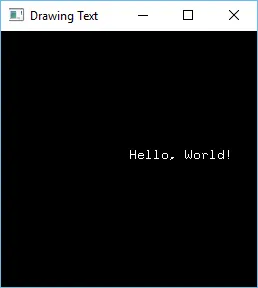
This example shows how to draw a text using FreeGLUT and deprecated/legacy OpenGL 1.5. And this example shows how to set up FreeGLUT in Visual Studio 2015.
Text_FreeGlutOpenGL15Cpp.zip - Just download and run this solution in your version of Visual Studio. But do not forget to set "Platform Toolset" to "Your Version Of VS" in the project settings. See screenshot:
If you want to set up FreeGLUT from scratch then download the "Libs" folders and set settings by yourself:
Libs: Libs_FreeGlutOpenGL15.zip
Settings:
1.
Configuration: All Configurations
Platforms: All Platforms
C/C++ -> Genaral -> Additional Include Directories:
$(SolutionDir)Libs\freeglut-3.0.0-2\include
Linker -> Input -> Additional Dependencies
freeglut.lib
2.
Configuration: All Configurations
Platforms: Win32
Linker -> General -> Additional Library Directories:
$(SolutionDir)Libs\freeglut-3.0.0-2\lib\Win32
Build Events -> Post-Build Event
xcopy /y /d "$(SolutionDir)Libs\freeglut-3.0.0-2\lib\Win32\freeglut.dll" "$(OutDir)"
3.
Configuration: All Configurations
Platforms: x64
Linker -> General -> Additional Library Directories:
$(SolutionDir)Libs\freeglut-3.0.0-2\lib\Win64
Build Events -> Post-Build Event
xcopy /y /d "$(SolutionDir)Libs\freeglut-3.0.0-2\lib\Win64\freeglut.dll" "$(OutDir)"
main.cpp
#include <GL/freeglut.h>
#include <string>

void drawText(float x, float y, std::string text)
{
    glRasterPos2f(x, y);
    glutBitmapString(GLUT_BITMAP_8_BY_13, (const unsigned char*)text.c_str());
}

void draw()
{
    glClear(GL_COLOR_BUFFER_BIT);
    drawText(0, 0, "Hello, World!");
    glutSwapBuffers();
}

int main(int argc, char** argv)
{
    glutInit(&argc, argv);
    glutInitDisplayMode(GLUT_DOUBLE | GLUT_RGB);
    glutInitWindowSize(256, 256);
    glutCreateWindow("Drawing Text");
    glutDisplayFunc(draw);
    glutMainLoop();
    return 0;
}
Discussion