
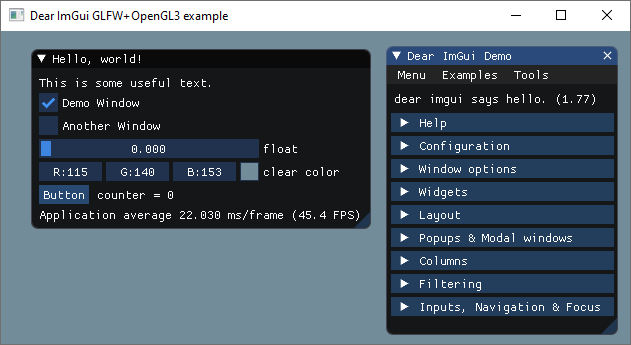
How to setup ImGui in QtCreator IDE

7,059
0
Advertisement
PRO Tired of ads? Read GameDev.net ad-free and help keep the community independent with GameDev Pro — $3/month.
I just copypasta the official “hello, world” example for GLFW: https://github.com/ocornut/imgui/blob/master/examples/example_glfw_opengl3/main.cpp
I use the QtCreator IDE and the MinGW compiler. You can create an empty C++ project in QtCreator like this: “File” > “New File or Project…” > “Other Project” > “Empty qmake Project”
Just copy the ImGUI files (download ImGUI release) to your project. You can see my .pro file below. If you want that your apps and games works on laptops then add this code to the beginning of your main.cpp:
#ifdef _WIN32
#include <windows.h>
extern "C" __declspec(dllexport) DWORD NvOptimusEnablement = 0x00000001;
extern "C" __declspec(dllexport) DWORD AmdPowerXpressRequestHighPerformance = 0x00000001;
#endif
HelloImGuiQtCreator.pro
INCLUDEPATH += "E:\Libs\glad-0.1.33-mingw-32bit\include"
LIBS += -L"E:\Libs\glad-0.1.33-mingw-32bit\lib"
LIBS += -lglad

INCLUDEPATH += "E:\Libs\glfw-3.3.2-mingw-32bit\include"
LIBS += -L"E:\Libs\glfw-3.3.2-mingw-32bit\lib"
LIBS += -lglfw3

LIBS += -lopengl32 -lgdi32

HEADERS += \
    imconfig.h \
    imgui.h \
    imgui_impl_glfw.h \
    imgui_impl_opengl3.h \
    imgui_internal.h \
    imstb_rectpack.h \
    imstb_textedit.h \
    imstb_truetype.h

SOURCES += \
    imgui.cpp \
    imgui_demo.cpp \
    imgui_draw.cpp \
    imgui_impl_glfw.cpp \
    imgui_impl_opengl3.cpp \
    imgui_widgets.cpp \
    main.cpp
Previous
Minimal OpenGL Example in C++ Qt5, PyQt5 and TypeScript WebGL 1.0
Next
GUI WPF + OpenGL 3.1
Advertisement
Advertisement
Advertisement
Discussion