
New navigation mesh
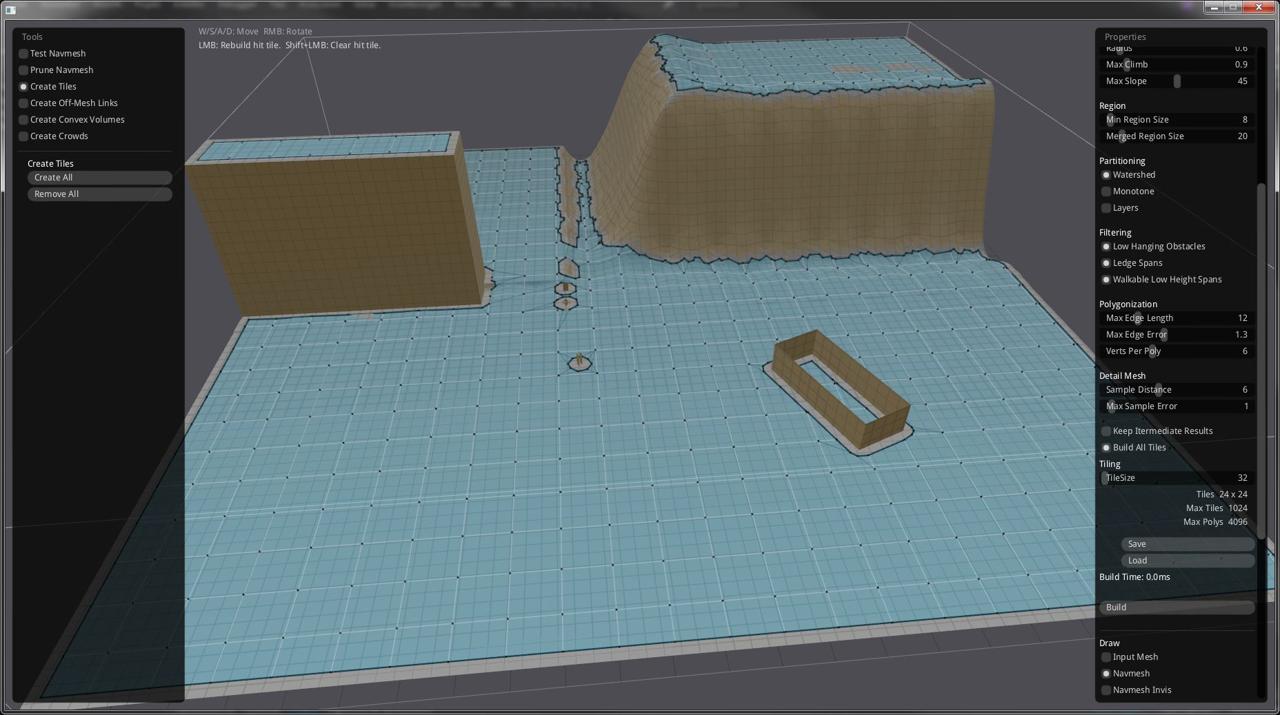
As mentioned earlier, ABx uses a navigation mesh to find routes from one point to another. There was the suggestion to include static scene objects, such a buildings, into the navigation mesh, so the route finding algorithm (in case of ABx this is Detour) automatically navigates around those obstacles. This solves many problems with adjusting the route on the fly when the character is going to collide with an object.
How does it work?
In ABx the terrain has a height map, which is a simple black/white image where brighter colors are higher altitudes.

A custom program takes this image and constructs a 3D mesh from it.

Then the same program adds all static objects (actually just their bounding volumes, at the moment only bounding boxes and spheres) to this mesh.

After all meshes are collected and merged into one big mesh, it generates the navigation mesh, just like the RecastDemo does. In the game an actor can only step on blue fields, and only these fields are considered when finding a route.

All this is done fully automatic, taking the Urho3D source scene, reading the height map and static objects and feeding the navigation mesh generation program with it. The above mesh is flipped because it uses right hand coordinates, while Urho3D uses left hand.

There is a short video demonstrating it: https://devtube.dev-wiki.de/videos/watch/d7bb6cd6-86ef-4652-98ed-89f68b61a25b.
Discussion