
First-Pass Tests for an AI-Generated 3D Level in Unity: Reachability, Collisions, and Performance
I’m working on a small experiment: taking an AI-generated 3D scene into Unity and checking whether it can become a simple playable level without manually rebuilding every part of the scene.
I want to be careful about what “playable” means here. I’m not trying to show that AI can produce a finished game in one click. A generated scene can look convincing and still fail as soon as a player tries to walk through it. The floor may be missing a collider, a doorway may be blocked by an invisible box, or an important object may be placed somewhere the player cannot reach.
So my first test is deliberately small and easy to understand.
The Test Scene
The scene is a small warehouse. The player starts at the loading-bay entrance, moves around several stacks of crates, finds a keycard, uses it to open a security door, and reaches the exit.
This is a simple route, but it gives me a useful test loop:
Player spawn → crate area → keycard → security door → exit goal
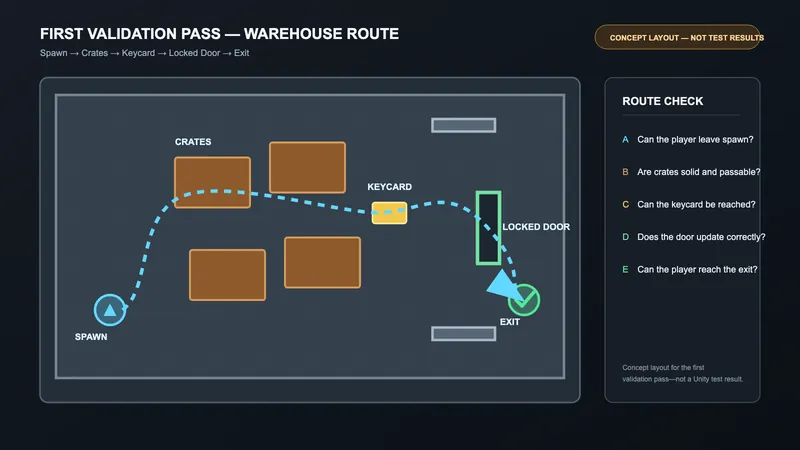
The first image below is a concept layout for that test route. It shows the objects I plan to check, but it is not a screenshot captured from a Unity test run and does not represent test results.
The point of using a small scene is isolation. If something fails, I want to know whether the problem comes from navigation, collision, interaction, or scene performance. A larger level would make the first test harder to explain and harder to reproduce.
For the Unity side, I’m keeping the setup simple: a basic player controller, a small interaction script for the keycard and door, and a clearly marked exit trigger. The generated content and the manually added gameplay logic should be kept separate so it is clear which part is being tested.
Tool note: The scene was prepared with KokoAI. This post focuses on validating the generated scene in Unity rather than on the generation process itself: https://kokoai.datasink.sensorsjourney.com/t/hn
What I’m Testing First
1. Can the player reach the goal?
The first question is not whether the scene looks good. It is whether the player can complete the intended route from start to finish.
I will check whether the player can:
leave the spawn area;
move around the crate stacks;
reach and collect the keycard;
reach the security door after collecting it;
enter the exit area.
A pass means the route can be completed without jumping over unintended geometry, leaving the playable area, or getting stuck in a corner. I also want to check whether the visible spaces match the actual spaces available to the player. A gap that looks wide enough may not be wide enough for the player controller or camera.
If the level uses a NavMesh, I will compare the baked navigation area with the visible floor. If the scene is being tested with a normal player controller first, I will manually walk the route and record any blocked or confusing sections before adding more systems.
2. Do collisions and interactions match the scene?
The next check is the relationship between what the player sees and what the game treats as solid.
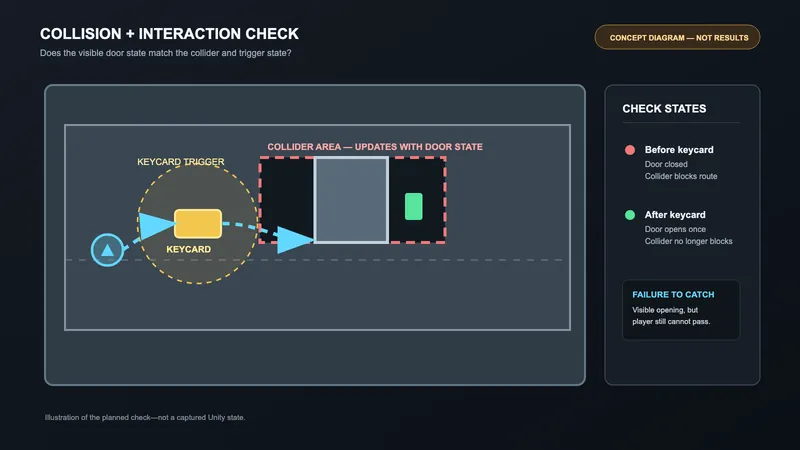
I will look for common problems such as:
walking through walls, crates, or the floor;
invisible colliders blocking an open doorway;
gaps between objects that catch the player;
triggers that fire too early or more than once;
a door that does not respond correctly to the keycard.
The keycard and door provide a small task loop instead of testing movement alone. Before the keycard is collected, the door should remain closed. After it is collected, the door should open once and allow the player to continue. The result does not need to be complex, but it should be predictable and easy to reproduce.
3. Does the scene remain stable when it gets larger?
Finally, I want to see what happens when the generated assets are repeated. A single crate may be fine, while fifty copies of the same asset may create unnecessary draw calls, large memory use, or physics overhead.
I plan to compare a small scene with one, five, and ten times the original number of repeated assets. For each case, I will record frame time, draw calls, and memory use. I will also look for missing materials, shader errors, physics warnings, and objects that behave differently after entering Play Mode more than once.
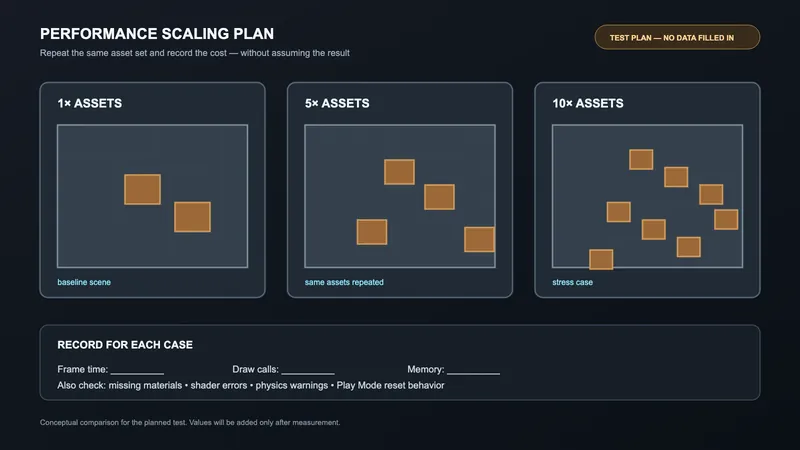
This is not a complete performance benchmark. It is a first warning system for problems that should be fixed before the scene is expanded.
What I’m Testing Next and Questions
After the basic route works, I want to test different player sizes, NavMesh agent settings, and a slightly larger layout. I also want to see whether the same checks can catch similar problems across several generated scenes instead of only this warehouse example.
The main question I’m bringing to the community is: for a first-pass validation tool, which failure would you prioritize first—unreachable objectives, incorrect collision, broken interactions, or performance regressions?
I’m also interested in practical Unity checks that you consider mandatory before calling an AI-generated scene “playable.” If there are failure cases I have missed, I would be glad to hear them.
Discussion