GameDev.net gamedev.net
🔒 Locked

Mozilla Firebird

Started by mittens May 17, 2003 at 11:47 AM 97 replies 3.2k views
Original Post
mittens
mittens
The new version of Mozilla Phoenix (as you can tell, it received a new name) has been released. And it has finally made me convert from IE to Mozilla. Firebird is indeed, very badass. Go download now. The only major problem I have so far, is that the browser doesn''t support the little middle-button scroller thing (you know, when you press the middle button, and a little circle appears, allowing you to move your mouse up/down to scroll). Other than that, I really love Firebird. It''s teh purdy. Trent Polack trent.codershq.com trent@codershq.com Author of Focus on 3D Terrain Programming

kordova
kordova
If only I wasn''t so lazy...eventually...I promise.


This is my sig. Or something.
Wow.
BradDaBug
BradDaBug
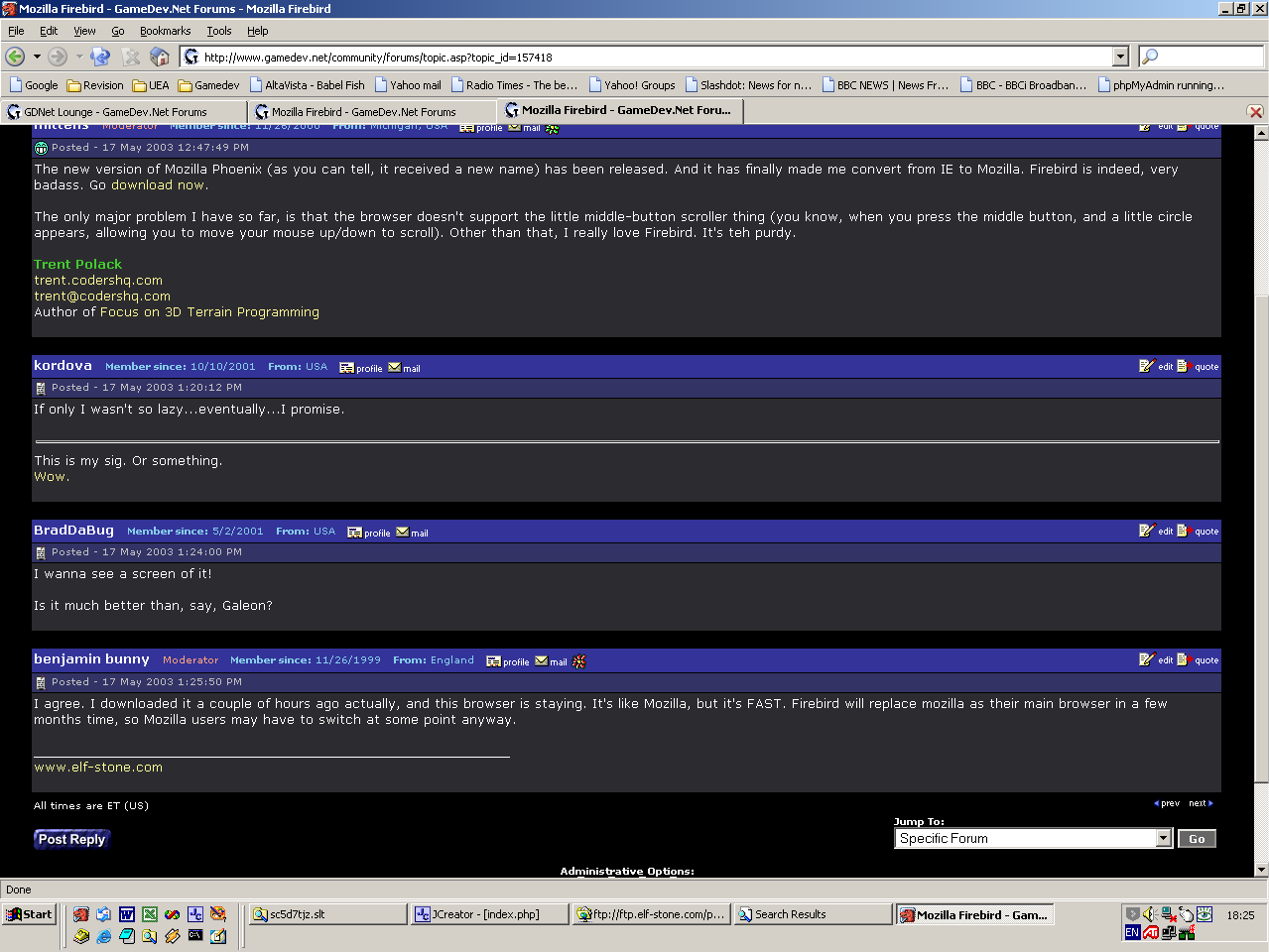
I wanna see a screen of it!

Is it much better than, say, Galeon?
I like the DARK layout!
benjamin bunny
benjamin bunny
I agree. I downloaded it a couple of hours ago actually, and this browser is staying. It's like Mozilla, but it's FAST. Firebird will replace mozilla as their main browser in a few months time, so Mozilla users may have to switch at some point anyway.

screenshot

____________________________________________________________
www.elf-stone.com

[edited by - benjamin bunny on May 17, 2003 1:29:50 PM]
kordova
kordova
Dled it, no install? Anyway, melikes. Now to import mozilla favorites...somehow...
benjamin bunny
benjamin bunny
The prefs folder is created when you run it the first time. It''s in Docs and Settings/[your profile]/application data/pheonix. You can just copy bookmarks.html straight over from the mozilla directory. I''m not sure which of the other files are compatible.
BradDaBug
BradDaBug
are Mozilla themes compatible? if not, are there plenty of themes for it already out there?
I like the DARK layout!
Raduprv
Raduprv
Ok, I downloaded it, and I am posting this from Firebird.
The first problem I noticed is that bellow the profile/register/bookmarks/active topics/etc. menu there is a grey/yellow line, under each icon.
Also, if I click on the input form, like now, and then I use the scrollwheel, it doesn''t work, I have to click outside the form first.
A 3rd problem is that, under Windows, the Firebird''s window has no custom icon, so it shows that ugly, windows default icon.
Now, i have to test it and see how much it crashes, etc.

Height Map Editor | Eternal Lands | Fast User Directory
kordova
kordova
I get the mozilla icon.
Alimonster
Alimonster
Holy cow, this is a fast browser! Yay!

Remember that you can use about:config in the address bar to fiddle with lots of options (like turning on "find everything" for type-ahead find instead of just links).
googlyeyes
googlyeyes
quote:
Form auto-complete is still an unstable feature and may lead to crashes.
Disabling of form auto-completion is not working.


I think I''ll wait untill they work out some of the bugs.
benjamin bunny
benjamin bunny
quote:
Original post by Raduprv
Ok, I downloaded it, and I am posting this from Firebird.
The first problem I noticed is that bellow the profile/register/bookmarks/active topics/etc. menu there is a grey/yellow line, under each icon.

Yeah, it''s there in mozilla too. Its just about the only thing I''ve noticed which doesn''t render properly, and I''ve been using mozilla for a few months now. It could just as easily be a problem with Gamedev.net''s HTML code as a bug in Mozilla/firebird.

quote:
Also, if I click on the input form, like now, and then I use the scrollwheel, it doesn''t work, I have to click outside the form first.

Works fine with on my machine. The only time I''ve had tempramental scroll-wheel support was before I installed the driver for my mouse. Perhaps this is your problem.

quote:
A 3rd problem is that, under Windows, the Firebird''s window has no custom icon, so it shows that ugly, windows default icon.

Odd. It looks fine on my machine (see the screenshot).

____________________________________________________________
www.elf-stone.com
Raduprv
Raduprv
quote:
Original post by Alimonster
Holy cow, this is a fast browser! Yay!

Remember that you can use about:config in the address bar to fiddle with lots of options (like turning on "find everything" for type-ahead find instead of just links).


I tried that, but there is no help on those options, and most of them are not that obvious.


Height Map Editor | Eternal Lands | Fast User Directory
Alimonster
Alimonster
Features/shortcuts for those who''ve not used a Mozilla-based browser before:

CTRL-T opens a new tab (you can also double-click an empty part of the tab area to open another one)
CTRL-W closes the current tab
CTRL-Page Down or CTRL-Tab moves to the next tab
CTRL-Page Up or CTRL-Shift-Tab to go to the previous tab

Remember that you can block images by right-clicking on them and selecting "block images from this server" (and unblock them in the same way).

Type-ahead find rocks -- use it! Just start typing away and it''ll get matched + highlighted (so you can press return to follow it if a link). It only finds links by default but you can change it to use all text in about:config. You can find link text by pressing the '' character and normal text with the / char. Use CTRL-G to go to the next match.

Press F7 to toggle caret browsing. This lets you select text like a word processor and copy it.

You can drag and drop links into the tab area to load it up in a new tab. Get used to right-clicking and selecting "load link in new tab" as well. Tabbed browsing is sooooo good.

Can''t think of anything else at the moment...
seanw
seanw
quote:
Original post by mittens
The only major problem I have so far, is that the browser doesn''t support the little middle-button scroller thing (you know, when you press the middle button, and a little circle appears, allowing you to move your mouse up/down to scroll). Other than that, I really love Firebird. It''s teh purdy.


Try this extension: http://autoscroll.mozdev.org/index.html

I''d recommend working your way through some of the other extension available (http://texturizer.net/firebird/extensions.html) to configure the browser to act exactly how you want it as it can really increase your effeciency.
Alimonster
Alimonster
quote:
Original post by Raduprv
I tried that, but there is no help on those options, and most of them are not that obvious.

Yeah, it's a pity that it's not as easily configurable as the standard Mozilla. However, I think that most of its default settings are fine (note: I don't have a mouse scroll wheel, so I can't comment about that part).

[edited by - Alimonster on May 17, 2003 2:08:40 PM]
Tron3k
Tron3k
I had the name Firebird first!!!
“[The clergy] believe that any portion of power confided to me, will be exerted in opposition to their schemes. And they believe rightly: for I have sworn upon the altar of God, eternal hostility against every form of tyranny over the mind of man” - Thomas Jefferson

Topic Locked

This topic has been locked by a moderator. New replies are not allowed.

Sign in to reply to this topic.