🔒 Locked
WTF mate?
Advertisement
Original Post
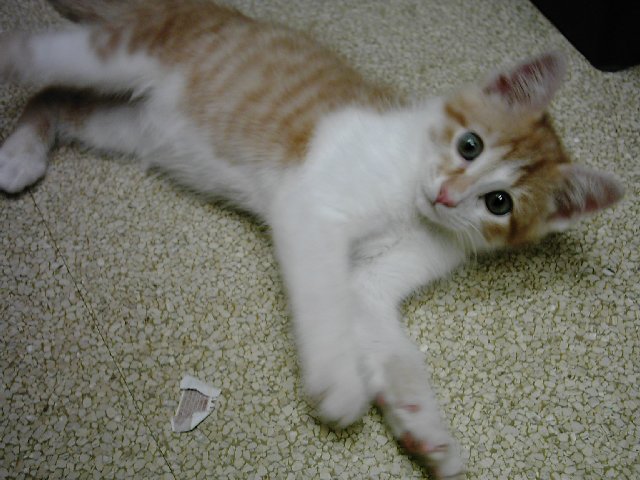
So, here I was surfing the net on Firefox.. when all of a sudden, I noticed the tabbed browser's X button wasn't displaying right. Soon, other things stop working properly, like icons on the taskbar and desktop. Well, I try to see if CounterStrike:Source has the same issue.. ..I couldn't even see what the hell was going on. So I restart, but now I'm getting screen artifacts and crap. I restart again, same thing. Then, I restart again and go to System Recovery, looking around in there to see if there's anything useful. --- Enter kitten. Said kitten decides this is a good time to jump on my computer keyboard. And he manages to land RIGHT on the Numeric Keypad's Enter key, and holds it down for a second before I can get him off. Thanks to today's fast processors and user friendliness, Windows System Recovery had already started and there was no way to stop it. An hour and twenty minutes later, here I am... and the screen is still not working right. So how was your day? -Greven

Pretty good, thanks!
-IV
-IV
「Foo」
Not bad at all. Get it fixed yet?
No, not yet..
While I've got most of the short-term required stuff fixed back up...
...I've still got the artifact problem that I had to begin with.
It's really getting annoying.
-Greven
While I've got most of the short-term required stuff fixed back up...
...I've still got the artifact problem that I had to begin with.
It's really getting annoying.
-Greven
Get your kitten a GDNet account so I can rate her up. My day was bloody boring 'til I read this.
I'm sure the worst part, is that you can't really stay mad at something with a face like that.
I thought it was my video card at first.
But consider... some of my icons aren't displaying right. If I rearrange them, the same ones don't show right, while the ones that did display correctly are fine.
edit:
Huh. So I ran Continuum as a test subject to see if a graphics driver reinstall fixed it. Last night, it was had a bunch of artifacts and instead of full-screen I opted to test Windowed mode.
It worked perfectly. Exited out... and all my icons are back to normal. Tried FullScreen, no problems. Color me confused.
-Greven
[Edited by - Evil_Greven on July 30, 2005 11:38:27 AM]
But consider... some of my icons aren't displaying right. If I rearrange them, the same ones don't show right, while the ones that did display correctly are fine.
edit:
Huh. So I ran Continuum as a test subject to see if a graphics driver reinstall fixed it. Last night, it was had a bunch of artifacts and instead of full-screen I opted to test Windowed mode.
It worked perfectly. Exited out... and all my icons are back to normal. Tried FullScreen, no problems. Color me confused.
-Greven
[Edited by - Evil_Greven on July 30, 2005 11:38:27 AM]
Quote:
Original post by Evil_Greven
I thought it was my video card at first.
But consider... some of my icons aren't displaying right. If I rearrange them, the same ones don't show right, while the ones that did display correctly are fine.
edit:
Huh. So I ran Continuum as a test subject to see if a graphics driver reinstall fixed it. Last night, it was had a bunch of artifacts and instead of full-screen I opted to test Windowed mode.
It worked perfectly. Exited out... and all my icons are back to normal. Tried FullScreen, no problems. Color me confused.
-Greven
Crazy. Maybe some kind of software conflict was causing it?
Bad news... it started again.
I left my kitten unattended while I went to take a shower, and when I came back my computer was in Suspended mode. Upon resuming, display was again screwed up.
-Greven
I left my kitten unattended while I went to take a shower, and when I came back my computer was in Suspended mode. Upon resuming, display was again screwed up.
-Greven
I ripped out the old modem card to leave an open spot under the Radeon 9800 Pro (before a TV tuner card occupied that slot, and had for a year and a half).
Started OK (no artifacts on startup screens) and DirectX games seem to be working w/o artifacts now. So maybe it was a cooling problem.
-Greven
Started OK (no artifacts on startup screens) and DirectX games seem to be working w/o artifacts now. So maybe it was a cooling problem.
-Greven
Quote:
Original post by Mawr
I'm 100% sure this isn't the case, but under Windows 9x, if star craft crashed, occasionally all the icons would invert colors and would stay like that. The real trick is, once your icons are inverted, to provoke a crash in a timely manner to invert them again. Weird stuff.
Hum, what a good way of fixing things. Two negatives equals a positive I guess.
Greven: Try degaussing the monitor. Perhaps your cat has some sort of magnetic power. You can try to put in a Linux LiveCD and see if its Windows' or the hardware's fault.
Hope that helps.
EDIT: Crap, you already fixed it. Oh well.
Topic Locked
This topic has been locked by a moderator. New replies are not allowed.
Sign in to reply to this topic.
Advertisement