
Original Post
🔒 Locked
Commenting Method
Advertisement


Generally the best method to use is one that a automatic documentation builder will understand. For example java's javadoc system or Natural Docs.
most important rule: comment what the code does, not how it does it....
good comment :
// sum all ages
for(unsigned i=0;i!=nm;++i)
total += values;
bad comment (tells me nothing that i couldn't determine from the code) :
// for each value, add to total
for(unsigned i=0;i!=nm;++i)
total += values;
as mentioned, commenting headers using javadoc, doc++ or doxygen comments is a damn good idea. I use doxygen personally....
good comment :
// sum all ages
for(unsigned i=0;i!=nm;++i)
total += values;
bad comment (tells me nothing that i couldn't determine from the code) :
// for each value, add to total
for(unsigned i=0;i!=nm;++i)
total += values;
as mentioned, commenting headers using javadoc, doc++ or doxygen comments is a damn good idea. I use doxygen personally....
I find that I've conformed to Visual Studio's XML documentation for library documention creation via NDoc.


You could take a look a literate programming. Its fairly extreme.
I think it takes jack Reeves' 1992 ARTICLE to heart; the code is the design not the product.
I think it takes jack Reeves' 1992 ARTICLE to heart; the code is the design not the product.
I'm pretty flexible in this area. Here's the general layout I use. At the start of every header file (but not associated inline or source files), I have a comment block like the following:
It's exactly 90 columns wide so it prints nicely. The contents of my comment blocks don't have many fixed requirements at this stage, though I'm going to develop this area somewhat. In this case, it's empty, though at some stage, ideally information should be filled in giving some kind of basic description of the class, what kind of role it fils, and how it fits into the rest of the system if applicable. I do not try and explain absolutely everything in these comment blocks. That's what seperate support documentation is for. It should give enough information so the programmer knows what documentation to consult if he needs to learn more.
Inside the class body, I organise the functions into logical collections, and put a little comment above them indicating the name of the collection, which should basically sum up what those functions manage. Eg:
Inside a matching source or inline file for this class, everything is grouped in a way that corresponds to the grouping in the class body. The start of each group is indicated by the following comment block:
If desired, the programmer can extend this down and fill in some information about the block, however it is optional. Each function is then preceeded by its own comment block, which looks like so:
Every function has this line above it. For functions that the programmer feels requires further explination (which really should be most of them), the comment block can be extended, and text added in the middle, like so:
In current versions of Visual Studio, this comment block also works with the tooltip popups in intellisence, to display this comment block when you have it selected. Eg:
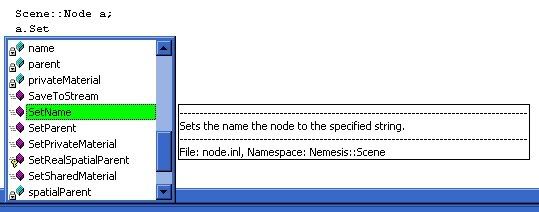
And I've just noticed I missed a word in that comment, but whatever. This comment block ideally should describe exactly what that function does, as well as briefly explain the arguments and return type, and any relevant effects calling this function will have on the public state of the object. It again is just a brief explination, and a full, more detailed description is left to external documentation.
Within functions, there are no restrictions on comments whatsoever. The programmer is free to place them wherever he feels they are nessicary. No block comments (/*...*/) are allowed within function bodies however, unless they are there to comment out blocks of code during development.
/*--------------------------------------Node-------------------------------------------*\ ||| Created 6/1/2005 Last Modified 3/8/2005\*--------------------------------------Node-------------------------------------------*/ It's exactly 90 columns wide so it prints nicely. The contents of my comment blocks don't have many fixed requirements at this stage, though I'm going to develop this area somewhat. In this case, it's empty, though at some stage, ideally information should be filled in giving some kind of basic description of the class, what kind of role it fils, and how it fits into the rest of the system if applicable. I do not try and explain absolutely everything in these comment blocks. That's what seperate support documentation is for. It should give enough information so the programmer knows what documentation to consult if he needs to learn more.
Inside the class body, I organise the functions into logical collections, and put a little comment above them indicating the name of the collection, which should basically sum up what those functions manage. Eg:
//Constructors inline Node(); explicit inline Node(const String& aName); Node(Stream& stream, const ChunkHeader& header, const Resource::Group& resources); virtual ~Node();Inside a matching source or inline file for this class, everything is grouped in a way that corresponds to the grouping in the class body. The start of each group is indicated by the following comment block:
/***********************************Constructors****************************************/ If desired, the programmer can extend this down and fill in some information about the block, however it is optional. Each function is then preceeded by its own comment block, which looks like so:
//---------------------------------------------------------------------------------------Every function has this line above it. For functions that the programmer feels requires further explination (which really should be most of them), the comment block can be extended, and text added in the middle, like so:
//---------------------------------------------------------------------------------------// Sets the name the node to the specified string.//---------------------------------------------------------------------------------------void Node::SetName(const String& aName){ name = aName;}In current versions of Visual Studio, this comment block also works with the tooltip popups in intellisence, to display this comment block when you have it selected. Eg:
And I've just noticed I missed a word in that comment, but whatever. This comment block ideally should describe exactly what that function does, as well as briefly explain the arguments and return type, and any relevant effects calling this function will have on the public state of the object. It again is just a brief explination, and a full, more detailed description is left to external documentation.
Within functions, there are no restrictions on comments whatsoever. The programmer is free to place them wherever he feels they are nessicary. No block comments (/*...*/) are allowed within function bodies however, unless they are there to comment out blocks of code during development.
Quote:
Original post by RobTheBloke
most important rule: comment what the code does, not how it does it....
good comment :
// sum all ages
for(unsigned i=0;i!=nm;++i)
total += values;
bad comment (tells me nothing that i couldn't determine from the code) :
// for each value, add to total
for(unsigned i=0;i!=nm;++i)
total += values;
as mentioned, commenting headers using javadoc, doc++ or doxygen comments is a damn good idea. I use doxygen personally....
I would say the good comment is a bad comment too. It should be replaced with more descriptive variable names, or even encapsulated within its own function.
int SumAges(int Ages[], int NumberOfAges){int SumOfAges = 0;for(unsigned int AgeIterator =0; AgeIterator < NumberOfAges; ++AgeIterator ) SumOfAges += Ages[AgeIterator ];return SumOfAges;}Now you have a functionality which can be used anywhere in your code without duplication, and have also removed the need for a comment. Your code now simply becomes
void function(){....int SumOfAllAges = SumAges(Ages, NumberOfAges);}Which is pretty self commenting.
I sometimes wish I could draw something on my comments. When I have complicated algorithm I want to explain, a figure would usually help a lot.
Anyway, another commenting tip: don't overcomment your code. If I can understand what your code does just by reading the comment without having to follow your logic thought and step-by-step tracing code, then it's well-commented.
Anyway, another commenting tip: don't overcomment your code. If I can understand what your code does just by reading the comment without having to follow your logic thought and step-by-step tracing code, then it's well-commented.
I agree with everything Jingo says: if a part of a method needs commenting, rip that part out of the method, put it in its own fully commented function.
Ideally, any given function should only contain:
- Self-evident code that does not need commenting
- Calls to well-documented functions.
An additional think I do to prevent code and docs from going out of sync is unit testing. For each function, I write clearly what it must do in each and every case where it can be called: return a (predetermined) value, throw an exception, fire an assert... and then write code that calls the function in all these cases, and checks the correct result appears. Make the unit testing application run at every compile as part of the build process, and you can be sure functions will not go out of sync with the documentation without some heavy reworking.
Of course, this is still pretty much archaic when compared with pre- and post-condition asserts inside functions that also serve as documentation (which ensures that, at least, documentation and tests don't go out of sync).
* snicker *
Ideally, any given function should only contain:
- Self-evident code that does not need commenting
- Calls to well-documented functions.
An additional think I do to prevent code and docs from going out of sync is unit testing. For each function, I write clearly what it must do in each and every case where it can be called: return a (predetermined) value, throw an exception, fire an assert... and then write code that calls the function in all these cases, and checks the correct result appears. Make the unit testing application run at every compile as part of the build process, and you can be sure functions will not go out of sync with the documentation without some heavy reworking.
Of course, this is still pretty much archaic when compared with pre- and post-condition asserts inside functions that also serve as documentation (which ensures that, at least, documentation and tests don't go out of sync).
Quote:
Original post by Jingo void function()
* snicker *
Topic Locked
This topic has been locked by a moderator. New replies are not allowed.
Sign in to reply to this topic.
Advertisement