
Original Post
🔒 Locked
Texturing Triangle Strips
Advertisement


I assume you want to tile the texture?
In that case use texture coordinates outside the 0.0F - 1.0F range:
Then you should be able to create something like this:
In that case use texture coordinates outside the 0.0F - 1.0F range:
glTexParameteri(GL_TEXTURE_2D, GL_TEXTURE_WRAP_S, GL_REPEAT);glTexParameteri(GL_TEXTURE_2D, GL_TEXTURE_WRAP_T, GL_REPEAT);Then you should be able to create something like this:
u=0.0 u=1.0 u=2.0 u=3.0v=0.0 |\ |\ |\ | | \ | \ | \ | | \ | \ | \ | | \ | \ | \ |v=1.0 | \| \| \| etc...
u and v actually stand for referencing the texture in texel space. If your texture is 512x256, u can range from [0..511] and v can range from [0..255]. s and t reference the texture in the range of [0..1], regardless of the size of the texture. WanMaster's example is good, but he should have used s and t instead of u and v :)
Anyway, if the above example looks like what you'd want your triangles to look like, then you could also make use of the texture generators to have OpenGL automatically create texcoords from the vertex position. Check out glTexGen.
Anyway, if the above example looks like what you'd want your triangles to look like, then you could also make use of the texture generators to have OpenGL automatically create texcoords from the vertex position. Check out glTexGen.
I didn't use glGenTex, I instead used what WanMaster said. I think My Textures are placed on diagonally.
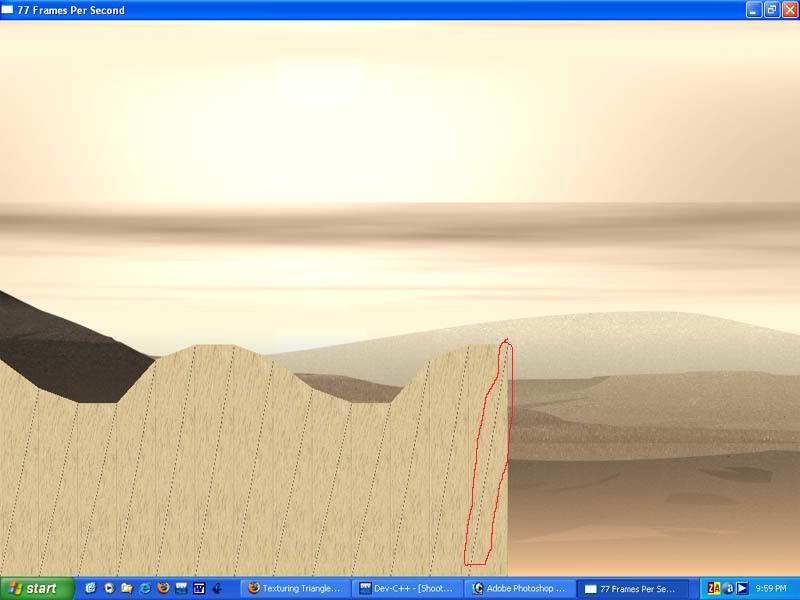
I used the following:
The NumofDots specifies the number of height coords in the map. Coordbase is just 0.0f, so it draws to the bottom of the screen.
I used the following:
glBegin(GL_TRIANGLE_STRIP);for(int x = 0; x < Terrain.Sector[0].NumofDots; x++){ glTexCoord2f(1.0f + (float)x, 0.0f + (float)x); glVertex3f(Terrain.Sector[0].Coordx[x], Terrain.Sector[0].Coordy[x], 0.0f); glTexCoord2f(1.0f + (float)x, 1.0f + (float)x); glVertex3f(Terrain.Sector[0].Coordx[x], Terrain.Sector[0].CoordBase, 0.0f); }glEnd();The NumofDots specifies the number of height coords in the map. Coordbase is just 0.0f, so it draws to the bottom of the screen.
you're doing something funny with your second texcoord parameters. Try this instead:
Or you could adjust your second texcoord tiling based on the height of the vertex at that point ie.
glBegin(GL_TRIANGLE_STRIP);for(int x = 0; x < Terrain.Sector[0].NumofDots; x++){ glTexCoord2f(1.0f + (float)x, 0.0f); glVertex3f(Terrain.Sector[0].Coordx[x], Terrain.Sector[0].Coordy[x], 0.0f); glTexCoord2f(1.0f + (float)x, 1.0f); glVertex3f(Terrain.Sector[0].Coordx[x], Terrain.Sector[0].CoordBase, 0.0f); }glEnd();Or you could adjust your second texcoord tiling based on the height of the vertex at that point ie.
float fTileYShift = 0.0f; // play around with thisfloat fTileYScale = 1.0f; // play around with this... (a greater number will mean more compression on the y axis)glBegin(GL_TRIANGLE_STRIP);for(int x = 0; x < Terrain.Sector[0].NumofDots; x++){ glTexCoord2f(1.0f + (float)x, fTileYShift ); glVertex3f(Terrain.Sector[0].Coordx[x], Terrain.Sector[0].Coordy[x], 0.0f); glTexCoord2f(1.0f + (float)x, fTileYShift +Terrain.Sector[0].Coordy[x] * fTileYScale ); glVertex3f(Terrain.Sector[0].Coordx[x], Terrain.Sector[0].CoordBase, 0.0f);}glEnd();
Thanks guys. Your code didn't work, so I took some time and figured it out. It was pretty much the same as yours.
Thanks for all of your suggestions and willingness to help! :)
float YShift = 0.0f;float YScale = 50.0f;glBindTexture(GL_TEXTURE_2D, TargaTex[4].texID);glBegin(GL_TRIANGLE_STRIP);for(int x = 0; x < Terrain.Sector[0].NumofDots; x++){ glTexCoord2f(0.0f + (float)x, (float)Terrain.Sector[0].Coordy[x] / YScale); glVertex3f(Terrain.Sector[0].Coordx[x], Terrain.Sector[0].Coordy[x], 0.0f); glTexCoord2f(0.0f + (float)x, 0.0f); glVertex3f(Terrain.Sector[0].Coordx[x], Terrain.Sector[0].CoordBase, 0.0f); }glEnd();Thanks for all of your suggestions and willingness to help! :)
Topic Locked
This topic has been locked by a moderator. New replies are not allowed.
Sign in to reply to this topic.
Advertisement