gamedev.net
🔒 Locked

depthtest only one side

Started by daniel_i_l 12 replies 1.1k views
Original Post
daniel_i_l
daniel_i_l
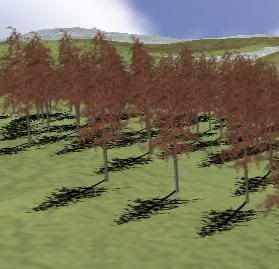
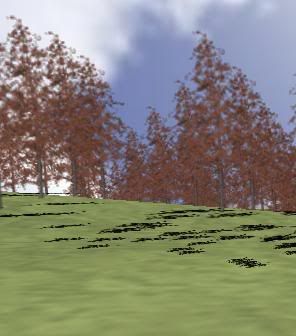
I found a great way (in my opinion) to render tree shadows - I drew a black picture of the tree on the ground and then disabled depth testing, that means that the terrain wont cut through the trees: Image hosting by Photobucket The problem is that also the bottom of the trees go through the terrain and so if the trees are on a hill, the shadows on the far side of the hill can be seen from the front of the hill: Image hosting by Photobucket How can this be fixed? Thanks!
"We've all heard that a million monkeys banging on a million typewriters will eventually reproduce the entire works of Shakespeare. Now, thanks to the internet, we know this is not true." -- Professor Robert Silensky
Rasmadrak
Rasmadrak
you may need to use the stencil buffer, so that stuff only gets drawn where shadows actually are drawn.

I never got it to work in my engine thou.. but it didn't matter since it was a RTS :D
"Game Maker For Life, probably never professional thou." =)
daniel_i_l
daniel_i_l
I don't understand, only draw the terrain were there're shadows?
(My game is a RTS, why doesn't it matter?)
Thanks.
"We've all heard that a million monkeys banging on a million typewriters will eventually reproduce the entire works of Shakespeare. Now, thanks to the internet, we know this is not true." -- Professor Robert Silensky
daniel_i_l
daniel_i_l
Anyone? And isn't there a way to do it without the stencil buffer? For example, is it possible to color the texture on only one side, or make the side oppisite the normal not show up?
Thanks.
"We've all heard that a million monkeys banging on a million typewriters will eventually reproduce the entire works of Shakespeare. Now, thanks to the internet, we know this is not true." -- Professor Robert Silensky
Falken42
Falken42
Quote:
Original post by daniel_i_l
Anyone? And isn't there a way to do it without the stencil buffer? For example, is it possible to color the texture on only one side, or make the side oppisite the normal not show up?
Thanks.

No, it's not possible. That's what happens when you disable the depth buffer. You have a couple of other options, but I don't think you're going to like them.

As the AP above mentioned, you can simply sort *all* polygons (the trees and the terrain) yourself. This might fix your problem, but it won't be perfect where the shadow polygons intersect the terrain. Sorting by polygon means using a point on the polygon (usually the midpoint) to determine which one to draw first. In an overlapping situation, this is a never-win situation. Even if you did implement it, the performance cost of sorting would be too slow and there is no way you could render the same number of polygons that you have now at the same FPS.

As for the other option, I presume you are drawing your shadows "straight out" -- as in the quad's vertices all have the same Y value? You could adjust the Y vertex of the shadow polygon by checking the height value of the terrain at that X,Z location, so the shadow polygon would never intersect the terrain. If you implemented this, you should re-enable depth testing, and then render: terrain -> tree shadows -> trees. That should hopefully give you the same effect you're looking for.

The only downfall with this method is if a tree is on flat ground but its shadow is on a hill -- the shadow polygon will be rendered floating above the ground. It might look bad, it might not. Depends on how close the camera gets to the ground, I guess.

You can work around that problem by either planning the locations of your trees well so that never happens, or splitting the shadow polygon into multiple pieces so it has less of a chance of being rendered at a noticable angle.
daniel_i_l
daniel_i_l
So if I render the terrain and shadows seperatly there's no way to fix the problem if depth-testing is disabled? I don't want to enable the testing and split the shadows up cause thats exactly what I was trying to avoid with this method.
Thanks.
"We've all heard that a million monkeys banging on a million typewriters will eventually reproduce the entire works of Shakespeare. Now, thanks to the internet, we know this is not true." -- Professor Robert Silensky
daniel_i_l
daniel_i_l
Could I do it somehow with lighting that takes into account the normal?
Thanks.
"We've all heard that a million monkeys banging on a million typewriters will eventually reproduce the entire works of Shakespeare. Now, thanks to the internet, we know this is not true." -- Professor Robert Silensky
haphazardlynamed
haphazardlynamed
Quote:
Original post by bpoint
Even if you did implement it, the performance cost of sorting would be too slow and there is no way you could render the same number of polygons that you have now at the same FPS.


Hello Im the AP

Regarding Sorting,
you can do it, but you have to be clever, otherwise its going to be prohibitively expensive

I'd like to point out, that assuming your terrain is a heightfield, that the polygons in it are *Already Sorted* - the 2d grid structure itself contains order information. While details of distance to camera are not accounted, the rows and columns themselves have an order, and simply ensuring on a row by row basis that rows in front render first, should be enough to cover the overlapping hill problem.
So depending on what direction your camera is facing, you can simply transverse the heightfield in forward or reverse ordered triangle list, to change their effective rendering order. (there are special cases where you might need to do it in two sections with different fwd/rev order, but thats the general idea)

Additionally, since a heightfield is grid based, each tree can be located and tracked as being placed on a cell of this grid. by rendering each tree immediatly after we render its associated heightmap cell, we can apply the 'free' sorting of the heightmap to the trees as well.
daniel_i_l
daniel_i_l
Thanks, and about the sorting you proposed - if I'm rendering the terrain as a quadtree were the rendering function is a recusive function that splits into 4 and does the render function on each part (which are split into 4) untill the function gets a "leaf" node which it renders. So to do the sorting would it work if every time I split a node into 4, I pass the new nodes to the render function in front to back order?
Thanks.
"We've all heard that a million monkeys banging on a million typewriters will eventually reproduce the entire works of Shakespeare. Now, thanks to the internet, we know this is not true." -- Professor Robert Silensky
daniel_i_l
daniel_i_l
I made sure that the tiles are rendered in the proper order and gave all the root nodes a std vector of trees. But I have a problem with the Multitexturing (detail texture), before I rendered the terrain first with the multitexture and then did the trees, but now I'm drawing the trees for each tile after that tile so I always have to turn the multitexture of and then on again, I'm not sure how to do that - Here is the main render function that turns on the MT and then draws the terrain, and then the trees:
void CBspTree :: RenderMap(){   if(!p_HeightMap) return;           number_of_parts=0;   Frustum.CalculateFrustum();   glLoadIdentity();   Camera.Look();    glActiveTextureARB(GL_TEXTURE0_ARB);    glEnable(GL_TEXTURE_2D);    glBindTexture(GL_TEXTURE_2D, g_Texture[0]);    if(g_bDetail)    {        glActiveTextureARB(GL_TEXTURE1_ARB);        glEnable(GL_TEXTURE_2D);                glTexEnvi(GL_TEXTURE_ENV, GL_TEXTURE_ENV_MODE, GL_COMBINE_EXT);        glTexEnvi(GL_TEXTURE_ENV, GL_RGB_SCALE_EXT, 2);        glBindTexture(GL_TEXTURE_2D, g_Texture[1]);            glMatrixMode(GL_TEXTURE);            glLoadIdentity();            glScalef((float)g_DetailScale, (float)g_DetailScale, 1);        glMatrixMode(GL_MODELVIEW);    }    Render(map);  //render the map + trees           // Turn the second multitexture pass off    glActiveTextureARB(GL_TEXTURE1_ARB);    glDisable(GL_TEXTURE_2D);    // Turn the first multitexture pass off    glActiveTextureARB(GL_TEXTURE0_ARB);            glDisable(GL_TEXTURE_2D);} 


and here's the Render(map):
void CBspTree :: Render(BSP* node){  //if((node->is_leaf) && (Frustum.BoxInFrustum( node->centerX, node->centerY, node->centerZ, 32, 50, 32 )) )  if(node->is_leaf)   {      glColor3f(1,1,1);            if(Frustum.BoxInFrustum( SCALE_SIDE*node->centerX, node->centerY, SCALE_SIDE*node->centerZ, node->height/2, (SCALE_SIDE*node->width)/2, (SCALE_SIDE*node->depth)/2))     {              RenderHeightMap(p_HeightMap, (int)(node->centerX - node->width/2), (int)(node->centerZ - node->depth/2),                                    (int)(node->centerX + node->width/2), (int)(node->centerZ + node->depth/2) );       number_of_parts++;       //draw trees with tree texture       sort(node->MyTrees.begin(), node->MyTrees.end());       for(int i=0; i<node->MyTrees.size(); i++)       {        node->MyTrees.rotation = Camera.BillBoard(node->MyTrees.position);        node->MyTrees.Render();       }     }   }  else   {    if(Frustum.BoxInFrustum( SCALE_SIDE*node->p_sec1->centerX, node->p_sec1->centerY, SCALE_SIDE*node->p_sec1->centerZ, node->p_sec1->height/2, (SCALE_SIDE*node->p_sec1->width)/2, (SCALE_SIDE*node->p_sec1->depth)/2))      Render(node->p_sec1);     if(Frustum.BoxInFrustum( SCALE_SIDE*node->p_sec2->centerX, node->p_sec2->centerY, SCALE_SIDE*node->p_sec2->centerZ, node->p_sec2->height/2, (SCALE_SIDE*node->p_sec2->width)/2, (SCALE_SIDE*node->p_sec2->depth)/2))      Render(node->p_sec2);     if(Frustum.BoxInFrustum( SCALE_SIDE*node->p_sec3->centerX, node->p_sec3->centerY, SCALE_SIDE*node->p_sec3->centerZ, node->p_sec3->height/2, (SCALE_SIDE*node->p_sec3->width)/2, (SCALE_SIDE*node->p_sec3->depth)/2))      Render(node->p_sec3);     if(Frustum.BoxInFrustum( SCALE_SIDE*node->p_sec4->centerX, node->p_sec4->centerY, SCALE_SIDE*node->p_sec4->centerZ, node->p_sec4->height/2, (SCALE_SIDE*node->p_sec4->width)/2, (SCALE_SIDE*node->p_sec4->depth)/2))      Render(node->p_sec4);    }}

I did this and the terrain didn't show up at all, amd some of the trees were textured with the ground? How do I solve this problem? (and alternate between multitexture and regular, as a think that thats the problem)
Thanks.
"We've all heard that a million monkeys banging on a million typewriters will eventually reproduce the entire works of Shakespeare. Now, thanks to the internet, we know this is not true." -- Professor Robert Silensky
daniel_i_l
daniel_i_l
Thanks, and what about the multitexture problem, how do I fix that?
"We've all heard that a million monkeys banging on a million typewriters will eventually reproduce the entire works of Shakespeare. Now, thanks to the internet, we know this is not true." -- Professor Robert Silensky
daniel_i_l
daniel_i_l
anyone?
"We've all heard that a million monkeys banging on a million typewriters will eventually reproduce the entire works of Shakespeare. Now, thanks to the internet, we know this is not true." -- Professor Robert Silensky

Topic Locked

This topic has been locked by a moderator. New replies are not allowed.

Sign in to reply to this topic.