
GameDev.net gamedev.net
🔒 Locked

HLSL - fast gaussian blur (C++, DX9, ps2)

Started by AshleysBrain Dec 9, 2006 at 6:09 AM 3 replies 33.4k views
Original Post
AshleysBrain
AshleysBrain
I'm trying to make a gaussian blur with a variable depth. Forgive the simple question, I searched for some time and couldn't answer... Here's my HLSL code:
// Foreground texture
texture ForegroundTexture;

// Foreground sampler
sampler2D foreground = sampler_state {
    Texture = (ForegroundTexture);
    MinFilter = Point;
    MagFilter = Point;
    MipFilter = Point;
};

// Pixel width in texels
float pixelWidth;

float PixelKernel[13] =
{
    -6,
    -5,
    -4,
    -3,
    -2,
    -1,
     0,
     1,
     2,
     3,
     4,
     5,
     6,
};

static const float BlurWeights[13] = 
{
    0.002216,
    0.008764,
    0.026995,
    0.064759,
    0.120985,
    0.176033,
    0.199471,
    0.176033,
    0.120985,
    0.064759,
    0.026995,
    0.008764,
    0.002216,
};

// Effect function
float4 EffectProcess( float2 Tex : TEXCOORD0 ) : COLOR0
{
    // Apply surrounding pixels
    float4 color = 0;
    float2 samp = Tex;
    samp.y = Tex.y;

    for (int i = 0; i < 13; i++) {
        samp.x = Tex.x + PixelKernel * pixelWidth;
        color += tex2D(foreground, samp.xy) * BlurWeights;
    }

    return color;
}

technique MyTechnique
{
    pass p0
    {
        VertexShader = null;
        PixelShader = compile ps_2_0 EffectProcess();
    }
}
The problem is I would like to increase the depth without increasing the number of samples taken. I thought if I simply multiplied the pixel kernel by an amount, for example 2, it would then sample pixels 2, 4, 6, 8 etc. and give a deeper blur (eg. samp.x = Tex.x + PixelKernel * pixelWidth * 2). Instead it gives an ugly ghosting effect. How do I keep the gaussian blur nice and "soft" over a large area? Also is 13 samples a sensible amount? How would the quality of a deeper 5 sample gaussian compare? What's an easy way to determine the blur weights?
Construct (Free open-source game creator)
Sc4Freak
Sc4Freak
If you don't really need it to be exact, you could do multiple passes of a box blur. Box blurs are fast, and 3 or so passes comes pretty close to a real gaussian blur. You can also increase the size of the kernel very easily, without having to worry about the weights.

And for a gaussian blur, I don't think you can increase the "depth" without recalculating the entire kernel. You need a kernel about 6 times the size of your σ value.
g0nzo
g0nzo
There are 2 simple ways to increase "depth" of gaussian blur without changing kernel size.

One way is to downsample the input texture - kernel size, weights, shader code don't change, you only need to pass a new size of the texture (or precalculated offsets) to the shader. It's described i.e. here (slides 46-53).

Another way is to take advantage of hardware filtering - it's described i.e. here. This way you can get 2x or 4x more samples, without actually increasing the number of samples taken.

Quote:

What's an easy way to determine the blur weights?

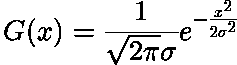
Just calculate them once for a given kernel size using 1D Gaussian distribution function and then pass them to the shader.
1D Gaussian distribution
Just remember that all weights must sum up to 1, so you may need to scale them a bit.

You may also read this.
LeGreg
LeGreg
Quote:
Original post by AshleysBrain
Also is 13 samples a sensible amount? How would the quality of a deeper 5 sample gaussian compare? What's an easy way to determine the blur weights?


It all depends on your kernel size. If it covers more than 13 pixels, then you're likely to undersample and end up with aliasing (note that aliasing may already be present in your original image too !) and bad behavior (waves or flickering) in movement.

Ways to accelerate a blur :
- use a separable filter. If the filter can be decomposed in a version that filters along X and then along Y, then you win. It seems it's already what you're doing.
- use the filter capabilities of the hardware, it's free mostly and can accelerate the computation by a lot. Bilinear filter is 4 neighbor samples per texel read. Sometimes you have to give up a little bit of precision because there is no nice way to fit a bilinear into a gaussian. Some people also use anisotropic filtering to quickly decimate samples.
- you can use multiple passes with fewer texel read per pass (because the filter is separable this way too..), in which case it's a trade off between your texturing capabilities (how many samples per pass) and the extra cost of an additional pass. Maybe with some experiment you can find a sweet point that depends on what hardware you run on. Sometimes you are obliged to multipass especially if you are limited in the number of texel read that you can do with some pixel shader version (original ps2 parts were limited to 4 dependant read). Multipass obliges you to ping pong also, so may not be interesting if you're memory constrained.

LeGreg
AshleysBrain
AshleysBrain
I'm also interested in making an effect where you can use a texture as a monochrome "blur mask", where black causes no change and white causes a deep blur. Any tips on the best way to achieve that? It'd be a good way to fake depth of field in 2D.

One more question (don't want to spam the board :)) I'm trying to work out how much VRAM my app is going to use. I've told DirectX to use A8R8G8B8, does that mean each pixel only takes 32 bits in VRAM, which are then converted to floats for pixel shaders then converted back, or does the GPU always store textures in a "native" format? 16 bit floats for each component maybe?
Construct (Free open-source game creator)

Topic Locked

This topic has been locked by a moderator. New replies are not allowed.

Sign in to reply to this topic.