
gamedev.net
🔒 Locked

Uniform Sphere

Started by LackOfGrace Aug 1, 2007 at 2:24 AM 7 replies 1.5k views
Original Post
LackOfGrace
LackOfGrace
i know this has been asked before, but i cant seem to find a good answer anywhere. Ive just created a geometric clipmap system. Its working by having several of quad areas around the player. i would like these areas to bend in a sphereical manner. the first approach that popped into my mind was to use x = sin( xRot ) * cos( yRot ); z = cos( xRot ) * cos( yRot ); y = sin( yRot ); though this dosent distribute the vertices uniformaly, wich will make everything look funny near the poles so, i would like to know how you people would approach this problem. i thought of using some geosphere algo, but it seems that the recommended way to make such a sphere is to subdivide a cube, and i would prefer not using that method ( as it will either it will be heavy on memory or the cpu )
kohlrak
kohlrak
Do you mean "If i turn left the world moves to the right making it appear i turned left" or do you mean "i want the objects in the world (the objects themselves, not the placement) to bend around the player?"
LackOfGrace
LackOfGrace
i want to generate the surface of a planet, so i want the surface to bend.
kohlrak
kohlrak
Sounds like you're going to have to draw the sphere as a model, or there might be a sphere function in your library. You'll have to check your referance or tell us which library you're trying to use... Then again, if you have a bend function, take into account that you're going to be bending to an end point. So, for a 2d example, 0,0 is the center of your sphere, while you can have a diameter of 2 (radius of 1) and you could start at 1,0 and bend the thing until the two ends meet at -1,0.
LackOfGrace
LackOfGrace
im using opengl

so basically i want to be able to create a quadratic patch that has a spherical bend

i don't have any bend functionality, i just want to calculate the points.

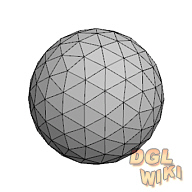
and i want the result to look something like

geosphere
Grecco
Grecco
Squares and spheres don't mix. That being said, there are several ways to 'fix' this issue.

One is to use a cubic model with 6 faces. This gives you 8 points and 12 edges where you have to do 'something special' to get your engine to work correctly.

Another is to use an icosahedral model with 20 faces (triangles) which are grouped together as 10 distorted quads, as for example shown here.

A third method is to 'pull down' vertices (i.e. displace them downwards) as they are further away to simulate the curvature of the earth. This won't work if you want to go into space, but you could always switch to a different method/mesh then.
Simulation & Visualization Software
GPU Computing
www.organicvectory.com
LackOfGrace
LackOfGrace
ok, basically just using two rotational values ( horisontal rotation and vertical rotation ) wont be able to give me vertices?
taby
taby
You might want to look into relaxation techniques for giving a uniform spread of points across a spherical surface.

Short of this, you can simply place the points randomly (which also serves as a very good starting set for relaxation techniques to work with).

http://mathworld.wolfram.com/SpherePointPicking.html

Here theta and phi are distributed as:
U = rand from 0 to 1
V = rand from 0 to 1

theta = 2*pi*U
phi = arccos(2*V - 1)
r = radius

x = r*cos(theta)*sin(phi)
y = r*sin(theta)*sin(phi)
z = r*cos(phi)
Zahlman
Zahlman
Quote:
Original post by LackOfGrace
though this dosent distribute the vertices uniformaly, wich will make everything look funny near the poles


There will be some kind of distortion in every case, unfortunately. Although you can minimize the distortion by basically projecting the cube onto the sphere from inside (i.e. circumscribe the cube, and take points on the sphere by the projection of points on the cube to the sphere surface).

Quote:
( as it will either it will be heavy on memory or the cpu )


You can pre-calculate, say, 10 vertices along each edge of the projected cube (in object coordinates; i.e. letting the sphere be a unit sphere at the origin), and do linear interpretation from there (along with the scaling and translation needed to get the world coordinates of your sphere).

Topic Locked

This topic has been locked by a moderator. New replies are not allowed.

Sign in to reply to this topic.