gamedev.net
🔒 Locked

Anyone ever have a Skeletal Animation error like this?

Started by zacaj 21 replies 5.2k views
Original Post
zacaj
zacaj
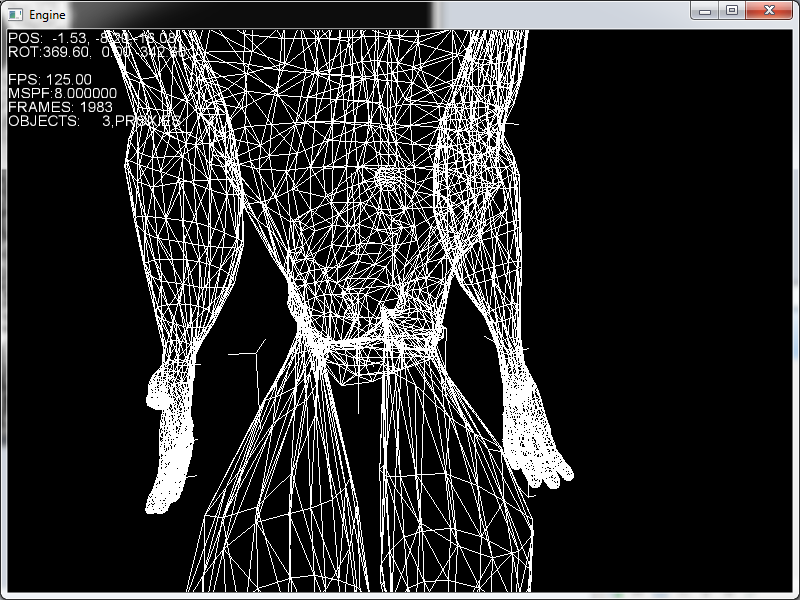
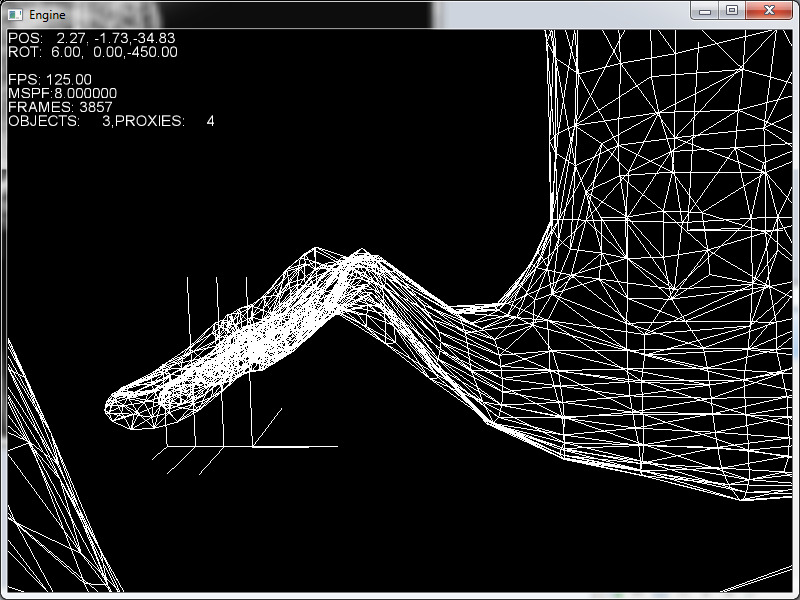
Ive been implementing skeletal animation, and I have it working fine for simpler test meshes, but when I import more complex stuff I start to get weird distortions, and I cant find why. Im hoping someone else had a problem like this and could tell me what they were doing wrong...
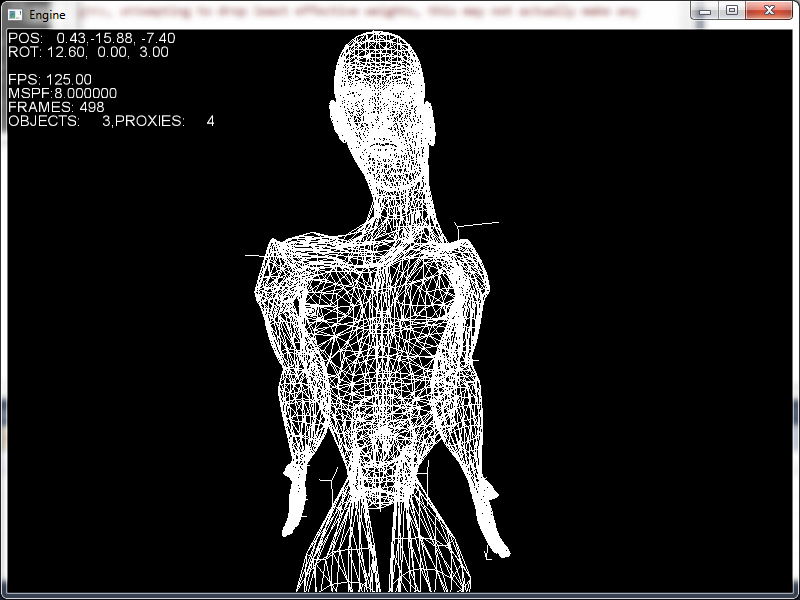
animation-error-1.pnganimation-error-2.pnganimation-error-3.png

It seems to be centered around certain joints, but not others, which lead me to think it might be a problem with my vertex weights. My engine is currently limited to 4 weights per vertex (size of a vector), and Ive been trying to make sure my models dont use more than 4, and warn when they do. I use this code to attempt to 'reweight' the vertex for only 4 weights, but im not sure if the logic behind it actually makes sense:

if(weightSet[k]->size()>MAX_VERTEX_WEIGHTS)
{
warn("Vertex %i of mesh %i has more than MAX_VERTEX_WEIGHTS weights, attempting to drop least effective weights, this may not actually make any sense...\n",k,i);
aiWeightSet::iterator it=weightSet[k]->begin();
totalWeightsStored=0;
for(int l=0;l<MAX_VERTEX_WEIGHTS;l++)
{
totalWeightsStored+=it->mWeight;
it++;
}
weightSet[k]->erase(it,weightSet[k]->end());
for each weight:
weight/=totalWeightStored;
}

Ive exported my mesh using both COLLADA and X formats from 3DS Max, and when loading the COLLADA I get warnings that there are too many weights, but not when I use X, however after loading they both look the same, so I thought that maybe the ASSIMP X loader or the Panda .x exporter automatically limits it to four weights, however the files still display correctly in the assimp viewer and 3ds max when loaded back in

NumberXaero
NumberXaero
Which way are you importing in those images? is that COLLADA or X?
It may be the long way around, but if you dont have access to max to reexport and limit it to 4, why not write some code to temporarily support more then 4, then youll know if its your reweighting thats the problem?
Also are you doing any conversions quaternion/matrix or other when importing?
zacaj
zacaj
They look the same with both COLLADA and X, and I havent seen an option in MAX to limit the weighs. I tried it with a vector of weights per vertex and that didnt help, so unless I implemented it wrong I guess you can cross off weights as the problem
zacaj
zacaj
They look the same with both COLLADA and X, and I havent seen an option in MAX to limit the weighs. I tried it with a vector of weights per vertex and that didnt help, so unless I implemented it wrong I guess you can cross off weights as the problem
Buckshag
Buckshag
It looks like you are removing the last weights, without actually looking at their values.
So if you have say 6 weights, you are removing the last two. That is not a safe way to do it, because these last two weights might be the most important ones with the highest values.

A better way to do it is to first of all remove weights below a given threshold, such as 0.0001 or so. Models often store weight values like that.
If you then still have more than the allowed number of influences, find the ones with the smallest weight value and remove those. I think what I did is finding the smallest weights that have to be removed, then summing up their value. Then you know how much 'weight' you remove, and spread that to the other remaining weights, depending on their importance (how big their influence is). Not sure if that's clear, but you just redistribute the removed smallest weight values to the existing ones that remain. Basically that is just renormalizing.

Also check/render your bone hierarchy, so you can make sure that your skeleton is ok. Does that animate correctly, are your inverse bind pose matrices correct, and is there no rotation inverted or so, like some twist.

But definitely fix your weight optimizer, unless you sorted the weights already from large to small. Also make sure it still points to the right bones when you did sort though. So that the right weight value is related to the right bone.
zacaj
zacaj
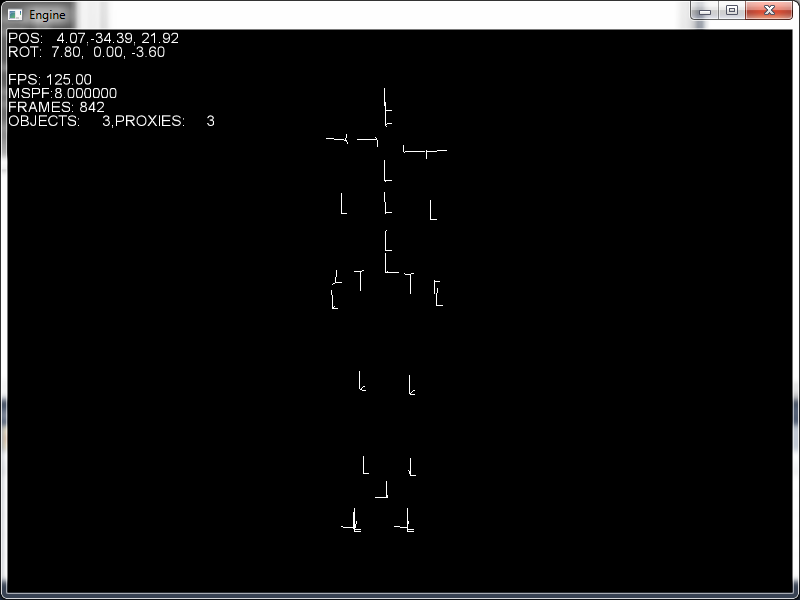
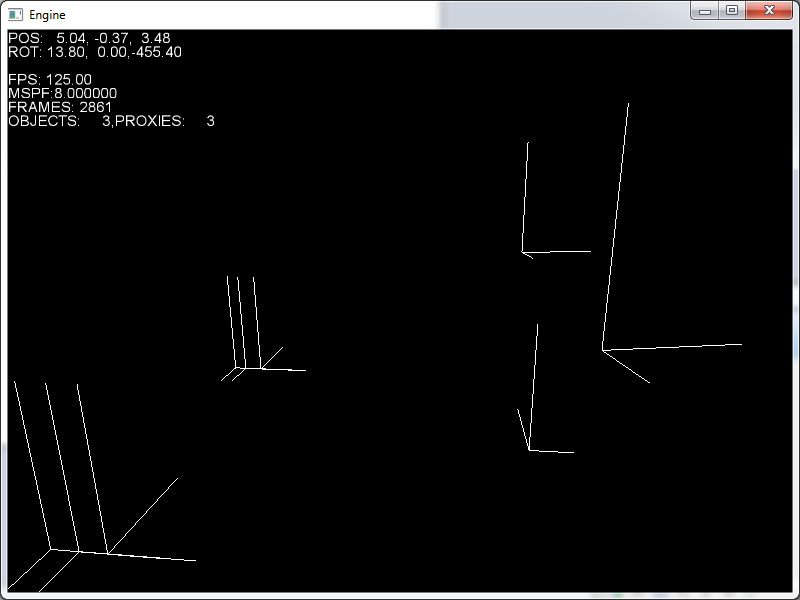
The weights are stored in a multiset, so theyre already sorted, and the last step, dividing by totalWeightStored should automatically scale the remaining weights up I think. In my last post I tried storing all the weights for each vertex, and that didnt help at all, but I couldnt edit my first post for some reason. If you look in the picture of the foot, you can see theres three axes flat on the ground which is where the toe bones were. They all seem to be in the right spot, and If I render just the joints they seem to animate correctly, unless of course theres just something off there that Im not noticing.
Heres some pictures of just the skeleton:
animation-error-4.png
And heres the feet:
animation-error-5.png
zacaj
zacaj
The weights are stored in a multiset, so theyre already sorted, and the last step, dividing by totalWeightStored should automatically scale the remaining weights up I think. In my last post I tried storing all the weights for each vertex, and that didnt help at all, but I couldnt edit my first post for some reason. If you look in the picture of the foot, you can see theres three axes flat on the ground which is where the toe bones were. They all seem to be in the right spot, and If I render just the joints they seem to animate correctly, unless of course theres just something off there that Im not noticing.
Heres some pictures of just the skeleton:
animation-error-4.png
And heres the feet:
animation-error-5.png
Buckshag
Buckshag
So if I understand correctly, the bind pose already goes wrong?
Assuming the weights are stored correctly, and your skinning algorithm is correct, it has to be either the transformations or the inverse bind pose matrices, or the bone matrices you pass to your shader if you skin on the GPU.

Can you maybe tell us how you perform the skinning. Is it on the CPU or on the GPU?
And with what matrices do you skin with?
zacaj
zacaj
I never actually implemented the bind pose, isnt it just drawing the model without animation (no skinning applied)? Im doing this all on the CPU.
To start, I load all the vertices in to a 'static list' which I use to display the model without any skinning, and then iterate through all the vertex weights, and add each vertex transformed by the inverse bind pose matrix and scaled by the weight

for each vertex:
vec3 staticVertex;
vec3 animatedVertex(0);
load staticVertex
for each weight of this vertex
animatedVertex+=inverseMatrix*staticVertex*currentWeight;

Then to skin them I load the local transforms for each bone at that frame (no interpolation yet), and multiply it by its parents, and then I make a new set of temporary vertices, and I add the animatedVertex transformed by the concatenated bones scaled by the weights

for each vertex
vec3 temporaryVertex(0);
for each weight of the vertex
temporaryVertex+=boneTransforms[currentWeightBoneIndex]*animatedVertex*currentWeight;

If the psuedo code leaves something out or anything I can post the exact code for instead, but I thought this would be easier.

On your assumptions:
Assuming the weights are stored correctly: Ive verified that all weights for each vertex sum to 1, other than that, if somehow assimp is giving me corrupt weights or Im converting them wrong, I cant think of any way to verify that. Im assuming its not some random corruption because the distortion in the mesh seems to center around areas that are affected by lots of bones, not something random, which is what origionally made me suspect the weights

Assuming the skinning algorithim is correct:
I cant really see any way to 'test' this. Its just adding a vertex scaled by a weight, theres nothing you could really mess up, is there?

Im assuming both the transformations and the bone matrices are correct, because I can use meshes that only have one weight per bone just fine. Which again points to a problem with my weights, which Im just not finding...
zacaj
zacaj
According to this post I found
http://sourceforge.net/projects/assimp/forums/forum/817654/topic/4659486
You cant actually always get the bind pose from Assimp. I implemented just using the default Node transform which should give me the bind pose if its available while I was replying, and it just gave me the first frame of animation again. Also, because of the gamedev.net facelift, I cant edit my posts or delete them, which is why I just double posted to point this out and I have all those duplicate posts
Buckshag
Buckshag
As test, can you try this instead:


for each vertex
vec3 skinnedResult(0);
for each influence
skinnedResult += ((boneTransform * invBindPoseMatrix) * staticVertex) * influenceWeight;


You can of course precalculate the boneTransform * inverseBindPoseMatrix before you enter your per vertex loop.

The boneTransform is the current world space transformation of the bone related to the influence/weight.
The invBindPoseMatrix is the inverse world space matrix of that non-animated bone, after loading most likely. It is the inverse of the world space matrix of the bone at the moment the artist linked the vertices to that bone.
zacaj
zacaj
Initial results arent promising: animation-error-6.png
Im going to play around a bit and see if I made some other stupid mistake/hack that the new code isnt taking into account.

Also, just to make sure:
boneTransform is all each of the bones Transformations relative to their parent concatenated
invBindPoseMatrix is the [color=#555555]Matrix that transforms from mesh space to bone space in bind pose. (im not so sure if I got this one right)
zacaj
zacaj
Also, switching the order of [color=#282828][font=helvetica, arial, verdana, tahoma, sans-serif]

boneTransform and invBindPoseMatrix seems to have no effect, which seems sort of weird.

[/font]

Buckshag
Buckshag
Not sure what you mean with mesh space.
But the inverse bind pose matrix has to be the inverse of the world space matrix (all relative ones concatenated), in bind pose. So the inverse world matrix of the bind pose.
So they have to contain the positions you are drawing. Or well, their inverse.
zacaj
zacaj
And is inverse just transposing it or is there something else? I always get it mixed up
Buckshag
Buckshag
No, the inverse of the matrix is not always the same as the transpose.
Transposing only is the same (and it is faster) when there is only a rotation involved (so no scaling etc).
But for safety, try to use the matrix inverse.
zacaj
zacaj
OK, using a combination of what youve said and http://sourceforge.net/projects/assimp/forums/forum/817654/topic/3880745 Ive managed to get it working, but currently its quite horribly coded and designed, so Im going to figure out why it works, rewrite it so it makes sense, and then post my findings. Maybe itll help SteveDeFacto. Anyway, I think we were running into problems because Assimp doesnt give me a bind pose, but instead 'saves' me some effort and provides an 'offset matrix' that youre supposed to use similarly to the inverse bind pose matrix but its different for each mesh or something. Their way seems a lot slower in practice, so Im going to try to calculate the inverse bind pose matrix from the data I get from Assimp so it works faster. Thanks for the help so far
Buckshag
Buckshag
Yes that is possible, if there is some offset matrix that probably moves the mesh into bind pose.
My exporter works around that by already exporting vertex data in bind pose directly, so I never need any offset matrices or so.
The input data to your skinning loop needs to be bind pose basically. And then your current bone matrices moves that, using the skin deformation.
zacaj
zacaj
OK, its all optimized now.
I think that the assimp offset matrix actually is the [color=#282828][font=helvetica, arial, verdana, tahoma, sans-serif]

invBindPoseMatrix. In my final algorithim I dont do any pre-transformation of the vertices by the offset matrix. When I animate I concatenate all the bone's local transformations from the bottom up (child->parent), and then transform that by the offset(

[/font][color=#282828][font=helvetica, arial, verdana, tahoma, sans-serif]

invBindPoseMatrix?) matrix. Then for each vertex weight I simply multiply the complete matrix by the bind pose vertex and scale by the weight.

[/font]
[color=#282828][font=helvetica, arial, verdana, tahoma, sans-serif]


mat4 bones[numBones]
for each bone
bone=local transform
bone=bone[parent]*bone
for each bone
bone=bone*boneOffset
for each vertex
vec3 tempVert(0)
for each weight
tempVert+=bone*staticVert*weight

[/font]
[color=#282828][font=helvetica, arial, verdana, tahoma, sans-serif]

Thanks for the help

[/font]

Topic Locked

This topic has been locked by a moderator. New replies are not allowed.

Sign in to reply to this topic.