GameDev.net gamedev.net
🔒 Locked 🎮 Unity

FBX SDK - Export Animation

Started by Noxil Jul 17, 2017 at 10:31 PM 15 replies 13.7k views
Original Post
Noxil
Noxil

Hello,

I have been fighting for sometime now with exporting animations from Maya to my own engine using DirectX 11.
I export the fbx file with all its content in it.

So the problem i have is that the animation dosnt seem to rotate the joints correctly?

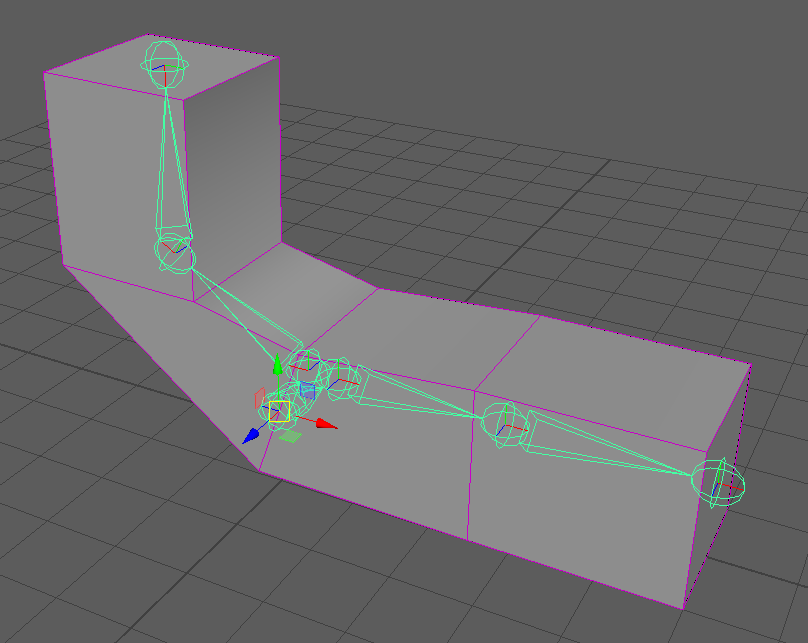
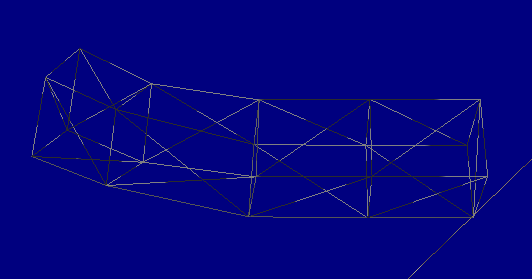
Please see the attached screenshots.
bindpose.png = Frame 1 (first keyframe is at frame 2), the bindpose, no animation applied.
frame30.png = Frame 30, rotation applied to two joints.
engine.png = Frame 30 of animation in engine, rotation != rotation in Maya :(

I use my custom tool to export data from the fbx file using the fbx sdk.

The following is how i extract the skeleton bind pose and inverse bind pose transforms using fbx sdk:
(Note: freeze transformation have been applied to the mesh, so i ignore the geometry transform since its just an identity)


FbxAMatrix localTransform = p_Node->EvaluateLocalTransform();
joint->m_Location = localTransform.GetT();
joint->m_Scale = localTransform.GetS();
joint->m_Rotation = localTransform.GetQ();

FbxAMatrix inverseBindTransform = p_Node->EvaluateGlobalTransform().Inverse();
joint->m_InverseLocation = inverseBindTransform.GetT();
joint->m_InverseScale = inverseBindTransform.GetS();
joint->m_InverseRotation = inverseBindTransform.GetQ();

Then i extract information about each join for all keyframes, in this example i only sample rotation:


for( int i=0; i<rotationCurve->KeyGetCount(); ++i ) {
	FbxAnimCurveKey key = rotationCurve->KeyGet( i );
	FbxTime time = key.GetTime();
	FbxAMatrix transform = p_Node->EvaluateLocalTransform( time );
	// setup frame
	JointFrame frame;
	frame.m_IsRotation = true;
	frame.m_Frame = time.GetFrameCount( m_AnimFramerate );
	frame.m_Rotation = transform.GetQ();
	joint->m_RotationKeyframes.add( frame );
}

When i look at the rotation values from Maya i see that sometimes the axis of the quaternion is 0,0,0 assuming that the axis is mData[0-2].
So i must be doing something wrong here right?

Thats the fbx part.
Then in my engine i load the resources.

This is how i setup and update the skeleton transforms:
(Note: m_Rotation is a quaternion)


void pmJoint::computeMatrices( pmJoint * p_Parent ) {
	if( m_IsDirty ) {
		pmMath::matrixCreateTransform( &m_LocalTransform, m_Location, m_Scale, m_Rotation );
	}
	if( p_Parent ) {
		if( p_Parent->m_IsDirty || m_IsDirty ) {
			m_WorldTransform = m_LocalTransform * p_Parent->m_WorldTransform;
			m_IsDirty = true;
		}
	} else if( m_IsDirty ) {
		m_WorldTransform = m_LocalTransform;
	}
	for( pmUInt32 i=0; i<m_Children.count(); ++i ) {
		m_Children[ i ]->computeMatrices( this );
	}
}

So as you can see, all bones operate in their localspace using their parents world to update their world.
Then to get the render matrices i call this function:


void pmJoint::computeRenderMatrices() {
	m_RenderTransform = m_InversBindTransform * m_WorldTransform;
	for( pmUInt32 i=0; i<m_Children.count(); ++i ) {
		m_Children[ i ]->computeRenderMatrices();
	}
}

The animation part is simply lerping and slerping.
I get the problem no matter if i interpolate or just show keyframe poses, so i left that code out.

Any input, idea or crazy thought is welcome.
Im at a loss here.
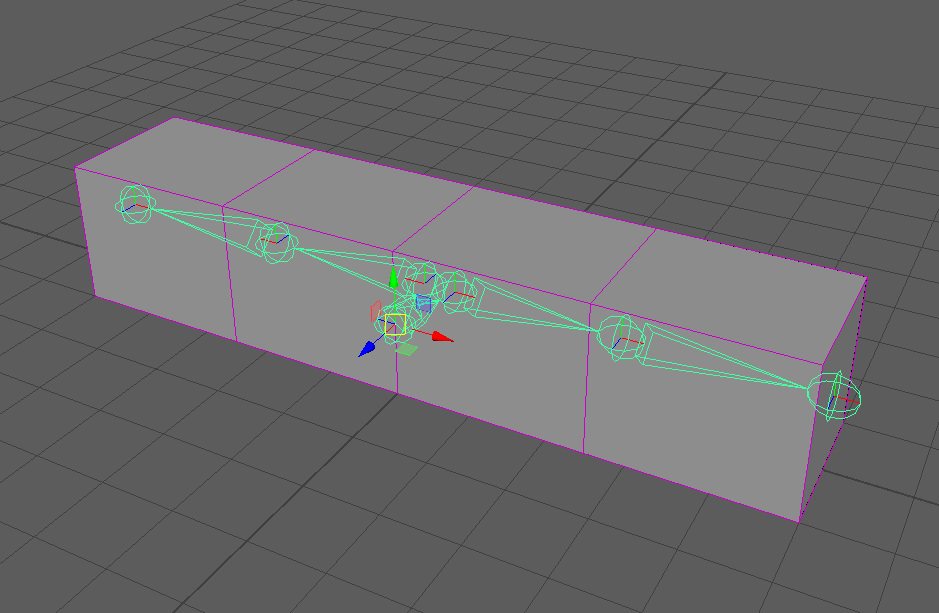
bindpose.png

frame30.png

engine.png

ongamex92
ongamex92

I really cannot help you with you code but I can paste what I'm using, and it works like a charm so far:

For the bind pose(offset) matrix.


fCluster->GetTransformMatrix(transformMatrix);
fCluster->GetTransformLinkMatrix(transformLinkMatrix);	
FbxAMatrix const globalBindposeInverseMatrix = transformLinkMatrix.Inverse() * transformMatrix;


And then for the keyframes I use:


FbxAMatrix const tr = fbxNode->EvaluateLocalTransform(fbxKeyTime);

And then I decompose tr using the functions in FbxAMatrix (GetT, GetR, GetS)

It works with all the pivots, geometric transfroms, and all that jazzy-stuff.

Noxil
Noxil

Hey thanks for replying.

Im assuming you get your cluster from the FbxMesh right?
Do you know if there is a difference in going from the deformer instead of getting the node directly from the scene?
What im wondering is if the deformer has other functions or properties that does something that the node does not.

Also for the keyframes, do you use the child nodes from the deformer or how do you access them?
In my exporter im looping through the scene nodes, find a skeleton type node then iterate over all its children.

So what i can see right of the bat is that your are getting the bind pose from the deformer and im using the regular node.
Might be something?

I will have to do some tests when i get back home, thanks for sharing your example :)

ongamex92
ongamex92


Quote

Do you know if there is a difference in going from the deformer instead of getting the node directly from the scene?

There should be. Later in my code I obtain the node via the cluster:

Quote

fbxsdk::FbxCluster* const fCluster = fSkin->GetCluster(iCluster);
fbxsdk::FbxNode* const fNodeBone = fCluster->GetLink();

And later I extract the keyframes from "fNodeBone" to load the animation.


I do not use any skeletion nodes. I only use clusters to find the vertices, weights and the node that is used to represent the bone.

Noxil
Noxil

Okey so now im using the cluster in the same maner you are regarding the inverse bind pose.
Also i now use the node from cluster->GetLink() to retreive the animation frame data.

And the result is the same :(

Rotation in frames is extracted like so:


FbxAMatrix transform = boneNode->EvaluateLocalTransform( time );
frame->m_Rotation = transform.GetQ();

So i dont use GetR but instead GetQ.
Is this a problem?

It must be something super simple. Everything looks right but its just not rotating all the way so to say..

Edit:
Also, i created a new mesh, new rig and new animation with less bones. Same problem. Are there some settings in Maya i need to be aware off maybe?

ongamex92
ongamex92

Could you share the model? if so I could try it in my importer and check the results?

Quote

So i dont use GetR but instead GetQ.

You should check if your quaternion has the same memory layout and meaning as the one in FBX SDK. I really can't remember why I'm using the euler angles. but here is how i convert the rotations form FBX euler angles to my internal quaterion types:


const FbxDouble3 fbxRotationEuler = tr.GetR();
const quatf rotation = quatFromFbx(FbxEuler::eOrderXYZ, fbxRotationEuler); // Hmmm. there is a function that returns the euler angles order, I do not know why I've hardcoded the eXYZ...

const quatf rotation = quatFromFbx(FbxEuler::eOrderXYZ, fbxRotationEuler);

// CAUTION: FBX SDK uses DEGREES this functon expects DEGREES!
// Converts an Euler angle rotation to quaternion.
quatf quatFromFbx(const fbxsdk::FbxEuler::EOrder rotationOrder, const fbxsdk::FbxDouble3& euler)
{
	const auto make_quat = [](int _1, int _2, int _3,  const fbxsdk::FbxDouble3& euler) {
		return
			  quatf::getAxisAngle(vec3f::getAxis(_3), Deg2Rad( (float)euler[_3] ) )
			* quatf::getAxisAngle(vec3f::getAxis(_2), Deg2Rad( (float)euler[_2] ) )
			* quatf::getAxisAngle(vec3f::getAxis(_1), Deg2Rad( (float)euler[_1] ) );
	};

	quatf result = quatf::getIdentity();

	switch(rotationOrder)
	{
		case fbxsdk::FbxEuler::eOrderXYZ : { result = make_quat(0,1,2, euler); } break;
		case fbxsdk::FbxEuler::eOrderXZY : { result = make_quat(0,2,1, euler); } break;
		case fbxsdk::FbxEuler::eOrderYZX : { result = make_quat(1,2,0, euler); } break;
		case fbxsdk::FbxEuler::eOrderYXZ : { result = make_quat(1,0,2, euler); } break;
		case fbxsdk::FbxEuler::eOrderZXY : { result = make_quat(2,0,1, euler); } break;
		case fbxsdk::FbxEuler::eOrderZYX : { result = make_quat(2,1,0, euler); } break;

		default :
		{
			throw FBXParseError("Unknown FBX rotation order!");
		}break;
	}

	return result;
}


Dirk Gregorius
Dirk Gregorius

Hi, I post my code here which should be relatively simple and have another look later if you want. Basically I collect all skeleton nodes (bones) and then I read the animation from these nodes. The animation is stored as an array of poses (as opposed to an array of tracks). Another good reference is the Ozz Animation Library. In particular if you need to transform the coordinate system or units. The FBX library can mess things up since it only applies some transformation in the root.

Quote

void RnAnimation::Read( FbxScene* Scene, FbxAnimStack* AnimStack )
{
// Collect nodes
RnArray< FbxNode* > Nodes;
Nodes.Reserve( Scene->GetNodeCount() );

int Count = 0;
FbxNode* Stack[ STACK_SIZE ];
Stack[ Count++ ] = Scene->GetRootNode();

while ( Count > 0 )
{
// Pop FBX source node
FbxNode* Node = Stack[ --Count ];

// Inspect node attributes
FbxNodeAttribute* Attribute = Node->GetNodeAttribute();
if ( Attribute && Attribute->GetAttributeType() == FbxNodeAttribute::eSkeleton )
{
Nodes.PushBack( Node );
}

// Recurse
for ( int Index = Node->GetChildCount() - 1; Index >= 0; --Index )
{
RN_ASSERT( Count < STACK_SIZE );
Stack[ Count++ ] = Node->GetChild( Index );
}
}

mTrackCount = Nodes.Size();
mTrackNames.Reserve( mTrackCount );

for ( FbxNode* Node : Nodes )
{
RnString NodeName = Node->GetNameOnly();
mTrackNames.PushBack( NodeName );
}

// Process keyframes
FbxString TakeName = AnimStack->GetName();
FbxTakeInfo* TakeInfo = Scene->GetTakeInfo( TakeName );
FbxTime::EMode TimeMode = FbxTime::GetGlobalTimeMode();
FbxTime Start = TakeInfo->mLocalTimeSpan.GetStart();
FbxLongLong StartFrame = Start.GetFrameCount( TimeMode );
FbxTime Stop = TakeInfo->mLocalTimeSpan.GetStop();
FbxLongLong StopFrame = Stop.GetFrameCount( TimeMode );

FbxLongLong FrameCount = StopFrame - StartFrame;
mFrameCount = static_cast< int >( FrameCount );
double FrameRate = FbxTime::GetFrameRate( TimeMode );
mFrameRate = static_cast< float >( FrameRate );

int KeyCount = ( mFrameCount + 1 ) * mTrackCount;
mTranslationKeys.Reserve( KeyCount );
mRotationKeys.Reserve( KeyCount );
mScaleKeys.Reserve( KeyCount );

for ( FbxLongLong Frame = Start.GetFrameCount( TimeMode ); Frame <= Stop.GetFrameCount( TimeMode ); ++Frame )
{
FbxTime Time;
Time.SetFrame( Frame, TimeMode );

for ( FbxNode* Node : Nodes )
{
// Evaluate and decompose
FbxAMatrix Transform = Node->EvaluateLocalTransform( Time );

RnVector3 Translation( Transform.GetT() );
mTranslationKeys.PushBack( Translation );
RnQuaternion Rotation( Transform.GetQ() );
mRotationKeys.PushBack( Rotation );
RnVector3 Scale( Transform.GetS() );
mScaleKeys.PushBack( Scale );
}
}
}


Noxil
Noxil

Thank you both for your replies, i will make some tests regarding your posts.
As per request from ongamex92 i have attached the maya file and fbx file.

Edit:
Reuploaded .mlt file, it hade unsaved changes (dont know what they where)

anim_scene.fbx


anim_test.mlt

Noxil
Noxil

So i have tried some euler to quaternion with no success.
I get a another type of rotation, it dosnt rotate from the root bone any more but just slighly bends in the middle instead.
It looks further away from the direction i should be heading if i compare to the quaternion rotation.
But im not quite sure that i got it all right.

I did the quaternion multiplications myself, aswell as to use the DX11 function "XMQuaternionRotationRollPitchYaw".
They both gave the same result.

It feels like the quaternion i get from "GetQ" using "boneNode->EvaluateLocalTransform(time)" is not the correct value or something.
When i load the frames and extract the quaternion in my engine. If i multiply the w component with 2.0f the animation seems to rotate almost to the point where it should.

Dirk Gregorius
Dirk Gregorius

This is a long shot, but one thing I noticed with XNAMath/DirectXMath is that the quaternion multiplication is reversed. Say you two rotations q1 and q2. In usual quaternion notation q = q2 * q1 would apply q1 first followed by q2. If you are using XNAMath they changed that order to match the matrix multiplication So q = q1 * q2 is how you need to concatenate. E.g. see here for an explanation:

https://msdn.microsoft.com/en-us/library/windows/desktop/microsoft.directx_sdk.quaternion.xmquaternionmultiply(v=vs.85).aspx

So if you use the operator overload you might be in trouble. I am sure you know this already. Still I point this out since I have seen this issue before. IIRC the Maya SDK does similar things. Personally I hate this, but I can see what they are trying to do.

Noxil
Noxil

Thanks for pointing this out DonDickieD.
These are my main matrix functions. Perhaps i have done something wrong here?


void matrixCreateTransform( Matrix4v4 * p_Result, const Vec3f & p_Translation, const Vec3f & p_Scale, const Quaternion & p_Rotation ) {
  XMMATRIX translation = XMMatrixTranslation( p_Translation.x, p_Translation.y, p_Translation.z );
  XMMATRIX scale = XMMatrixScaling( p_Scale.x, p_Scale.y, p_Scale.z );
  XMMATRIX rotation = XMMatrixRotationQuaternion( makeVectorRegister(p_Rotation.axis.x, p_Rotation.axis.y, p_Rotation.axis.z, p_Rotation.amount) );
  XMMATRIX m = XMMatrixMultiply( scale, rotation );
  XMStoreFloat4x4A( (XMFLOAT4X4A *)p_Result, XMMatrixMultiply(m, translation) );
}

void matrixMultiply( Matrix4v4 * p_Result, const Matrix4v4 * p_A, const Matrix4v4 * p_B ) {
  XMMATRIX a = XMLoadFloat4x4A( (const XMFLOAT4X4A *)p_A );
  XMMATRIX b = XMLoadFloat4x4A( (const XMFLOAT4X4A *)p_B );
  XMMATRIX r = XMMatrixMultiply( a, b );
  XMStoreFloat4x4A( (XMFLOAT4X4A *)p_Result, r );
}


ongamex92
ongamex92

EDIT: It works on with me I swear :D I'm having some issues with the gif recording program. The thing lays down, gets up, and then lays again.
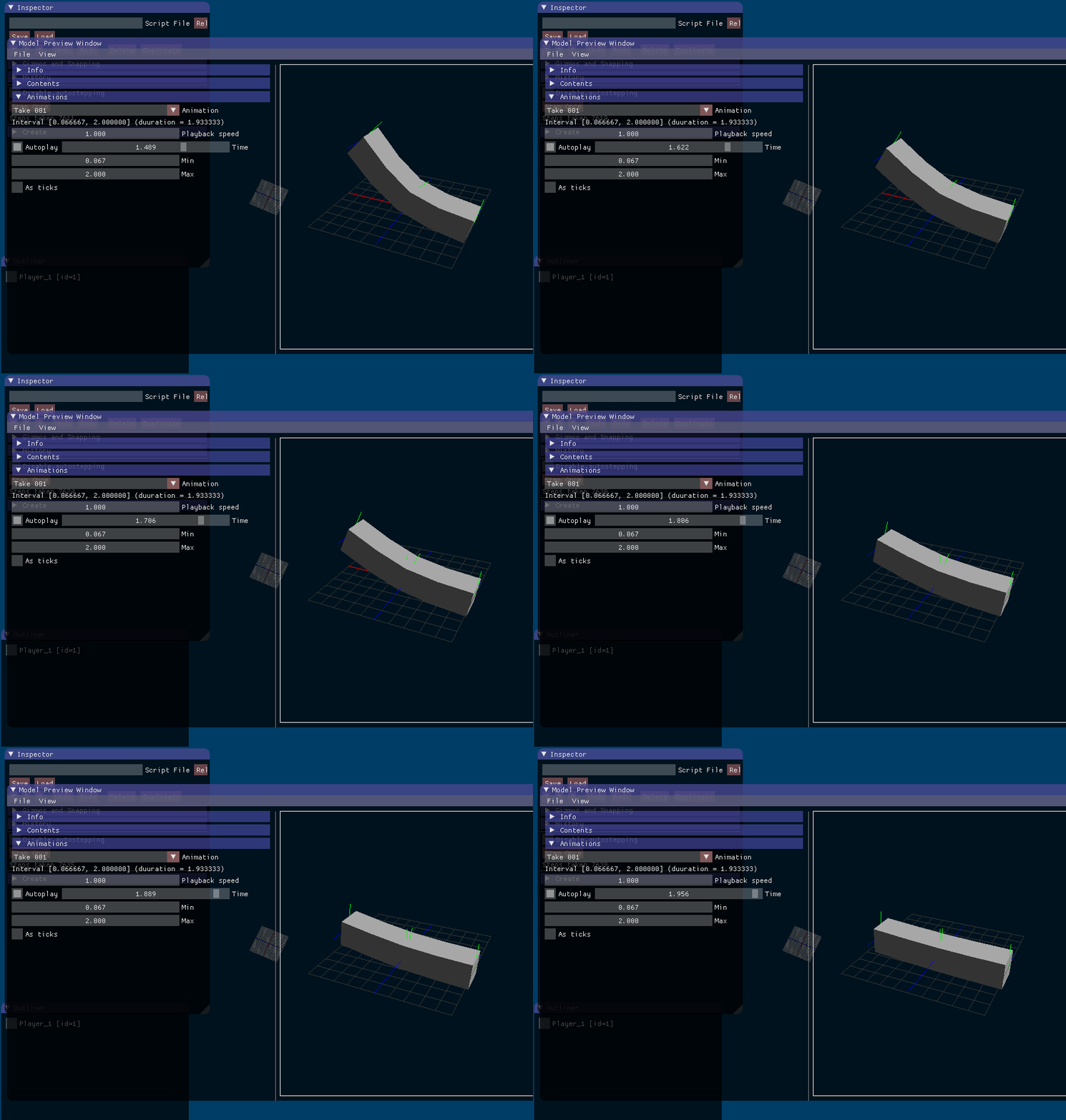
Hmm it works like intended in my engine. You should double check you skinning perhaps?

thingy.gif

Noxil
Noxil

If that is your result then you get the same result as i do. My keyframe in maya it rotates to about 90 degree :o

This is frame 30 for me.
So im assuming i have done something really wrong in maya then! :)

maya_anim.png


Edit:
So hmm if it works for you, then yeah it must be the skin then i guess.
Thank you for trying it out :)

Noxil
Noxil

Oh my...
I cant thank you enough! :)
I finally found the problem! And you where so correct in your last statement, the SKIN!

So the problem was a missunderstanding on my side on how to apply the skinning correctly in the shader.

I have been fighting with this problem for so long now.
There are so many places where things can go wrong, export, import, interpolations, rigs, heirarchies etc etc.

What helped me the most was the fact that you posted images from your engine showing my mesh.
Thank you so much!

ongamex92
ongamex92

Glad I could help! Debugging these thing is always tedious!

Topic Locked

This topic has been locked by a moderator. New replies are not allowed.

Sign in to reply to this topic.