GameDev.net gamedev.net
🔒 Locked

Animation Doubt?

Started by marcus12 Dec 1, 2017 at 2:21 PM 6 replies 5.2k views
Original Post
marcus12
marcus12

Hello Guys,

I have a doubt whether a particular animation is a 3d or 2d animation. Just see this video from time frame 0:30 and watch the character who is firing. I feel it's 2d and done either in sprite animation or skeletal animation (using spine etc). What you guys think about it?

" rel="external">

I want to achieve this animation using 2d skeletal animation in Unity but having problem while rotating the character around the fixed point ( hip part of the character).

Indie Game Developer Game Studio: Freakout Games
Scouting Ninja
Scouting Ninja
16 hours ago, marcus12 said:

I want to achieve this animation using 2d skeletal animation in Unity

This was done the same way. It's a 2D skeletal animation made in engine. No need for external software for something this simple.

16 hours ago, marcus12 said:

but having problem while rotating the character around the fixed point ( hip part of the character).

The character was drawn from a almost top down angle, so the whole character just turns.


marcus12
marcus12
23 hours ago, Scouting Ninja said:

This was done the same way. It's a 2D skeletal animation made in engine. No need for external software for something this simple.

The character was drawn from a almost top down angle, so the whole character just turns.


Do you think there were multiple images used depending on the angle? If so which are the parts mainly to consider?

Indie Game Developer Game Studio: Freakout Games
zizulot
zizulot
6 hours ago, marcus12 said:

Do you think there were multiple images used depending on the angle? If so which are the parts mainly to consider?

I think its same image no extras added, Im working on animations on my game in Unity now, and I can say you can get same effect inside unity animator, and its 2d

Scouting Ninja
Scouting Ninja
6 hours ago, marcus12 said:

Do you think there were multiple images used depending on the angle? If so which are the parts mainly to consider?

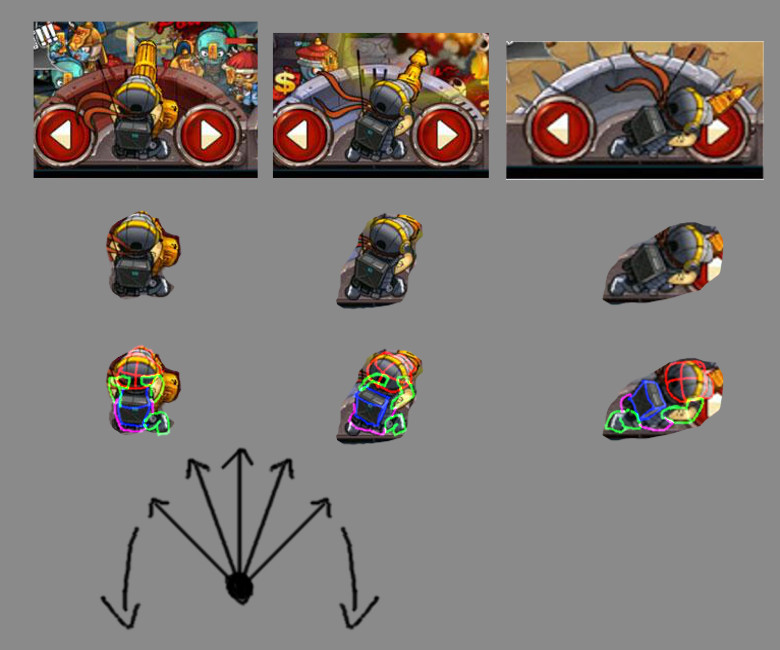
Yes. I did a breakdown for you.

Angle.jpg.bdfe970fdc9ed0496292866893de726f.jpg

By looking at the video we can see there are 5 points where the images are changing. That is why the last image looks so wrong.

The character is made of: Head image, Body image, BackPack image, Left arm image, Right arm image, Left leg image, Right leg image. There also is a animated band but it is just attached to the head.

The objects are drawn from a top down view so that little change is needed to each. Mostly looks like the artist was using a perspective tool and filling in details. The arms and legs are just rotated.

The Head, body and backpack changes. The arms and legs remain the same but are mostly hidden.


Hope this helps.


marcus12
marcus12

@Scouting Ninja Thank you very much for explaining. We are also working on same pattern :)

Indie Game Developer Game Studio: Freakout Games
zizulot
zizulot
On 2017-12-03 at 3:30 PM, Scouting Ninja said:

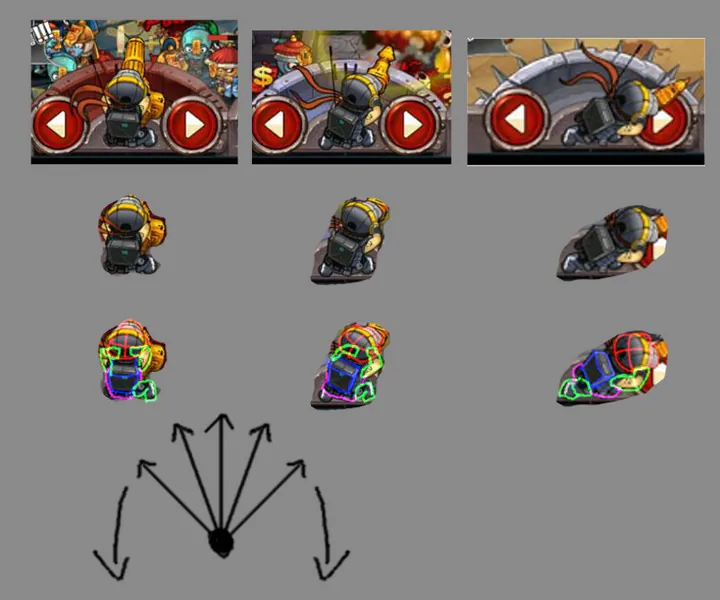
Yes. I did a breakdown for you.

Angle.jpg.bdfe970fdc9ed0496292866893de726f.jpg

By looking at the video we can see there are 5 points where the images are changing. That is why the last image looks so wrong.

The character is made of: Head image, Body image, BackPack image, Left arm image, Right arm image, Left leg image, Right leg image. There also is a animated band but it is just attached to the head.

The objects are drawn from a top down view so that little change is needed to each. Mostly looks like the artist was using a perspective tool and filling in details. The arms and legs are just rotated.

The Head, body and backpack changes. The arms and legs remain the same but are mostly hidden.


Hope this helps.


Awesome job! Youre like Sherlock in this thing :D

Topic Locked

This topic has been locked by a moderator. New replies are not allowed.

Sign in to reply to this topic.