GameDev.net gamedev.net
🔒 Locked

DirectX Input Layout w/ Instancing Problem

Started by JWColeman Sep 5, 2018 at 7:20 PM 21 replies 9.8k views
Original Post
JWColeman
JWColeman

Hi all I am attempting to follow the Rastertek tutorial http://www.rastertek.com/dx11tut37.html


Right now I am having a problem, it appears that my input layout is not being initialized properly and I'm not sure why, an exception is being thrown when i call CreateInputLayout...


Exception thrown at 0x00007FFD9B8EA388 in MyGame.exe: Microsoft C++ exception: _com_error at memory location 0x0000000D4D18ED30.


Maybe you all can point out where I'm going wrong here?


void Renderer::InitPipeline()
{
	// load and compile the two shaders
	ID3D10Blob *VS, *PS;
	D3DX11CompileFromFile("Shaders.shader", 0, 0, "VShader", "vs_4_0", 0, 0, 0, &VS, 0, 0);
	D3DX11CompileFromFile("Shaders.shader", 0, 0, "PShader", "ps_4_0", 0, 0, 0, &PS, 0, 0);

	// encapsulate both shaders into shader objects
	dev->CreateVertexShader(VS->GetBufferPointer(), VS->GetBufferSize(), NULL, &pVS);
	dev->CreatePixelShader(PS->GetBufferPointer(), PS->GetBufferSize(), NULL, &pPS);

	// set the shader objects
	devcon->VSSetShader(pVS, 0, 0);
	devcon->PSSetShader(pPS, 0, 0);

	// create the input layout object
	D3D11_INPUT_ELEMENT_DESC ied[] =
	{
		{ "POSITION", 0, DXGI_FORMAT_R32G32B32_FLOAT, 0, 0, D3D11_INPUT_PER_VERTEX_DATA, 0 },
		{ "COLOR", 0, DXGI_FORMAT_R32G32B32A32_FLOAT, 0, 12, D3D11_INPUT_PER_VERTEX_DATA, 0 },
		// Add another input for the instance buffer
		{ "INSTANCE", 0, DXGI_FORMAT_R32G32B32_FLOAT, 1, 0, D3D11_INPUT_PER_INSTANCE_DATA, 1}
	};

	dev->CreateInputLayout(ied, 2, VS->GetBufferPointer(), VS->GetBufferSize(), &pLayout);
	devcon->IASetInputLayout(pLayout);
}
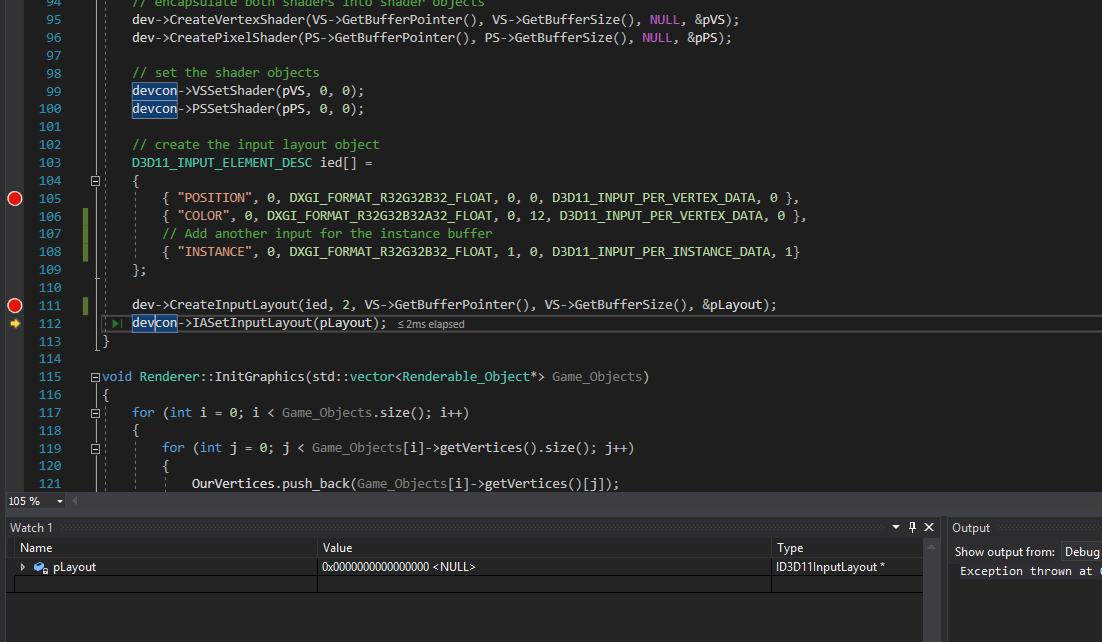

image.thumb.png.4150d1457d08de53edf5285ca3e7caf8.png


If I have not provided enough information, please help me understand what is needed so I can provide the info.


Kavarna
Kavarna

Anything from the debug layer?

If you don't know to enable debug layer, it's very simple. Just add D3D11_CREATE_DEVICE_DEBUG to flags when creating a Direct3D device.


UINT creationFlags = 0;

#ifdef _DEBUG
creationFlags |= D3D11_CREATE_DEVICE_DEBUG;
#endif

D3D_FEATURE_LEVEL capabilities;
D3D11CreateDeviceAndSwapChain(  NULL,
                                D3D_DRIVER_TYPE_HARDWARE,
                                NULL,
                                creationFlags,
                                featureLevels, //D3D_FEATURE_LEVEL *
                                ARRAYSIZE(featureLevels), //number of feature levels
                                D3D11_SDK_VERSION,
                                &swapChainDesc,
                                &m_swapChain,
                                &m_device,
                                &capabilities,
                                &m_devCon);

Check this for further reading.

If you enable this, I'm sure you'll fix the error in no time.

Tell me if you fixed the issue or you need further help.

JWColeman
JWColeman

It appears I am missing something to be able to enable this flag:


D3D11CreateDevice: Flags (0x2) were specified which require the D3D11 SDK Layers for Windows 10, but they are not present on the system.
These flags must be removed, or the Windows 10 SDK must be installed.
Flags include: D3D11_CREATE_DEVICE_DEBUG
Exception thrown at 0x00007FFD9B8EA388 in MyGame.exe: Microsoft C++ exception: _com_error at memory location 0x000000F646BDE660.
Exception thrown: read access violation.
this->**swapchain** was nullptr.


I'll have to give this a try on my home PC.

Kavarna
Kavarna

Till you get on your home PC. Maybe there's a typo.

Check the spelling of "POSITION", "COLOR" and "INSTANCE" in shader.

Check is VS is a valid pointer (ie not nullptr).

These are some mistakes I've made in the past, maybe it's one of them.

JWColeman
JWColeman

Hi kavarna, now that I'm at home we have intermittent power outages, as soon as it clears up I'll check all this. Cant win today!

Before power cut on me I got the debugger turned on and it mentioned something about my instance input being expected but not found or something along those lines. Literally seconds after I read the message my power cut haha

Hodgman
Hodgman

Create Input Layout returns a HRESULT that you should be checking for errors. In your current code, if that function fails, pLayout will be an uninitialized pointer, which you then pass to IASetInputLayout, setting up a crash deep inside D3D when it tries to use this garbage pointer.

As for the cause of the failure - you're passing a hard coded '2' for the array length and the array actually contains 3 elements?

vinterberg
vinterberg

Have you tried setting the arraysize to 3+ for ied[]?


.:vinterberg:.  
JWColeman
JWColeman

Hi all, thanks very much for your input here!!!!

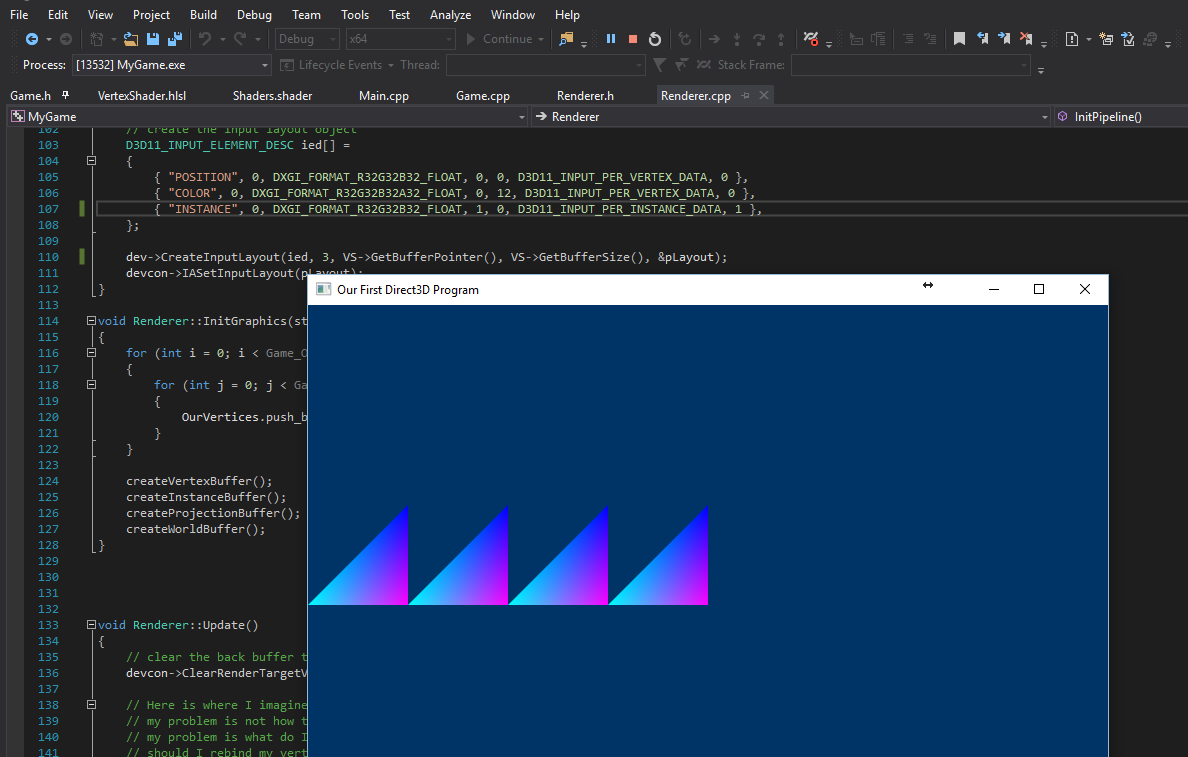
This, is not quite right, but a step in the right direction:

image.thumb.png.29945cf2ccbcc440a2690e63b0b59839.png

It should be drawing four quads, built from two triangles a piece, I will work out the rest of the details :)


Thanks so much for your input! I will post again if I get stuck.

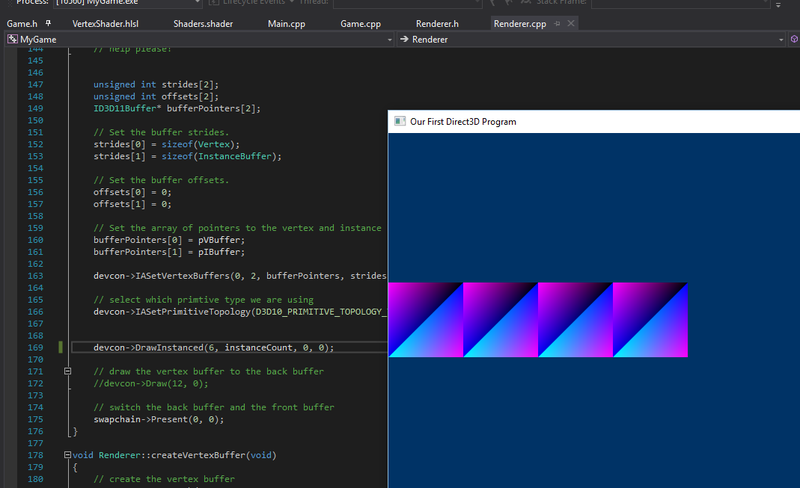
I got my quads!!


image.png.85d2b3e2f01f00c205f1ebdffbb8e9f7.png

JWColeman
JWColeman

After enabling the device level debug, d3d is giving me a rather cheeky error:


D3D11 WARNING: ID3D11DeviceContext::DrawInstanced: Vertex Buffer at the input vertex slot 0 is not big enough for what the Draw*() call expects to traverse. This is OK, as reading off the end of the Buffer is defined to return 0. However the developer probably did not intend to make use of this behavior.  [ EXECUTION WARNING #356: DEVICE_DRAW_VERTEX_BUFFER_TOO_SMALL]
D3D11 WARNING: ID3D11DeviceContext::DrawInstanced: Input vertex slot 0 has stride 24 which is less than the minimum stride logically expected from the current Input Layout (28 bytes). This is OK, as hardware is perfectly capable of reading overlapping data. However the developer probably did not intend to make use of this behavior.  [ EXECUTION WARNING #355: DEVICE_DRAW_VERTEX_BUFFER_STRIDE_TOO_SMALL]

Where di I set input vertex slot 0 and its stride 24? Why does it differ from the input layout?


I'd like to squash this while I have the opportunity.

vinterberg
vinterberg

RGB32 + RGBA32 = 28 bytes, and your Vertex struct is probably defined as two float3s (which would give 24 bytes)..?
You set the stride yourself, at "strides[0] = sizeof(Vertex);"


.:vinterberg:.  
JWColeman
JWColeman
3 hours ago, vinterberg said:

RGB32 + RGBA32 = 28 bytes, and your Vertex struct is probably defined as two float3s (which would give 24 bytes)..?
You set the stride yourself, at "strides[0] = sizeof(Vertex);"


Man you real programmers make me look bad ^_^

JWColeman
JWColeman

Dumb question guys, now that I have instancing set up, and my squares are getting drawn on the screen in a location determined by the instance, what role does my world matrix play?


Now I translate with my instance buffer, rather than the world constant buffer.


Also, I assumed it was possible to update my instance buffer during my update loop, do I need to create a new instance buffer each time an object moves, how do I go about updating my instance buffer during runtime?

After some googling, I found this little Q&A here:

https://gamedev.stackexchange.com/questions/48179/directx-instance-buffer-how-to-use-instance-buffers-to-enable-reuse-of-verte


Now, the guy is suggesting he use constant buffer updates to move his stuff around the world, but how do I use a constant buffer to change my world translation for each instance with one "drawinstanced" call... Maybe someone can help me piece things together.


I think i found my answer in that link:

Quote

@WindAndFlame yes, if you have to models in one vertex buffer (say, first one has 30, second one 50 vertices) you can draw them by Draw(30, 0) and Draw(50,30). This extends to DrawInstanced etc, and works the same with the instance buffers user13213 Jan 26 '13 at 22:37

I can use this capability of the DrawInstanced function, to set the constant buffer between calls.


But then this defeats the purpose of passing position data via the instance?


I feel conflicted, can someone help me sort this logic out? Why pass an instance position if I'm going to be updating the constant buffer to translate my instances?

vinterberg
vinterberg

Unbind the instance buffer, and use Map()/Unmap() to update it once per frame - don't think there's much overhead in that :)

What he's talking about with Draw(30,0) and Draw(50,30) is when you have more than one model in your vertex buffer, by using offset into a vertex buffer (starting point).


.:vinterberg:.  
ChuckNovice
ChuckNovice

From what I read so far it seems that you are passing a float3 per instance. It sounds like you ditched the world matrix approach to revert back to pass a pure translation as float3 instead. This is where your world matrix was supposed to go which is 4x R32G32B32A32 as instance in your vertex layout. When you draw with instancing your world matrix is part of the vertex layout instead of the constant buffer. You'll need 2 version of that same shader for drawinstance and for regular draw. In my case I use the same hlsl file with #if pre-compile instructions to generate both.

JWColeman
JWColeman
3 minutes ago, vinterberg said:

Unbind the instance buffer, and use Map()/Unmap() to update it once per frame - don't think there's much overhead in that :)

What he's talking about with Draw(30,0) and Draw(50,30) is when you have more than one model in your vertex buffer, by using offset into a vertex buffer (starting point).


Cool, so map, unmap, I've seen that before

So, maybe you can help me understand, I'm doing two seemingly different things to set data in my subresources...


For my vertex buffer, I'm doing a map and unmap like you're talking about:


	devcon->Map(pVBuffer, NULL, D3D11_MAP_WRITE_DISCARD, NULL, &ms);    // map the buffer
	memcpy(ms.pData, OurVertices.data(), sizeof(Vertex) * OurVertices.size());                 // copy the data
	devcon->Unmap(pVBuffer, NULL);                                      // unmap the buffer

For my instance buffer, which was created by checking out the rastertek tutorial, I'm doing this:


	// Give the subresource structure a pointer to the instance data.
	instanceData.pSysMem = instances;
	instanceData.SysMemPitch = 0;
	instanceData.SysMemSlicePitch = 0;


The vertex buffer, I notice data is getting set AFTER the CreateBuffer call, for the instance buffer, the data is being set BEFORE.


Can I just map/unmap my buffer I created for my instance buffer after I have already set data like this?

4 minutes ago, ChuckNovice said:

From what I read so far it seems that you are passing a float3 per instance. It sounds like you ditched the world matrix approach to revert back to pass a pure translation as float3 instead. This is where your world matrix was supposed to go which is 4x R32G32B32A32 as instance in your vertex layout.

Chuck, you're correct, I did revert back to a float3, in the form of a D3DXVECTOR3 because I was having trouble getting things to work. Now that things are working, I'll give switching my per instance data back to a D3DXMATRIX. This should simplify my shader code.


So, on that note chuck, the world matrix in my constant buffer, should be a separate matrix from the one in my instances correct? In this respect, the constant buffer world matrix is a translation on a set of instances, rather than individually?

ChuckNovice
ChuckNovice


23 minutes ago, JWColeman said:

Can I just map/unmap my buffer I created for my instance buffer after I have already set data like this?

Yes, a buffer is a buffer. Doesn't matter if you use it as a vertex buffer / index buffer / constant buffer. Map/Unmap will work on that. Also I believe I've read somewhere that nvidia driver map the UpdateSubresource call to Map/Unmap. They essentially do the same thing and the real difference between the two remain a mystery to me.


23 minutes ago, JWColeman said:

So, on that note chuck, the world matrix in my constant buffer, should be a separate matrix from the one in my instances correct? In this respect, the constant buffer world matrix is a translation on a set of instances, rather than individually?

Yes they are separate, you will need to compile two version of the shader. One that work with Draw and one that work with DrawInstanced. In my project I simply pass a macro called "MESH_INSTANCE" when compiling the shader and let pre-compiler instructions adjust the constant buffer / vertex layout accordingly. That way I don't have to write 2 version of the same HLSL file. Looks something like this :


//---------------------------------------------------------------------------------------
//		Per object buffer.
//---------------------------------------------------------------------------------------
#ifndef MESH_INSTANCE
	cbuffer ObjectConstantBuffer : register(b1)
	{
		float4x4 WorldMatrix;
		float4x4 WorldInvertMatrix;
	}
#endif

//--------------------------------------------------------------------
//		Defines the vertex input structure.
//--------------------------------------------------------------------
struct VertexInput
{
	#include <VERTEX_INPUT_LAYOUT>

	// The world transform matrix if the mesh is an instance.
#ifdef MESH_INSTANCE
	float4x4 WorldMatrix : WORLDMATRIX;
	float4x4 WorldInvertMatrix : WORLDINVERTMATRIX;
	uint InstanceId : SV_InstanceID;
#endif
};


As you can see, if MESH_INSTANCE is defined my shader wont have a constant buffer and it will instead be part of the vertex layout.


//---------------------------------------------------------------------------------------
//		Main function of the vertex shader.
//---------------------------------------------------------------------------------------
VertexOutput VS(VertexInput input)
{

#ifdef MESH_INSTANCE
	float4x4 World = input.WorldMatrix;
	float4x4 WorldInvert = input.WorldInvertMatrix;
#else
	float4x4 World = WorldMatrix;
	float4x4 WorldInvert = WorldInvertMatrix;
#endif
	VertexOutput output;

	// generated code.
	#include <VERTEX_BODY>

	return output;
}
JWColeman
JWColeman

Looks fancy Chuck, for now, I'm going to leave my shader as a one trick pony and only use instanced drawing.

I think, using only 2d for now, most of my stuff is going to be instanced geometry, or a couple very small differences. Right now, I'm going to focus on getting this thing to work dynamically and take input, I want to be able to move the instanced squares around using input.

That, along with generally scrubbing my code and adding in error handling and things of that nature.

I also need to figure out how my Renderable_Object class will come into play now that there is only one copy of the vertices on hand at a given time due to instancing...

Right now I have a class renderable object that is storing vertex information, as well as other various bits of info, such as position, velocity, min and max values, etc.. Now with instancing, I only need 1 copy of vertex data and many copies of position and velocity data. I had this setup previously in opengl and have since lost it. Oh well, onward I go!


class Renderable_Object
{
public:

	Renderable_Object(float minX, float minY, float maxX, float maxY)
	{
		
		d_min.x = minX;
		d_min.y = minY;
		d_max.x = maxX;
		d_max.y = maxY;
		/*
		position.x = posX;
		position.y = posY;
		velocity.x = 0;
		velocity.y = 0;
		isVisible = visible;
		isPhysical = physical;
		*/
		Vertex OurVertices[] =
		{
			{ D3DXVECTOR2(maxX, maxY), D3DXCOLOR(1.0f, 0.0f, 0.0f, 1.0f) },
			{ D3DXVECTOR2(maxX, minY), D3DXCOLOR(0.0f, 1.0f, 0.0f, 1.0f) },
			{ D3DXVECTOR2(minX, minY), D3DXCOLOR(0.0f, 0.0f, 1.0f, 1.0f) },
			{ D3DXVECTOR2(minX, minY), D3DXCOLOR(1.0f, 0.0f, 0.0f, 1.0f) },
			{ D3DXVECTOR2(minX, maxY), D3DXCOLOR(0.0f, 1.0f, 0.0f, 1.0f) },
			{ D3DXVECTOR2(maxX, maxY), D3DXCOLOR(0.0f, 0.0f, 1.0f, 1.0f) }
		};

		for (int i = 0; i < 6; i++)
		{
			Vertices.push_back(OurVertices[i]);
		}
	}
	D3DXVECTOR2 & getVelocity()
	{
		return velocity;
	}
	void setVelocity(float x, float y)
	{
		velocity.x = x; velocity.y = y;
	}
	D3DXVECTOR2 & getLocation()
	{
		return position;
	}
	D3DXVECTOR2 & getMinimum()
	{
		return d_min;
	}
	D3DXVECTOR2 & getMaximum()
	{
		return d_max;
	}

	std::vector<Vertex> & getVertices()
	{
		return Vertices;
	}

private:

	
	D3DXVECTOR2 position;
	D3DXVECTOR2 velocity;
	D3DXVECTOR2 d_min;
	D3DXVECTOR2 d_max;

	std::vector<Vertex> Vertices;

	bool isPhysical;		// can you touch it?
	bool isVisible;			// render this object?
	bool AABB;				// compatible with AABB collision detection
};


ChuckNovice
ChuckNovice

It's all good. Be very careful tho because those square wont solve all your problems. Let's take this basic example of a mario bros level :

image.thumb.png.f6bf7d205380689f6229febeca503f31.png


In this case is it better to draw 46 squares or a big rectangle with different texture coordinates to make the texture repeat? The world of graphic programming never cease to paint us in a corner when we assume such things :P


JWColeman
JWColeman
9 minutes ago, ChuckNovice said:

It's all good. Be very careful tho because those square wont solve all your problems. Let's take this basic example of a mario bros level :

image.thumb.png.f6bf7d205380689f6229febeca503f31.png


In this case is it better to draw 46 squares or a big rectangle with different texture coordinates to make the texture repeat? The world of graphic programming never cease to paint us in a corner when we assume such things :P


Oh how shortsighted I am!

I know nothing!


JWColeman
JWColeman
1 hour ago, ChuckNovice said:

Yes, a buffer is a buffer. Doesn't matter if you use it as a vertex buffer / index buffer / constant buffer. Map/Unmap will work on that. Also I believe I've read somewhere that nvidia driver map the UpdateSubresource call to Map/Unmap. They essentially do the same thing and the real difference between the two remain a mystery to me.

Thanks for this tidbit, so as far as you know, theres no true difference to map/unmap and UpdateSubresource calls?


I could just use UpdateSubresource to peform my instance updates?

Topic Locked

This topic has been locked by a moderator. New replies are not allowed.

Sign in to reply to this topic.