GameDev.net gamedev.net
🔒 Locked

Texture mapping acts weird on some images.

Started by babaliaris Dec 12, 2018 at 6:56 PM 26 replies 11.2k views
Original Post
babaliaris
babaliaris

Hello!

My texture problems just don't want to stop keep coming...

After a lot of discussions here with you guys, I've learned a lot about textures and digital images and I fixed my bugs. But right now I'm making an animation system and this happened.


Now if you see, the first animation (bomb) is ok. But the second and the third (which are arrows changing direction) are being render weird (They get the GL_REPEAT effect).

In order to be sure, I only rendered (without using my animation system or anything else i created in my project, just using simple opengl rendering code) the textures that are causing this issue and this is the result (all these textures have exactly 115x93 resolution)

Capture.png

I will attach all the images which I'm using.

giphy-27 and giphy-28 are rendering just fine.

All the others not.They give me an effect like GL_REPEAT which I use in my code. This is why I'm getting this result? But my texture coordinates are inside the range of -1 and 1 so why?

My Texture Code:


#include "Texture.h"
#include "STB_IMAGE/stb_image.h"
#include "GLCall.h"
#include "EngineError.h"
#include "Logger.h"


Texture::Texture(std::string path, int unit)
{

	//Try to load the image.
	unsigned char *data = stbi_load(path.c_str(), &m_width, &m_height, &m_channels, 0);

	//Image loaded successfully.
	if (data)
	{

		//Generate the texture and bind it.
		GLCall(glGenTextures(1, &m_id));
		GLCall(glActiveTexture(GL_TEXTURE0 + unit));
		GLCall(glBindTexture(GL_TEXTURE_2D, m_id));

		//Not Transparent texture.
		if (m_channels == 3)
		{
			GLCall(glTexImage2D(GL_TEXTURE_2D, 0, GL_RGB, m_width, m_height, 0, GL_RGB, GL_UNSIGNED_BYTE, data));
		}

		//Transparent texture.
		else if (m_channels == 4)
		{
			GLCall(glTexImage2D(GL_TEXTURE_2D, 0, GL_RGBA, m_width, m_height, 0, GL_RGBA, GL_UNSIGNED_BYTE, data));
		}

		//This image is not supported.
		else
		{
			std::string err = "The Image: " + path;
			err += " , is using " + m_channels;
			err += " channels which are not supported.";
			throw VampEngine::EngineError(err);
		}

		//Texture Filters.
		GLCall(glTexParameteri(GL_TEXTURE_2D, GL_TEXTURE_WRAP_S, GL_REPEAT));
		GLCall(glTexParameteri(GL_TEXTURE_2D, GL_TEXTURE_WRAP_T, GL_REPEAT));
		GLCall(glTexParameteri(GL_TEXTURE_2D, GL_TEXTURE_MIN_FILTER, GL_NEAREST_MIPMAP_NEAREST));
		GLCall(glTexParameteri(GL_TEXTURE_2D, GL_TEXTURE_MAG_FILTER, GL_LINEAR));

		//Generate mipmaps.
		GLCall(glGenerateMipmap(GL_TEXTURE_2D));
	}


	//Loading Failed.
	else
		throw VampEngine::EngineError("There was an error loading image \
		(Myabe the image format is not supported): " + path);


	//Unbind the texture.
	GLCall(glBindTexture(GL_TEXTURE_2D, 0));

	//Free the image data.
	stbi_image_free(data);
}


Texture::~Texture()
{
	GLCall(glDeleteTextures(1, &m_id));
}

void Texture::Bind(int unit)
{
	GLCall(glActiveTexture(GL_TEXTURE0 + unit));
	GLCall(glBindTexture(GL_TEXTURE_2D, m_id));
}


My Render Code:


#include "Renderer.h"
#include "glcall.h"
#include "shader.h"


Renderer::Renderer()
{

	//Vertices.
	float vertices[] =
	{

		//Positions    Texture Coordinates.

		0.0f, 0.0f,    0.0f, 0.0f, //Left Bottom.
		0.0f, 1.0f,    0.0f, 1.0f, //Left Top.
		1.0f, 1.0f,    1.0f, 1.0f, //Right Top.
		1.0f, 0.0f,    1.0f, 0.0f  //Right Bottom.
	};

	//Indices.
	unsigned int indices[] = 
	{
		0, 1, 2, //Left Up Triangle.
		0, 3, 2  //Right Down Triangle.
	};


	//Create and bind a Vertex Array.
	GLCall(glGenVertexArrays(1, &VAO));
	GLCall(glBindVertexArray(VAO));

	
	//Create and bind a Vertex Buffer.
	GLCall(glGenBuffers(1, &VBO));
	GLCall(glBindBuffer(GL_ARRAY_BUFFER, VBO));

	//Create and bind an Index Buffer.
	GLCall(glGenBuffers(1, &EBO));
	GLCall(glBindBuffer(GL_ELEMENT_ARRAY_BUFFER, EBO));

	//Transfer the data to the VBO and EBO.
	GLCall(glBufferData(GL_ARRAY_BUFFER, sizeof(vertices), vertices, GL_STATIC_DRAW));
	GLCall(glBufferData(GL_ELEMENT_ARRAY_BUFFER, sizeof(indices), indices, GL_STATIC_DRAW));

	//Enable and create the attribute for both Positions and Texture Coordinates.
	GLCall(glEnableVertexAttribArray(0));
	GLCall(glVertexAttribPointer(0, 4, GL_FLOAT, GL_FALSE, sizeof(float) * 4, (void *)0));

	//Create the shader program.
	m_shader = new Shader("Shaders/sprite_vertex.glsl", "Shaders/sprite_fragment.glsl");

}


Renderer::~Renderer()
{
	//Clean Up.
	GLCall(glDeleteVertexArrays(1, &VAO));
	GLCall(glDeleteBuffers(1, &VBO));
	GLCall(glDeleteBuffers(1, &EBO));
	delete m_shader;
}


void Renderer::RenderElements(glm::mat4 model)
{

	//Create the projection matrix.
	glm::mat4 proj = glm::ortho(0.0f, 600.0f, 600.0f, 0.0f, -1.0f, 1.0f);

	//Set the texture unit to be used.
	m_shader->SetUniform1i("diffuse", 0);

	//Set the transformation matrices.
	m_shader->SetUniformMat4f("model", model);
	m_shader->SetUniformMat4f("proj", proj);

	//Draw Call.
	GLCall(glDrawElements(GL_TRIANGLES, 6, GL_UNSIGNED_INT, NULL));
}


Vertex Shader:


#version 330 core

layout(location = 0) in vec4 aData;

uniform mat4 model;
uniform mat4 proj;


out vec2 TexCoord;

void main()
{
	gl_Position = proj * model * vec4(aData.xy, 0.0f, 1.0);

	TexCoord = aData.zw;
}


Fragment Shader:


#version 330 core

out vec4 Color;
in vec2 TexCoord;

uniform sampler2D diffuse;

void main()
{
	Color = texture(diffuse, TexCoord);
}




down.png

left.png

right.png

up.png

giphy-27.png

giphy-28.png

void life() { while (!succeed()) try_again(); die_happily();<
JWColeman
JWColeman

Are you using individual images for the arrows? Or, are they packed together in an atlas? If you're sure it's not UV's...


Try making your own set of arrows in gimp or something, maybe that will change it?

babaliaris
babaliaris
24 minutes ago, JWColeman said:

Are you using individual images for the arrows? Or, are they packed together in an atlas? If you're sure it's not UV's...


Try making your own set of arrows in gimp or something, maybe that will change it?

I created the images using paint in Windows 10 and saved them as PNG.

I'm not sure what do you mean by atlas???

Edited:

You mean sprite sheets. No I'm not using them, the images are individual made with windows 10 paint program.

void life() { while (!succeed()) try_again(); die_happily();<
JWColeman
JWColeman

What I mean is are they all packed into one image, or individual images. It looks like they are individual images so i dont think that is the problem (U/V's)

babaliaris
babaliaris
Just now, JWColeman said:

What I mean is are they all packed into one image, or individual images. It looks like they are individual images so i dont think that is the problem (U/V's)

Yes they are not packed, they are individual images made with paint from windows 10.

void life() { while (!succeed()) try_again(); die_happily();<
JWColeman
JWColeman

How many channels does your image have? Could there be a problem where you are reading in a channel that isn't there, or, applying a value to a channel that is causing the distortion?


IIRC paint does not support alpha channel

babaliaris
babaliaris
4 minutes ago, JWColeman said:

How many channels does your image have? Could there be a problem where you are reading in a channel that isn't there, or, applying a value to a channel that is causing the distortion?


IIRC paint does not support alpha channel

it has 3 channels. Also I tried to make this image on gimp and saved it as a PNG and it works just fine.

void life() { while (!succeed()) try_again(); die_happily();<
babaliaris
babaliaris
Just now, JWColeman said:

So, the file from gimp worked but not from paint?

Exactly.

void life() { while (!succeed()) try_again(); die_happily();<
JWColeman
JWColeman

It sounds like your shader is the problem then, a null value in an alpha channel in your shader could cause some unexpected behavior.


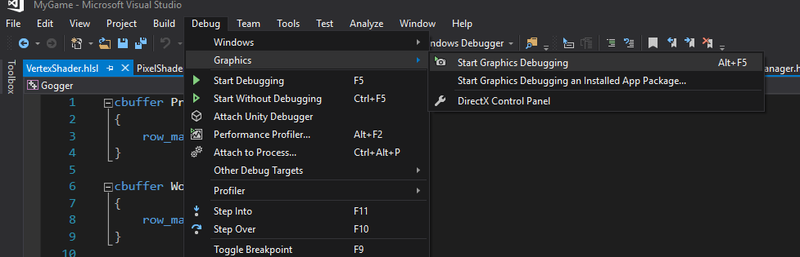
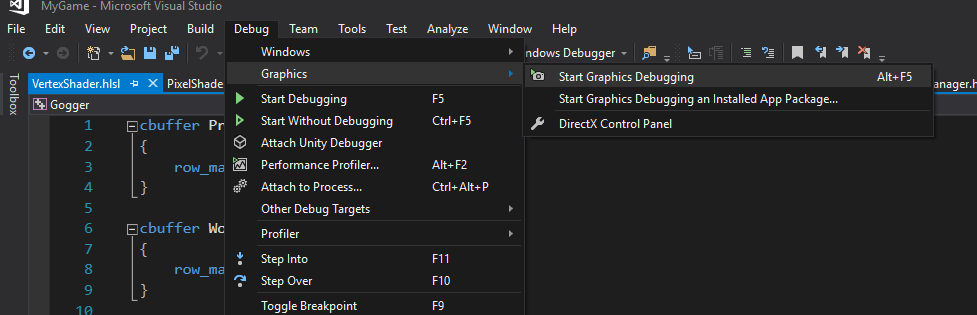
Have you tried stepping through the graphics debug and checking the alpha value, when from your paint file, the alpha isn't there?

The quick solution is to just not use any png files that don't have an alpha :)

babaliaris
babaliaris
4 minutes ago, JWColeman said:

It sounds like your shader is the problem then, a null value in an alpha channel in your shader could cause some unexpected behavior.


Have you tried stepping through the graphics debug and checking the alpha value, when from your paint file, the alpha isn't there?

I don't think i have a graphics debug. Can I somehow use Visual Studio for that?

void life() { while (!succeed()) try_again(); die_happily();<
JWColeman
JWColeman

Yep,

image.png.6f10a4cac7577fdbbaac04302c423f88.png

Now, how to use it, is a whole other discussion :D

I'm sure openGL has a device debug layer as well, its possible it could be throwing some warnings at you because of this.

JWColeman
JWColeman

Also, it may be that if you're pushing an RGBA through to your device but only sending it data for an RGB, it could be that each frame your RGB is getting shifted by sizeof(A)...

I'm really no expert on the rendering pipeline but these are oddities that I'm aware can occur when data is not pairing up just right.

babaliaris
babaliaris
17 minutes ago, JWColeman said:

Yep,

image.png.6f10a4cac7577fdbbaac04302c423f88.png

Now, how to use it, is a whole other discussion :D

I'm sure openGL has a device debug layer as well, its possible it could be throwing some warnings at you because of this.

I searched and they say you can't debug shaders natively. They have also Nvdia Inslight gor visual studio but i have amd and i cant use that debugger. I will see This gDebugger and i will come back later to post re results ;)

3 minutes ago, JWColeman said:

Also, it may be that if you're pushing an RGBA through to your device but only sending it data for an RGB, it could be that each frame your RGB is getting shifted by sizeof(A)...

I'm really no expert on the rendering pipeline but these are oddities that I'm aware can occur when data is not pairing up just right.

what do you mean by that? Can you understand if I;m doing it in the code below? What is what you're saying and where i might be doing that?


Texture::Texture(std::string path, int unit)
{

	//Try to load the image.
	unsigned char *data = stbi_load(path.c_str(), &m_width, &m_height, &m_channels, 0);


	//Image loaded successfully.
	if (data)
	{

		//Generate the texture and bind it.
		GLCall(glGenTextures(1, &m_id));
		GLCall(glActiveTexture(GL_TEXTURE0 + unit));
		GLCall(glBindTexture(GL_TEXTURE_2D, m_id));

		//Not Transparent texture.
		if (m_channels == 3)
		{
			GLCall(glTexImage2D(GL_TEXTURE_2D, 0, GL_RGB, m_width, m_height, 0, GL_RGB, GL_UNSIGNED_BYTE, data));
		}

		//Transparent texture.
		else if (m_channels == 4)
		{
			GLCall(glTexImage2D(GL_TEXTURE_2D, 0, GL_RGBA, m_width, m_height, 0, GL_RGBA, GL_UNSIGNED_BYTE, data));
		}

		//This image is not supported.
		else
		{
			std::string err = "The Image: " + path;
			err += " , is using " + m_channels;
			err += " channels which are not supported.";
			throw VampEngine::EngineError(err);
		}

		//Texture Filters.
		GLCall(glTexParameteri(GL_TEXTURE_2D, GL_TEXTURE_WRAP_S, GL_REPEAT));
		GLCall(glTexParameteri(GL_TEXTURE_2D, GL_TEXTURE_WRAP_T, GL_REPEAT));
		GLCall(glTexParameteri(GL_TEXTURE_2D, GL_TEXTURE_MIN_FILTER, GL_NEAREST_MIPMAP_NEAREST));
		GLCall(glTexParameteri(GL_TEXTURE_2D, GL_TEXTURE_MAG_FILTER, GL_LINEAR));

		//Generate mipmaps.
		GLCall(glGenerateMipmap(GL_TEXTURE_2D));
	}


	//Loading Failed.
	else
		throw VampEngine::EngineError("There was an error loading image \
		(Myabe the image format is not supported): " + path);


	//Unbind the texture.
	GLCall(glBindTexture(GL_TEXTURE_2D, 0));

	//Free the image data.
	stbi_image_free(data);
}


void life() { while (!succeed()) try_again(); die_happily();<
Cararasu
Cararasu

It looks to me that you are not filling the whole memory of the image on the GPU. If you look closely at the rendered image you will notice at the last pixel-line that some pixels are missing. The amount seems to be about the same as the height of your image, which would mean the width is one pixel too wide. Your image loading code seems alright on first glance so that is strange.


I do not think that the problem is that you are loading an RGBA image and treating it as RGB. This would create a different effect as the image is fully opaque. In this case, every pixel in the black area would be I think either red, green or blue.

babaliaris
babaliaris

I tried to force how many channels to use in stbi_load() and it worked! Now from your expirience do you now why this might have fixed that? The files have 3 channels only.

The code:


Texture::Texture(std::string path, int unit)
{

	//Try to load the image.
	unsigned char *data = stbi_load(path.c_str(), &m_width, &m_height, &m_channels, 4);

	m_channels = 4;

	std::cout << m_channels << std::endl;

	//Image loaded successfully.
	if (data)
	{

		//Generate the texture and bind it.
		GLCall(glGenTextures(1, &m_id));
		GLCall(glActiveTexture(GL_TEXTURE0 + unit));
		GLCall(glBindTexture(GL_TEXTURE_2D, m_id));

		//Not Transparent texture.
		if (m_channels == 3)
		{
			GLCall(glTexImage2D(GL_TEXTURE_2D, 0, GL_RGB, m_width, m_height, 0, GL_RGB, GL_UNSIGNED_BYTE, data));
		}

		//Transparent texture.
		else if (m_channels == 4)
		{
			GLCall(glTexImage2D(GL_TEXTURE_2D, 0, GL_RGBA, m_width, m_height, 0, GL_RGBA, GL_UNSIGNED_BYTE, data));
		}

		//This image is not supported.
		else
		{
			std::string err = "The Image: " + path;
			err += " , is using " + m_channels;
			err += " channels which are not supported.";
			throw VampEngine::EngineError(err);
		}

		//Texture Filters.
		GLCall(glTexParameteri(GL_TEXTURE_2D, GL_TEXTURE_WRAP_S, GL_REPEAT));
		GLCall(glTexParameteri(GL_TEXTURE_2D, GL_TEXTURE_WRAP_T, GL_REPEAT));
		GLCall(glTexParameteri(GL_TEXTURE_2D, GL_TEXTURE_MIN_FILTER, GL_NEAREST_MIPMAP_NEAREST));
		GLCall(glTexParameteri(GL_TEXTURE_2D, GL_TEXTURE_MAG_FILTER, GL_LINEAR));

		//Generate mipmaps.
		GLCall(glGenerateMipmap(GL_TEXTURE_2D));
	}


	//Loading Failed.
	else
		throw VampEngine::EngineError("There was an error loading image \
		(Myabe the image format is not supported): " + path);


	//Unbind the texture.
	GLCall(glBindTexture(GL_TEXTURE_2D, 0));

	//Free the image data.
	stbi_image_free(data);
}


void life() { while (!succeed()) try_again(); die_happily();<
babaliaris
babaliaris
Just now, JWColeman said:

It worked with the old image?

Yes, with the ones from paint which was causing the problem. These images have 3 channels (according with stb_image when i don't force how many channels to be used).

void life() { while (!succeed()) try_again(); die_happily();<
JWColeman
JWColeman

Well, likely, my best guess, is that stbi_load is putting something other than a null value in the A channel when its not present, therefore your shader handles it normally.

babaliaris
babaliaris
1 minute ago, JWColeman said:

Well, likely, my best guess, is that stbi_load is putting something other than a null value in the A channel when its not present, therefore your shader handles it normally.

Well, how do you explain then the gimp images. They have 3 channels too and they work without the need to force 4 channels. Also in my code, if the file has only 3 channels i'm telling the driver through the glTexImage2D function to handle the data as rgb not rgba. And if 4 as rgba.

void life() { while (!succeed()) try_again(); die_happily();<

Topic Locked

This topic has been locked by a moderator. New replies are not allowed.

Sign in to reply to this topic.