GameDev.net gamedev.net
🔒 Locked

C++/Linux which IDE are you using or would you recommend ?

Started by Green_Baron May 27, 2019 at 8:50 PM 29 replies 28.4k views
Original Post
Green_Baron
Green_Baron

I am somewhat frustrated that i could not find an IDE that fits my imaginations (Debian 10 user). Here's what i tried until now and why none of them really pleased me:

- Code::Blocks: frequently just crashes, has problems with my pc's config and does not display file contents correctly. Also, the display of directory structures is tricky and error prone, it is easy to put files in the wrong places. Good thing is it uses make. But due to the crashes it is not mine to use.

- Eclipse CDT. The one i use now. It is ok so far, only needs a restart 1 or 2 times a day, especially working with the real directory structure on disk and debugging with gdt is really creamy. But it is a huge pile of bloatware as it brings all that java stuff with it (around 600MB in all), and it brings its own project tools, make integration is buggy, which is a shame.

- Emacs. My opinion ? Computer science folklore. Unusable if you're not an oldtimer (which i am) with a mind like a memory chip (which i haven't). I am aware that now some fingers may be hovering over the downvote button now ^^. But i'd rather use sed than emacs.

- Codelight. Nice and lean, uses make. Very nice type ahead function. Haven't tried debugging because i can't figure out how to work with the directory structure. I don't want virtual directories and such, i want to work with the real structure my project has on disk, on pc or on notebook. And the project already has quite a few files, maybe a hundred. Am i supposed to build the directory by hand in virtual folders ? What if i change things ? Nope, i can't use an IDE that doesn't let me use the file system.

- QT creator. Being forced to say yes to another 600MB of stuff i don't need (clang and connected libs and stuff, but i use the gcc) drove me off.


So, if i wanted an IDE that uses gcc and gdt as a debugger, lets me work with the directory structure, doesn't bring too many extras plugins mods whatever, which ones would you guys recommend ? Cost free, i mean ...

Cheers ?

dbravo
dbravo

I like CodeLite IDE, it's a very simplistic environment and beautiful besides is easily configurable

Green_Baron
Green_Baron

CodeLite, that's what i meant ! Not Codelight. My code doesn't shine.

How can it be configured to use the directory structure of a project on disc and not these virtual workspaces, projects and virtual folders ? If i can figure that out i'll give it another try :-)

RPTD
RPTD

I'm working with KDevelop all the time. While it had lots of problems in the past it came a long way. Definitely working well nowadays.

EDIT: And yes, KDevelop shows project directory structure. Basically the project file (*.kdev4) defines the root path and some filtering for convenience (like filtering out build directories, doc directories and such). That and the usual class tree listing etc etc.

dbravo
dbravo
2 minutes ago, Green_Baron said:

CodeLite, that's what i meant ! Not Codelight. My code doesn't shine.

How can it be configured to use the directory structure of a project on disc and not these virtual workspaces, projects and virtual folders ? If i can figure that out i'll give it another try ?

I just create the folders manually, and then just imports their contents into my projects, the import option is in the context menu on the tree view

Green_Baron
Green_Baron
1 minute ago, dannbravo said:

I just create the folders manually, and then just imports their contents into my projects, the import option is in the context menu on the tree view

Yep, so did i in my test, but after my import everything was under src, it didn't copy the struture from disc. Everything is 107 files, tendency growing ...

--------

KDevelop also wants clang .... and other stuff. My desktop is xfce .... ?

dbravo
dbravo
6 minutes ago, Green_Baron said:

Yep, so did i in my test, but after my import everything was under src, it didn't copy the struture from disc. Everything is 107 files, tendency growing ...

--------

KDevelop also wants clang .... and other stuff. My desktop is xfce .... ?

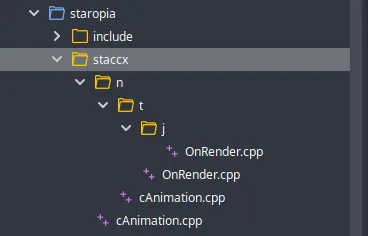
Thats weird I usually do whatever structure I want to use and the import always worked for me.


I just create a test project to show you a example with random structure.


image.png.040ddccec8542f6826fa6863f2204844.png

Green_Baron
Green_Baron

Ok ... thanks ! Will try out again tomorrow, looks like i overlooked a switch or so. CodeLite tickles me because its so lean and has not many dependencies.

_Silence_
_Silence_

As I always answer to this recurrent question, Kdevelop is the way to go on Linux if you want a full IDE. It is now mature. It provides so-called AppImages that run directly without needing to install Kde libraries, Qt, themes or whatever. Even without the AppImage, and even if you are on Xfce or Gnome, it will run as long as all dependencies are installed. Also, you don't need to use Clang (even if it uses it in the background as its C++ parser), cmake or so. So it will run well with gcc and autotools if you want.

If you don't feel well with it, Qt Creator and Visual Studio Code are other alternatives, the later is not a real full IDE (ie integrated builds will not be selectable and set the editor to the good file and line) but works well if you like to keep the way Visual Studio works.

Bregma
Bregma

No IDE. They just get in the way. Terminal, shell, gvim.

If I had to choose an IDE, Microsoft Code is nicely minimal.

Stephen M. Webb
Professional Free Software Developer
SillyCow
SillyCow

If like me, you like Visual C++, then the Netbeans IDE is as close as you can get on Linux.

Since in my day-job I have to modify non-IDE Linux projects, I find it rather usefull that Netbeans supports projects based on Makefiles. ( That way I don't need to impose my IDE preferences on the rest of the team. )

Aside from this, many of the ux metaphores are reminiscent of Ms-VisualStudio and Jetbrains. So if you like you those IDEs you will feel right at home.

The downsides:

* It is a very resource heavy IDE

* GDB integration sometimes crashes (but works most of the time)


My Oculus Rift Game: RaiderV My Android VR games: Time-Rider& Dozer Driver My browser game: 
Green_Baron
Green_Baron

Two rather contrary views :-)

Yeah, some ides hide too much relevant information and behave for too clever with automatisms, wizards and helpers. Eclipse CDT is such an ide imo, that's why i am looking for something else.

Will recheck CodeLite and give Vim a try.

Michael Marchesan
Michael Marchesan

If you're willing to not totally ditch Microsoft and give them a try, there's a feature in Windows 10 that is so underrated most Linux users didn't even hear of it: Windows Subsystem for Linux (WSL).

You can have an effectively Linux environment in Windows, without a virtual machine. You can open bash console and that's literally like being on Linux. Any command line linux software can be installed and run; gui software is not officially supported but there's still ways to run it.

Then you can use Visual Studio on Windows and configure it to work with WSL. That way Visual Studio can compile with a Linux OS target and the WSL can run the compiled program; and you have all the benefits of using one of the best c++ IDEs around.

If you go through the process of making gui software work under WSL you can start Windows and use Linux out of it as if you started a Linux os, but you can also run any Windows software, including Visual Studio, without any emulation happening.

Green_Baron
Green_Baron

Decision fell, for now, i stay with eclipse cdt.

The other suggestions, though most appreciated (Thanks :-)), don't really work equally well for me.

John Cater
John Cater

I really like Visual Studio.

None
SillyCow
SillyCow

Visual-studio-code is not very good.

  • No customizable windows.
  • Terrible code navigation features.
  • Terrible debugger integration (try browsing the contents of an std::map)
  • etc… etc…

An IDE is not just a text editor with compiler bindings. A good IDE is much much more than that. There is a huge difference between what visual-studio does, and visual-studio-code

My Oculus Rift Game: RaiderV My Android VR games: Time-Rider& Dozer Driver My browser game: 
Green_Baron
Green_Baron

I had almost forgotten the thread, thanks for all the reply !

I had to pause for 3 months, and I am still with edlipse cdt. Though it is an overblown pile of which i use only a small part, it let's me work with the file system's directory structure directly, my main prerequisite. Easy debugger integration is the other thing I am not really content with everything (bad autocomplete, complicated user interface, bad make/autotools integration).

1 or 2 terminals are open anyway and many linux editors offer terminal integration.

Will have a look again at the biotope of ides in some time.

Shaarigan
Shaarigan

As far as I know, (don't have the source on hand currently) Unreal is able to generate projects for Code::Blocks and KDevelop so maybe they know what developers want

Bregma
Bregma

I don't usually use an IDE (I dislike having tools get in the way of doing productive work) but when I do, I use Microsoft's Visual Studio Code. It's lightweight enough that it starts up in my lifetime and can keep up with my (slow) typing, something that can't be said for any other IDE I've tried. It even has a vi-like set of keybindings.

Stephen M. Webb
Professional Free Software Developer

Topic Locked

This topic has been locked by a moderator. New replies are not allowed.

Sign in to reply to this topic.