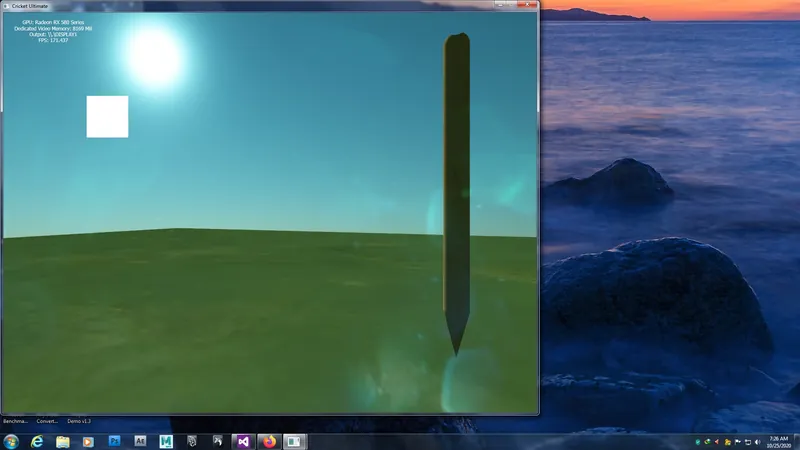
I have enabled MSAA. It works fine without post-processing effects such as lens flare.

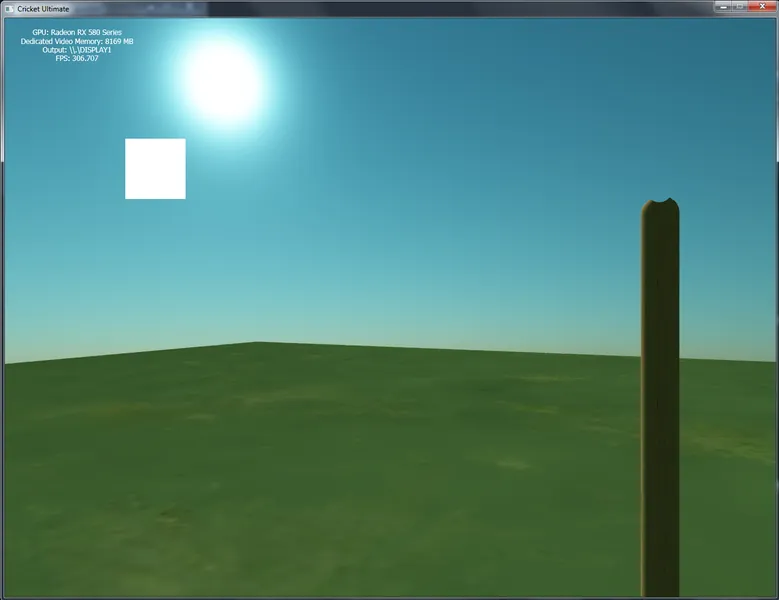
the problem comes when i enable the postprocessing effects lens flare. I lose all the antialiasing and some artifacts in the image. Debugging also shows this

I create render to textures with msaa enabled. I will create classes for render to texture mechanism in the future. this is just for testing.
		// DOWNSAMPLE SCENE TEXTURE
RE_D3D11_ImmediateContext->OMSetRenderTargets(1, &DSRTV, RE_D3D11_DepthStencilView);
RE_D3D11_ImmediateContext->ClearRenderTargetView(DSRTV, Colors::Black);
RE_D3D11_ImmediateContext->ClearDepthStencilView(RE_D3D11_DepthStencilView, D3D11_CLEAR_DEPTH, 1.0f, 0);
		RE_D3D11_ImmediateContext->OMSetDepthStencilState(RE_D3D11_DepthState_DD, 1);

mysky->Render(RE_D3D11_ImmediateContext, RE_D3D11_SamplerState_Main, mycam, RE_LightDirection);
		RE_D3D11_ImmediateContext->OMSetDepthStencilState(RE_D3D11_DepthState_DE, 1);

for (auto G3DQ_Iter = RE_3D_Graphics_Queue.begin(); G3DQ_Iter != RE_3D_Graphics_Queue.end(); G3DQ_Iter++)
		{
(*G3DQ_Iter)->Execute_Render_Commands_For_Scene(RE_D3D11_ImmediateContext, RE_D3D11_SamplerState_Main, RE_D3D11_CSM_SRV, mycam, RE_LightDirection, mLightViewProjection, XMMatrixIdentity());
		}

RE_D3D11_ImmediateContext->OMSetRenderTargets(1, &NULLRTV, NULLDSV);


		//SOURCE GENERATION
RE_D3D11_ImmediateContext->OMSetRenderTargets(1, &LFGRTV, RE_D3D11_DepthStencilView);
RE_D3D11_ImmediateContext->ClearRenderTargetView(LFGRTV, Colors::Black);
RE_D3D11_ImmediateContext->ClearDepthStencilView(RE_D3D11_DepthStencilView, D3D11_CLEAR_DEPTH, 1.0f, 0);

mylf->SourceGenDraw(RE_D3D11_ImmediateContext, RE_D3D11_SamplerState_Main, DSSRV);

RE_D3D11_ImmediateContext->OMSetRenderTargets(1, &NULLRTV, NULLDSV);


RE_D3D11_ImmediateContext->OMSetRenderTargets(1, &RE_D3D11_RenderTargetView_Main, RE_D3D11_DepthStencilView);
RE_D3D11_ImmediateContext->ClearRenderTargetView(RE_D3D11_RenderTargetView_Main, Colors::Black);
RE_D3D11_ImmediateContext->ClearDepthStencilView(RE_D3D11_DepthStencilView, D3D11_CLEAR_DEPTH, 1.0f, 0);

mylf->FinalDraw(RE_D3D11_ImmediateContext, RE_D3D11_SamplerState_Main, DSSRV, LFGSRV);

RE_D3D11_ImmediateContext->OMSetRenderTargets(1, &NULLRTV, NULLDSV);
Debug:
D3D11 ERROR: ID3D11DeviceContext::Draw: The Shader Resource View dimension declared in the shader code (TEXTURE2D) does not match the view type bound to slot 0 of the Pixel Shader unit (TEXTURE2DMS). This mismatch is invalid if the shader actually uses the view (e.g. it is not skipped due to shader code branching). [ EXECUTION ERROR #354: DEVICE_DRAW_VIEW_DIMENSION_MISMATCH]
D3D11 ERROR: ID3D11DeviceContext::Draw: The Shader Resource View dimension declared in the shader code (TEXTURE2D) does not match the view type bound to slot 1 of the Pixel Shader unit (TEXTURE2DMS). This mismatch is invalid if the shader actually uses the view (e.g. it is not skipped due to shader code branching). [ EXECUTION ERROR #354: DEVICE_DRAW_VIEW_DIMENSION_MISMATCH]
D3D11 ERROR: ID3D11DeviceContext::Draw: The Shader Resource View dimension declared in the shader code (TEXTURE2D) does not match the view type bound to slot 2 of the Pixel Shader unit (TEXTURE2DMS). This mismatch is invalid if the shader actually uses the view (e.g. it is not skipped due to shader code branching). [ EXECUTION ERROR #354: DEVICE_DRAW_VIEW_DIMENSION_MISMATCH]
I know why that happens. cos i dont use Texture2DMS in shader. I just want to know how to use ResolveSubresource in this scenario? Any thoughts?