GameDev.net gamedev.net
🔒 Locked

best way to "sculpt" terrain c++ directx

Started by Enzio599 Dec 26, 2021 at 6:09 PM 23 replies 26.6k views
Original Post
Enzio599
Enzio599

Hi guys,

I want to sculpt a terrain in my program written in c++, DirectX 11.

currently I am having a copy of height map where I am setting vertices height based on sculpting brush I have, which is just a circle with a radius. I am editing height map and then again generating vertex geometry from it and the updating a DYNAMIC vertex buffer, which is eats lots of memory and absolutely not optimized.

I want to do this sculpting on GPU, where I can use alpha terrain map brushes as well as simple brushes with fall off. with a better memory footprint. My height map resolution may go up to 64k x 64k

what is the good approach for it.

I would probably need to read back from gpu to get a final sculpted terrain and do collision detection on it.

My picking algorithm is working correctly but I need to do sculpting on GPU.

please guide …

thanks…!

JoeJ
JoeJ

This web gl erosion demo has interactive editing the way you describe, so you could try that to see what it gives: https://github.com/LanLou123/Webgl-Erosion
It's not much ofc. Painting height maps from hand would require automated help, like erosion simulation as shown. With this, even bad input becomes something looking like terrain.
Professional terrain tools thus often start from some noise functions, and run simulation over that for nice results. Painting is mostly supported too, so such tools (World Machine, Gaea, etc.) might be worth a look as well.

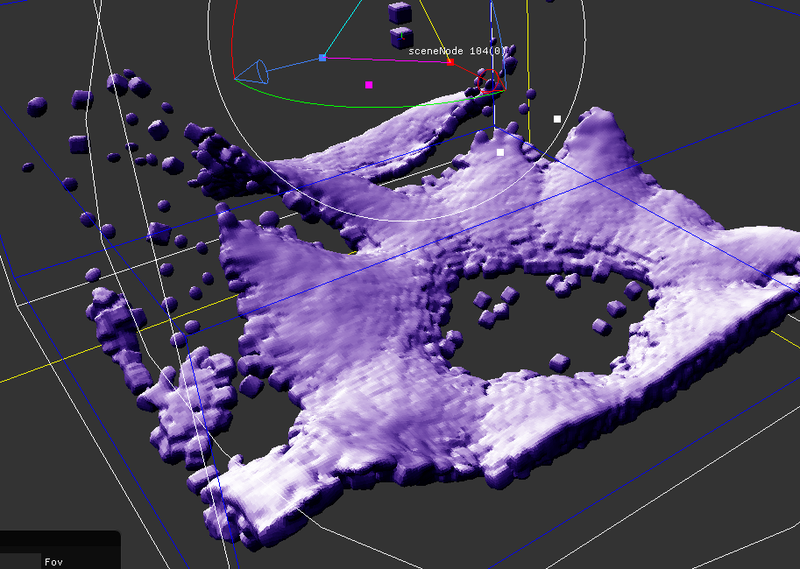
Personally i try to overcome the 2D heightmap limitations and working with 3D particle simulation instead. Here an image showing a layer of sediment particles, meshed with blended SDF primitives.

This would allow sculpting by moving particles, but i have not worked on such tools yet.
Simulation in 3D is much harder (and slower) than in 2D. I still struggle to match 2D quality, and i don't wonder we don't have any 3D tools yet.
So i recommend to stick at heightmaps. ; )

What is your goal here? Some God game with interactive terrain, or offline content generation?

Enzio599
Enzio599

offline content generation

  1. looking for optimized sculpting of terrain with in memory budget
  2. Must be on GPU to support alpha textures directly added as a brush
  3. dynamic vertex buffer(should I need it???????)
JoeJ
JoeJ

Enzio599 said:
dynamic vertex buffer(should I need it???????)

People say the fastest way to draw would be using a small patch of grid mesh (e.g. 8x8 quads), drawing instances of that, and calculating per instance vertex positions / normals on the fly from the height map texture. (Now mesh shaders would be a lot faster again i guess.)
So you don't need a huge vertex buffer for the whole terrain.

Enzio599 said:
looking for optimized sculpting of terrain with in memory budget

I would implement this somehow like this…

CPU:
User can select brushes, blending modes, and paint. Pretty sure you also need layers and paint-able masks. So a basic Photoshop.
The application could create an execution graph to represent blending operations in correct order, containing lists of brush strokes.
Then eventually compile this list to draw calls. Could draw a quad per brush stroke, with mask and blending mode, and in proper order.

GPU:
Draw the heightmap texture with traditional rendering. Use tiles to deal with large size.
Display mesh for preview.

So, with just drawing brush strokes, no big problem is expected. An option to collapse the execution graph would be needed, so further work starts with the resulting image, but we no longer need to generate it after each time from scratch.


If you want simulation too, tiling becomes a problem. You can simulate the tiles with some overlap area and blend them. Will work as long as simulation mainly generates local features (usually the case!), but would break on global things such as a river network.
Simulation will complicate all things in unexpected and hard to predict ways.
For example: You want to simulate at multiple frequencies. Meaning to do erosion first on a 64x64 terrain, then upscale to 128x128, add missing details from original image, erode again, and repeat until you have final resoltion. That's the key to achieve natural results from my experience. But it breaks the simplicity of above painting implementation proposal.

At this point i would develop the whole system on CPU first, and port to GPU later if successful / needed.
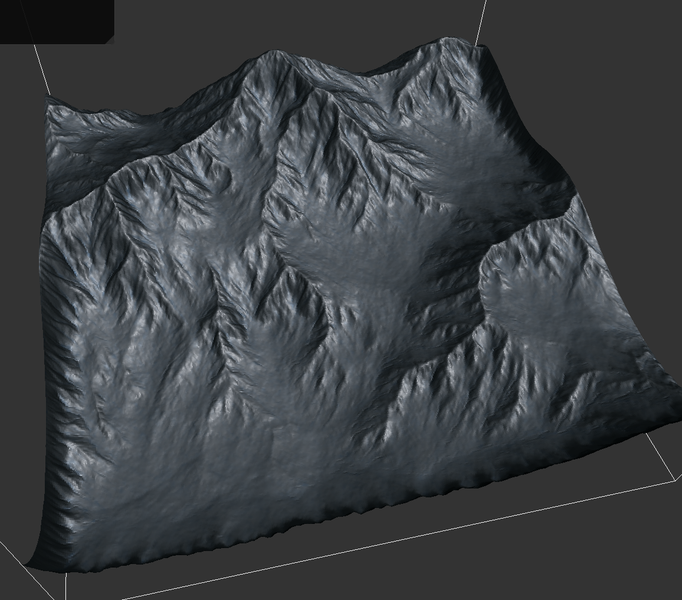
That's more practical to me. And performance is fine too. IIRC, this 1024^2 terrain takes maybe 10 seconds, and my 2D sim is single threaded and not optimized at all:

Enzio599
Enzio599

hey,

i have successfully done the sculpting implementation on CPU,

throw some guide on how to do this on GPU kindly …

i have moved the sculpting code to vertex shader but the sculpting is not accumulating in vertex shader and cant modify position in vertex shader… kindly tell me how …

Enzio599
Enzio599

see whats happening

if (SculptMode.x == 1)//Raise
   {
       float dist = length(uint2(PickedPoint.xz) - input.position.xz);
       if (dist <= BrushRadius.x)
       { 
           PositionOffset[int2(input.position.xz)] += BrushRadius.y * smoothstep(dist, BrushRadius.x, BrushRadius.x - dist) * DeltaTime.x * 10.0f;
       }
   }  

i am using a RWTexture2D for position offset by sculpting

storing offsets in that

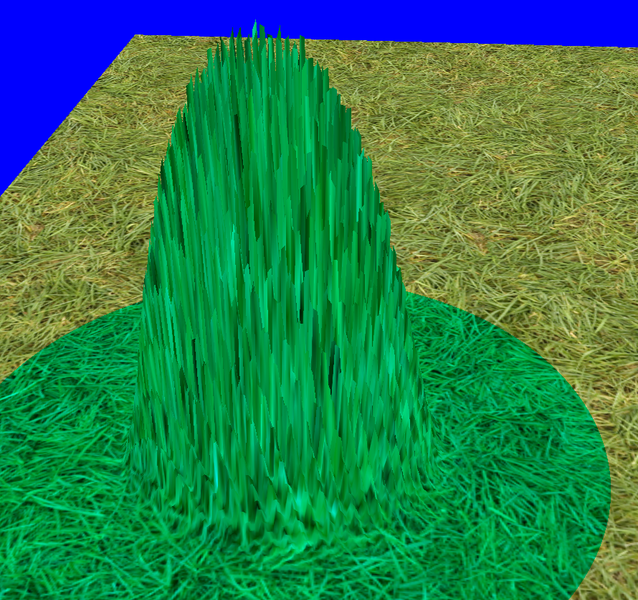
not all vertices get the correct height offset, why the vertices are in spikes formation when i am just setting y values of vertices to calculated value

then

   input.position.y = PositionOffset[int2(input.position.xz)];
JoeJ
JoeJ

Enzio599 said:
smoothstep(dist, BrushRadius.x, BrushRadius.x - dist)

Looking up, i see is specified like this: smoothsetp (min, max, x)

So i guess you actually want: smoothstep(0, BrushRadius.x, BrushRadius.x - dist)

Enzio599
Enzio599

Yes bro I noticed that and I corrected that but even after correcting that my sculpting world is still in spike formation

JoeJ
JoeJ

Enzio599 said:
float dist = length(uint2(PickedPoint.xz) - input.position.xz);

I was wondering this works at all with integers. Maybe it causes some quantization causing artifacts?

RobM
RobM

I've recently done this for my terrain pretty successfully.

My terrain heightmap is 8192 x 8192 (max size). When sculpting, I simply use the terrain heightmap as a render target and render a full quad over it. In the pixel shader, I check that the texture coordinate is within range of the brush coordinates, if it's not I just use the existing data. If you flip-flop two copies of the heightmap texture, you can do some nice smoothing effects by using the last render as an input to the next. I also need to access the terrain, like max height per chunk for visibility and also for picking, so I copy resource from the GPU version to a CPU version. It all works really nicely and super quick.

Let me know if you want any more details.

Enzio599
Enzio599

i think this quantization is happening because there are vertex which are shared among triangles and sculpting adjustment is applied multiple times to same vertex, that is why spikes…

how to apply sculpting adjustment to shared vertex of quad of terrain only once.

JoeJ
JoeJ

Enzio599 said:
i think this quantization is happening because there are vertex which are shared among triangles and sculpting adjustment is applied multiple times to same vertex, that is why spikes… how to apply sculpting adjustment to shared vertex of quad of terrain only once.

Ugh, at this point i'd really consider switching to a proper hightmap data structure, like a texture or just a buffer of floats.
You can implement sculpting or simulation stuff on this without being bothered by meshing issues.

Then, displace mesh vertices (and calculate normals) using this texture / buffer, without being bothered by sculpting.

To do it on meshes directly, you would need adjacency information per vertex, and accessing neighbors becomes random memory access with indirections.
Or, if the mesh is guaranteed to be a simple grid of quads (which is likely), you could calculate indices of neighbors from the grid and also lay out the vertices in memory accordingly.
Should be simple, but at some point you may expand to having tiles, LODs, eventually reduction, and i think separating hightmap from mesh data would make this easier / more flexible.

Enzio599
Enzio599

RobM said:

I've recently done this for my terrain pretty successfully.

My terrain heightmap is 8192 x 8192 (max size). When sculpting, I simply use the terrain heightmap as a render target and render a full quad over it. In the pixel shader, I check that the texture coordinate is within range of the brush coordinates, if it's not I just use the existing data. If you flip-flop two copies of the heightmap texture, you can do some nice smoothing effects by using the last render as an input to the next. I also need to access the terrain, like max height per chunk for visibility and also for picking, so I copy resource from the GPU version to a CPU version. It all works really nicely and super quick.

Let me know if you want any more details.

have you implemented Smooth Sculpting option …. i have successfully implemented Raise, Lower, Alpha maps(no rotation or scale right now) and Flatten modes, but there is issue with smooth, On CPU this smooth code was working perfectly … but in pixel shader it is not behaving correctly … does the code looks erroneous ?

JoeJ said:

Enzio599 said:
i think this quantization is happening because there are vertex which are shared among triangles and sculpting adjustment is applied multiple times to same vertex, that is why spikes… how to apply sculpting adjustment to shared vertex of quad of terrain only once.

Ugh, at this point i'd really consider switching to a proper hightmap data structure, like a texture or just a buffer of floats.
You can implement sculpting or simulation stuff on this without being bothered by meshing issues.

Then, displace mesh vertices (and calculate normals) using this texture / buffer, without being bothered by sculpting.

To do it on meshes directly, you would need adjacency information per vertex, and accessing neighbors becomes random memory access with indirections.
Or, if the mesh is guaranteed to be a simple grid of quads (which is likely), you could calculate indices of neighbors from the grid and also lay out the vertices in memory accordingly.
Should be simple, but at some point you may expand to having tiles, LODs, eventually reduction, and i think separating hightmap from mesh data would make this easier / more flexible.

Raise, Lower, Alpha maps(no rotation or scale right now) and Flatten modes works correctly,

i have one heightmap input to sculpting pixel shader and it renders to a R32_FLOAT texture render target, with a fullscreen quad…

on end of loop i copyresource() from render target to heightmap texture …

this heightmap texture is then input to final displacing vertex shader which renders the terrain correctly.

performance is pretty good to ...

/*Sculpting Pixel Shader - Smooth Code*/

float SculptOffset = 0.0f;
     
float dist = length(int2(PickedPoint.xz) - int2(input.tex * TerrainSize.x));	

if (dist <= BrushParams.x)
{
	float2 VertexTexCoord = input.tex;
	VertexTexCoord.y = 1.0f - VertexTexCoord.y;
	
	int smoothRadius = 5;
	int samplesTaken = 0;
	float avgY = 0.0f;
	for (int k = -smoothRadius; k < smoothRadius; k++)
	{
		for (int l = -smoothRadius; l < smoothRadius; l++)
		{
			float2 smoothingPos = VertexTexCoord + float2(k, l)/TerrainSize.x;
			float radiusLocal = length(int2(k, l));
			avgY += radiusLocal > smoothRadius ? 0.0f : HeightMapTexture.Sample(SampleType, smoothingPos);
			radiusLocal > smoothRadius ? samplesTaken : samplesTaken++;
		}
	}
	avgY /= samplesTaken;

	float localHeight = HeightMapTexture.Sample(SampleType, VertexTexCoord);
	float adjustment = smoothstep(0, BrushParams.x, BrushParams.x - dist) * DeltaTime.x * 10.0f;
	if (localHeight > avgY)
	{
		SculptOffset -= adjustment;
	}
	else
	{
		SculptOffset += adjustment;
	} 
}

return SculptOffset;
RobM
RobM

When ’smoothing’ a terrain, I assume you mean averaging the values, kind of like a Gaussian blur. That’s effectively what I do, but in order for that to happen, you have to use two FP textures (RT1 & RT2):

  1. on initial smooth, copy the terrain into RT1
  2. pass RT1 into the smooth pixel shader and average the pixel values outputting to RT2
  3. copy RT2 to the final terrain texture
  4. switch RT1 and RT2
  5. repeat

Essentially you can’t read from the same texture you’re writing to and in order to smooth, you need to be able to access the pixels around the area of interest.

I do this for mine and for an 8k x 8k terrain, there’s no lag at all.

Enzio599
Enzio599

RobM said:

When ’smoothing’ a terrain, I assume you mean averaging the values, kind of like a Gaussian blur. That’s effectively what I do, but in order for that to happen, you have to use two FP textures (RT1 & RT2):

  1. on initial smooth, copy the terrain into RT1
  2. pass RT1 into the smooth pixel shader and average the pixel values outputting to RT2
  3. copy RT2 to the final terrain texture
  4. switch RT1 and RT2
  5. repeat

Essentially you can’t read from the same texture you’re writing to and in order to smooth, you need to be able to access the pixels around the area of interest.

I do this for mine and for an 8k x 8k terrain, there’s no lag at all.

i am rendering to different rendertarget texture then HeightMapTexture, this HeightMapTexture is a input to sculpting shader,

at the end of loop a copy from rendertarget to this HeightMapTexture, so HeightMapTexture contains final height values from previous frame …

what about my code???

I am not reading from same texture i am writing to .. though …

JoeJ
JoeJ

This line here has errors:

radiusLocal > smoothRadius ? samplesTaken : samplesTaken++;

Likely ‘samplesTaken = …’ is missing in front if it.

Enzio599
Enzio599

JoeJ said:

This line here has errors:

radiusLocal > smoothRadius ? samplesTaken : samplesTaken++;

Likely ‘samplesTaken = …’ is missing in front if it.

i dont think so ,, ++ operator will take care of that …

JoeJ
JoeJ

Not sure if such syntax is specified. Using some old GCC, i once looked for a bug for days and turned out even the braces are needed.
What happens if you try an alternative like

samplesTaken += (radiusLocal > smoothRadius ? 0 : 1);

RobM
RobM

@Enzio599 You said it's “not behaving correctly” but you haven't explained why. What's the issue?

Acosix
Acosix

What kind of a map are you trying to make?

Topic Locked

This topic has been locked by a moderator. New replies are not allowed.

Sign in to reply to this topic.