GameDev.net gamedev.net
🔒 Locked

Tips for increasing fps?

Started by LtFutt Mar 5, 2022 at 6:01 PM 12 replies 10.7k views
Original Post
LtFutt
LtFutt

Hi. I'm having a lot of fun programming a “flying” in wormholes game.. The goal is to fly as long as possible with constantly increasing speed in randomly generated “wormholes/tunnels”. I had really good fps when i was just generating one “tunnel”, but when i added more tunnels, fps dropped a lot. I have tried with glQueries to avoid rendering tunnels i dont see. But it doesn't work fast enough when speed is increasing. My question is. Are Queries still a smart/correct way to do it (with opengl), and im just doing it wrong. -Or could there mayebee be some other methods which could be faster/better?

The way i do it now is to split the world in to regions, and then run queries for each region in front of “camera/player”.

JoeJ
JoeJ

LtFutt said:
My question is. Are Queries still a smart/correct way to do it (with opengl),

I would say it never was a really good way. It's brute force, it requires expensive sync across GPU and CPU within a single frame.
With Vulkan you could probably do all on GPU, including conditional draws, but even then i don't think it's a great solution.

What's pretty common these days is reprojecting previous frame, make hierarchical Z pyramid, use that for cluster culling, all on GPU. (Some recent UE5 Nanite Talk with Brian Karis is on YouTube and has all the details.)

Though - Are your tunnels static? Then precomputing a Potentially Visible Set would be the ideal solution for you i think. Assuming you're always inside some tunnel, you could partition your tunnels, and calculate which parts are visible from the current part.

LtFutt
LtFutt

@JoeJ Thanks for helping me! I will scrap queries for now, and check out your recommended methods!

frob
frob

Out of curiosity, when you write “really good fps” and “dropped a lot”, what numbers are you seeing?

Acosix
Acosix

Dude you do realize in 20 minutes of playing, speed could be too hard to follow?

LtFutt
LtFutt

@frob Maybe not the best way to “phrase” it. But i had stable 60fps before. Now it's more unstable and can drop to 30fps.

JoeJ
JoeJ

LtFutt said:
Maybe not the best way to “phrase” it. But i had stable 60fps before. Now it's more unstable and can drop to 30fps.

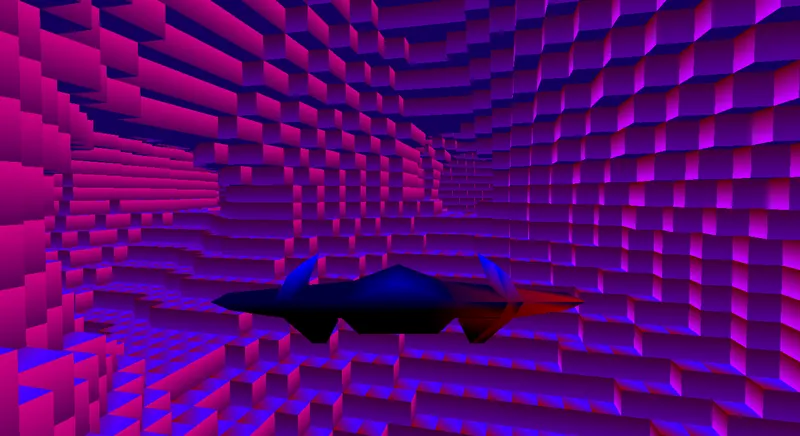
You could post a screenshot of a demanding section if you can, and also give HW specs.
Then we could estimate if a fps drop from scene complexity makes sense. Maybe other reasons are more likely the true cause, like too many state switches, draw calls, etc.
Hidden surface removal always is a lot of work, no matter how. So i'd try to make sure it's really necessary before.

LtFutt
LtFutt

@JoeJ Its just very simple. Behind what you see in this picture there are many more tunnels. They are generated in spereate thread so it doesent steal fps. But they are still rendered as i dont have a good way to exclude whats not in “view”. Please dont judge to hard. This is just “learing” and having fun for me!!

JoeJ
JoeJ

LtFutt said:
Please dont judge to hard. This is just “learing” and having fun for me!!

Don't worry - I didn't expect AAA visuals. It's nice ; )
But i would add some constant fog or a simple atmospheric scattering model, to improve depth perception, so one can instantly see what is far away.

LtFutt said:
They are generated in spereate thread so it doesent steal fps.

I assume you generate a volume of density procedurally. This rules out a PVS, which would make sense only for levels generated offline. So you need a realtime solution, like that UE5 stuff i have mentioned.
But first - do you render only the surface? Or do you render ALL dense cubes of the volume (which would explain it becomes slow)?

Btw, if you want i can give you a code snippet to project the vertices to the smooth surface, so it does not look blocky but smooth.

LtFutt
LtFutt

@JoeJ I would like that “code snippet” yes. But i'm probably to noob to implement it at the moment =) ;P. Its generated procedurally yes. I enter a seed in the beginning and the tunnels generates as i move in to new regions. Regions are16 x16x48(48 is max height) I Only render the surfaces that have “air” next to them. I also compile the regions so that in the next frame i can just call a compile list. The problem is that i dont know how the world is going to look. Im currently looking in to what you previously mentiond “hierarchical Z pyramid”. Do you still think that could be a good way to do it after seeing the picture?

LtFutt
LtFutt

Acosix said:

Dude you do realize in 20 minutes of playing, speed could be too hard to follow?

yes.. But the world is seed based, So you could practice and go longer and longer each time. But eventually it becomes “impossible”.

JoeJ
JoeJ

LtFutt said:
Im currently looking in to what you previously mentiond “hierarchical Z pyramid”. Do you still think that could be a good way to do it after seeing the picture?

Yes. But my understanding is only very basic. The idea is similar to how we use occlusion queries. I think it would work somehow like this:

You have clusters of geometry (like your ‘regions’). Each cluster has a bounding box, which you convert to bounding rectangles in screen space, which also have a closest depth value..

You reproject your previous frames depth to current time (using camera transformation but also motion vectors for non static stuff, which isn't easy).
Then you make a Z pyramid from the resulting depth. But not using an average color as usually with mip maps - instead you keep the max depth of the 4 texels.

Then you use the pyramid to cull your clusters.
You take the bounding rectangle of the cluster, see how many pixels the rectangle would cover, then select the mip of the pyramid so you do not need to make too many tests.
For example, bounding rect is 80 x 40 pixels, so an area of 3200 pixels which is too much. If we reduce resolution 3 times, we get 10 x 5 = only 50 pixels, which is a nice small number fitting into workgroups of 64 threads. So we pick mip 3 of the pyramid, do the tests, and if all depths are closer than the closest depth of the rectangle, we can cull the cluster.
The surviving clusters can be attended to a list which we then draw using an Indirect Draw, so no need for any CPU ←> GPU sync.

Beside the Z pyramid, you can also make a hierarchy from the clusters. E.g. a BVH. Then you could cull a whole branch of subclusters with a single test on the parent bound.
That' i'd call a cool end efficient non-brute-force-algorithm, but as always: To make it worth it, your initial problem has to be a really big one. Otherwise the complexity of the neat algorithm causes a higher constant cost than the savings you get.

I would implement all this with compute shaders.

Some tricks would make sense, like excluding the player ship. As the rest of the world is static, you would not need to mess with motion vectors and reprojection becomes easier / more robust.
Then there are problems, e.g. on camera rotation you'll miss information at the edges of the screen. So depth at the edges would keep infinite, and you end up drawing everything which intersects edges. To prevent this, i would diffuse valid depth values to cover the edges.
The whole reprojection process isn't perfect even in the middle of the screen. There is a chance of error. Maybe you noticed single frame white flashes of missing geometry in UE4 games, e.g. if walking around a corner. This artifact seems to be caused from failures of this system. They are rare, but noticeable. Seemingly they improved this now for UE5 with some two pass approach, and they talk about that in detail in the Nanite Deep Dive video.

That said, you see it's a lot of work and new stuff, i guess. It's no longer just fun, but becomes hard work, taking a lot of time. Not sure if that's worth it. And somehow i think there is indeed another issue causing your perf issues, which might be easier to fix.

LtFutt said:
I also compile the regions so that in the next frame i can just call a compile list.

‘Compiling' sounds you would use the ancient OpenGL Display Lists? You don't do that, no?
You do not upload vertex data for your persisting regions each frame?
You do frustum culling, i guess?
And could you eventually just reduce draw distance?

LtFutt said:
I would like that “code snippet” yes.

It's easy to use. But your density values need to be real numbers in the range 0 - 1, not a boolean which just says solid or empty. So it depends on your data - is it real?

LtFutt
LtFutt

JoeJ said:
Yes. But my understanding is only very basic. The idea is similar to how we use occlusion queries. I think it would work somehow like this: You have clusters of geometry (like your ‘regions’). Each cluster has a bounding box, which you convert to bounding rectangles in screen space, which also have a closest depth value.. You reproject your previous frames depth to current time (using camera transformation but also motion vectors for non static stuff, which isn't easy). Then you make a Z pyramid from the resulting depth. But not using an average color as usually with mip maps - instead you keep the max depth of the 4 texels. Then you use the pyramid to cull your clusters. You take the bounding rectangle of the cluster, see how many pixels the rectangle would cover, then select the mip of the pyramid so you do not need to make too many tests. For example, bounding rect is 80 x 40 pixels, so an area of 3200 pixels which is too much. If we reduce resolution 3 times, we get 10 x 5 = only 50 pixels, which is a nice small number fitting into workgroups of 64 threads. So we pick mip 3 of the pyramid, do the tests, and if all depths are closer than the closest depth of the rectangle, we can cull the cluster. The surviving clusters can be attended to a list which we then draw using an Indirect Draw, so no need for any CPU ←> GPU sync. Beside the Z pyramid, you can also make a hierarchy from the clusters. E.g. a BVH. Then you could cull a whole branch of subclusters with a single test on the parent bound. That' i'd call a cool end efficient non-brute-force-algorithm, but as always: To make it worth it, your initial problem has to be a really big one. Otherwise the complexity of the neat algorithm causes a higher constant cost than the savings you get. I would implement all this with compute shaders. Some tricks would make sense, like excluding the player ship. As the rest of the world is static, you would not need to mess with motion vectors and reprojection becomes easier / more robust. Then there are problems, e.g. on camera rotation you'll miss information at the edges of the screen. So depth at the edges would keep infinite, and you end up drawing everything which intersects edges. To prevent this, i would diffuse valid depth values to cover the edges. The whole reprojection process isn't perfect even in the middle of the screen. There is a chance of error. Maybe you noticed single frame white flashes of missing geometry in UE4 games, e.g. if walking around a corner. This artifact seems to be caused from failures of this system. They are rare, but noticeable. Seemingly they improved this now for UE5 with some two pass approach, and they talk about that in detail in the Nanite Deep Dive video. That said, you see it's a lot of work and new stuff, i guess. It's no longer just fun, but becomes hard work, taking a lot of time. Not sure if that's worth it. And somehow i think there is indeed another issue causing your perf issues, which might be easier to fix.

Thank you so much for helping me out!! I really appreciate it. I will have to spend the evening to see if i can understand any of it!! =)

Topic Locked

This topic has been locked by a moderator. New replies are not allowed.

Sign in to reply to this topic.