
Fruit Box
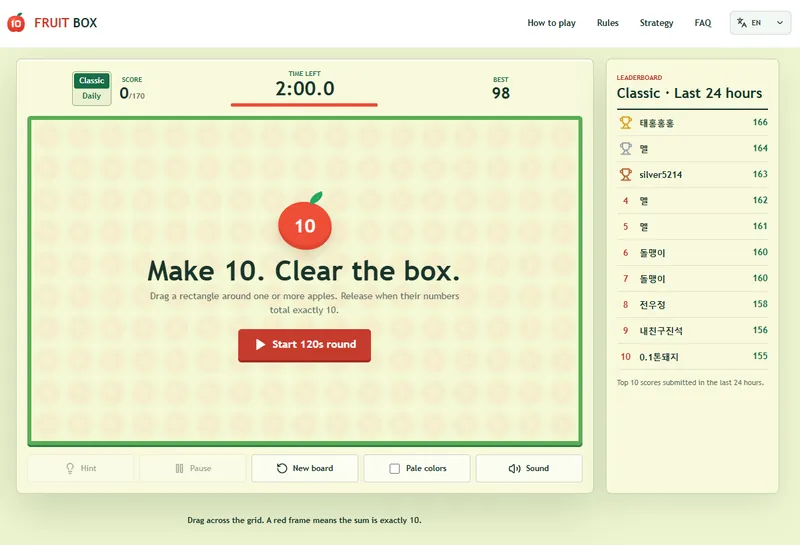
Make 10, clear every apple, and chase a perfect 170.
Screenshots (1)
Trailer
About This Project
Fruit Box — make 10, clear the box
Fruit Box is a free browser puzzle built around one rule: drag a rectangle around numbered apples whose active values add up to exactly 10. Each cleared apple scores one point. Clear as many as possible in 120 seconds, or go for the perfect 170/170 harvest.
This is an in-development project page for the current web build. I’m sharing it to get practical feedback on the game feel, difficulty, mobile controls, and the parts that need more polish.
How it plays
The board starts with 17 columns × 10 rows: 170 numbered apples.
Drag a rectangle across one or more apples.
The selection clears only when every active apple inside adds up to exactly 10.
Empty cells are allowed and count as zero, so cleared spaces can open new moves.
The round ends after 120 seconds or when the whole board is cleared.
The rule is easy to learn, but the board changes after every successful move. The challenge is scanning quickly, choosing useful rectangles, and keeping a route open for the endgame.
Current build
Playable at https://fruitboxgame.com/
Classic mode with a fresh solvable board each round
Daily Challenge with one shared board for everyone each day
Limited hints that highlight a valid rectangle without clearing it
Public top-10 leaderboards for Classic and Daily Challenge
Score sharing, pause/resume, restart, sound, and a low-color option
Mouse, trackpad, touch, and keyboard support
English, Japanese, Korean, Vietnamese, and Traditional Chinese UI
Responsive layout with a focused game view for smaller screens
What I’m tuning now
Making the first round and the tutorial easier to understand at a glance
Tuning the difficulty curve from the dense opening board to the sparse endgame
Improving drag feedback and selection readability on phones
Polishing the Daily Challenge and leaderboard flow
Checking the visual balance of the apples, timer, score, hints, and result screen
Feedback I’d love
If you try the current build, please tell me:
Was the “rectangle totals exactly 10” rule clear without extra explanation?
Did the 120-second timer feel exciting, fair, or too short?
Did you understand which apples were included while dragging?
How did the game feel on your phone, tablet, or trackpad?
Did Classic and Daily Challenge give you a reason to play another round?
Which improvement would help most: onboarding, controls, difficulty, visuals, or sound?
Thanks for testing, and feel free to share a score, browser/device combination, or a small playtest note.
Discussion