
Analytic Ray-Traced Spheres
by GameDev.net · GLSL ES 3.00 (WebGL2) · 25 Aug 2026
Run the shader to adjust these controls.
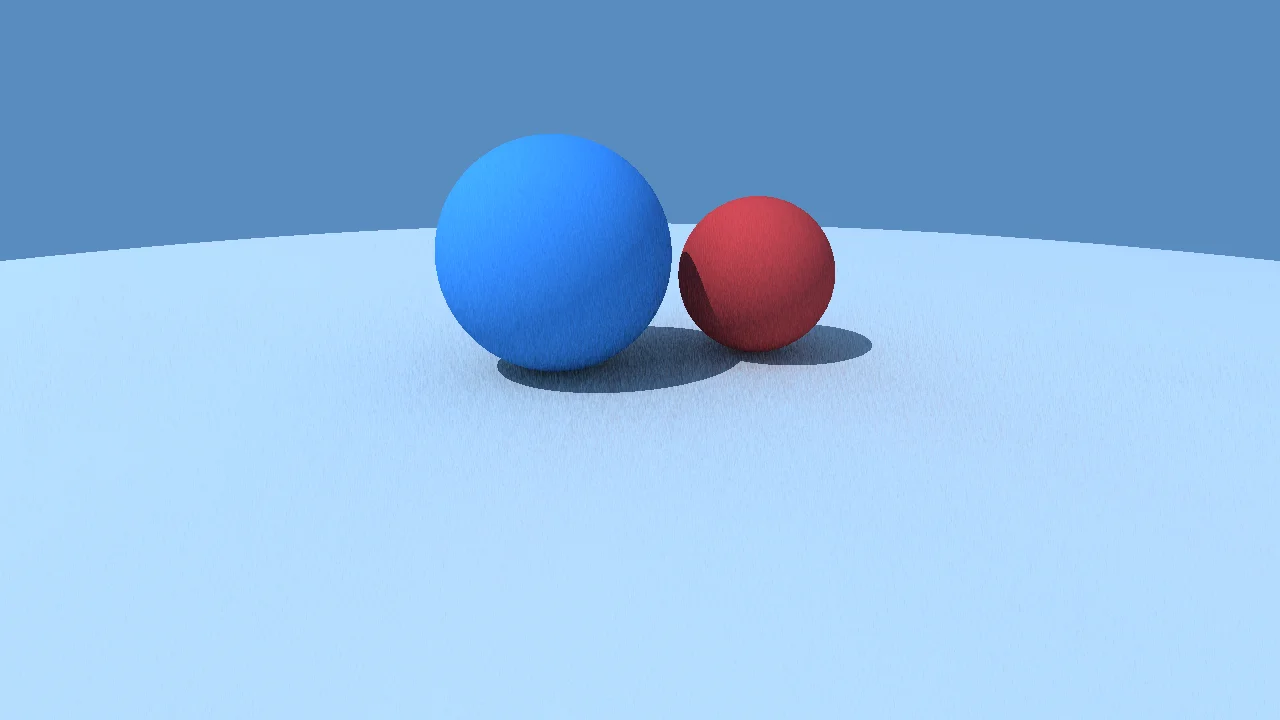
This project is the smallest honest ray tracer. For every pixel we shoot one ray, intersect it against a short list of spheres, and shade the closest hit.
What it demonstrates
Ray construction from a camera origin plus screen UV. Analytic sphere intersection using the quadratic form. A hard-shadow ray loop, which is the seed of a real ray tracer. Phong-style diffuse plus specular on a surface normal.
Shader inputs
void mainImage(out vec4 fragColor, in vec2 fragCoord)
Called once per pixel. Write the colour to fragColor.
-
iResolutionvec3 - Viewport size in pixels (z is the pixel aspect ratio).
-
iTimefloat - Seconds since the shader started.
-
iTimeDeltafloat - Seconds since the previous frame.
-
iFrameRatefloat - Frames per second, smoothed.
-
iFrameint - Frames rendered since the start.
-
iMousevec4 - Mouse position: xy while held, zw of the last click.
-
iDatevec4 - Year, month, day, and seconds within the day.
-
iChannel0sampler2D - Texture bound to channel 0.
-
iChannel1sampler2D - Texture bound to channel 1.
-
iChannel2sampler2D - Texture bound to channel 2.
-
iChannel3sampler2D - Texture bound to channel 3.
-
iChannelResolutionvec3[4] - Pixel size of each bound channel texture.
-
iChannelTimefloat[4] - Playback time of each channel, in seconds.
-
iSampleRatefloat - Audio sample rate, always 44100.
Main Image5
uniform vec3 uSunDir; // @param -1.0..1.0 = 0.42, 0.65, 0.15 direction "Sun direction"
uniform vec3 uSky; // @param 0.0..1.0 = 0.35, 0.55, 0.75 color "Sky"
uniform vec3 uGround; // @param 0.0..1.0 = 0.12, 0.10, 0.09 color "Ground"
struct Sphere {
vec3 center;
float radius;
vec3 color;
float roughness;
};
float hitSphere(vec3 ro, vec3 rd, vec3 c, float r) {
vec3 oc = ro - c;
float b = dot(oc, rd);
float d = b * b - (dot(oc, oc) - r * r);
if (d < 0.0) return -1.0;
d = sqrt(d);
float t = -b - d;
return t > 0.0 ? t : -b + d;
}
vec3 sceneNormal(vec3 p, Sphere s) {
return normalize(p - s.center);
}
void mainImage(out vec4 fragColor, in vec2 fragCoord) {
vec2 uv = (fragCoord - 0.5 * iResolution.xy) / iResolution.y;
vec3 ro = vec3(0.0, 0.9, 2.8);
vec3 lookAt = vec3(0.0, 0.1, 0.0);
vec3 cw = normalize(lookAt - ro);
vec3 cu = normalize(cross(vec3(0.0, 1.0, 0.0), cw));
vec3 cv = cross(cw, cu);
vec3 rd = normalize(cw + uv.x * cu + uv.y * cv);
Sphere spheres[3];
spheres[0] = Sphere(vec3(-0.55, 0.35, 0.0), 0.35, vec3(0.92, 0.25, 0.25), 0.08);
spheres[1] = Sphere(vec3(0.35, 0.55, -0.45), 0.55, vec3(0.25, 0.62, 0.92), 0.18);
spheres[2] = Sphere(vec3(0.0, -100.0, 0.0), 100.0, vec3(1.0), 0.95);
vec3 sun = normalize(uSunDir);
vec3 col = uSky - 0.45 * uv.y;
float tMin = 1e9;
int hitIdx = -1;
for (int i = 0; i < 3; i++) {
float t = hitSphere(ro, rd, spheres[i].center, spheres[i].radius);
if (t > 0.0 && t < tMin) {
tMin = t;
hitIdx = i;
}
}
if (hitIdx >= 0) {
Sphere s = spheres[hitIdx];
vec3 p = ro + rd * tMin;
vec3 n = sceneNormal(p, s);
// One hard shadow ray per light, not ambient occlusion. The point is to
// show that a ray tracer is just a loop over geometry for every ray.
float shadow = 1.0;
for (int i = 0; i < 2; i++) {
if (i == hitIdx) continue;
float tShadow = hitSphere(p + n * 0.001, sun, spheres[i].center, spheres[i].radius);
if (tShadow > 0.0) {
shadow = 0.0;
break;
}
}
float diff = max(dot(n, sun), 0.0);
vec3 view = normalize(ro - p);
vec3 halfDir = normalize(sun + view);
float spec = pow(max(dot(n, halfDir), 0.0), mix(64.0, 4.0, s.roughness));
col = s.color * (uGround * 0.35 + 0.55 * diff * shadow) + vec3(0.9) * spec * shadow;
// Distance fade keeps the sky in the picture, which is why the ground
// sphere is huge rather than a finite plane.
col = mix(col, uSky - 0.45 * uv.y, smoothstep(12.0, 35.0, tMin));
}
fragColor = vec4(col, 1.0);
}
Learn from this shader
How it works
The image pass builds a camera basis, then loops over three spheres. For each sphere it calls hitSphere, which solves the quadratic for the nearest positive t. The sphere with the smallest t wins. The normal is the normalized vector from the sphere center to the hit point, and a second loop casts a ray toward the sun to test whether that point is in shadow.
Try changing
Move the two small spheres or change their radii. Add a fourth sphere to the array; the loop bound is fixed, so keep the count small. Raise the roughness of the blue sphere to make it shinier, or lower it to matte. Replace the hard shadow with a soft approximation by testing more shadow rays.
Using it in a game
A full game engine uses bounding hierarchies, ray-triangle intersection, and many rays per pixel. This project is the same idea with one geometry type and one ray per pixel: it is the conceptual foundation, not a drop-in replacement. The camera math is exactly what a deferred light or screen-space reflection pass uses.
Explore the techniques
Continue with curated explanations and progressively related examples.
-
 Explained
GLSL
Explained
GLSL
-
 Explained
GLSL
Explained
GLSL
-
 Explained
GLSL
Explained
GLSL

Discussion