
Understanding Component-Entity-Systems
The traditional way to implement game entities was to use object-oriented programming. This led to large, rigid class hierarchies. To solve this, game programmers started to build entities through composition instead of inheritance.
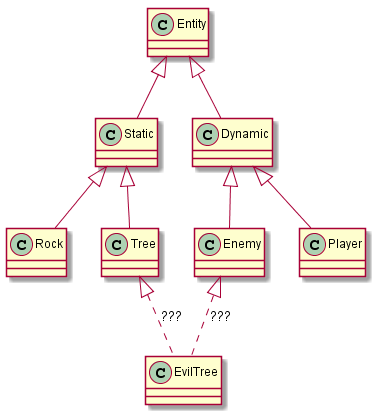 To solve this, game programmers started to build entities through composition instead of inheritance. An entity is simply an aggregation (technically a composition) of components. This has some major benefits over the object-oriented architecture described above:
 - It's easy to add new, complex entities
- It's easy to define new entities in data
- It's more efficient
The Component
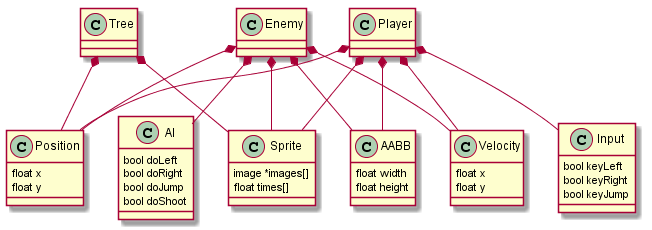
A component can be likened to a C struct. It has no methods and is only capable of storing data, not acting upon it. In a typical implementation, each different component type will derive from an abstract Component class, which provides facilities for getting a component's type and containing entity at runtime. Each component describes a certain aspect of an entity and its parameters. By themselves, components are practically meaningless, but when used in conjunction with entities and systems, they become extremely powerful. Empty components are useful for tagging entities.Examples
- Position (x, y)
- Velocity (x, y)
- Physics (body)
- Sprite (images, animations)
- Health (value)
- Character (name, level)
- Player (empty)
The Entity
An entity is something that exists in your game world. Again, an entity is little more than a list of components. Because they are so simple, most implementations won't define an entity as a concrete piece of data. Instead, an entity is a unique ID, and all components that make up an entity will be tagged with that ID. The entity is an implicit aggregation of the components tagged with its ID. If you want, you can allow components to be dynamically added to and removed from entities. This allows you to "mutate" entities on the fly. For example, you could have a spell that makes its target freeze. To do this, you could simply remove the Velocity component.Examples
- Rock (Position, Sprite)
- Crate (Position, Sprite, Health)
- Sign (Position, Sprite, Text)
- Ball (Position, Velocity, Physics, Sprite)
- Enemy (Position, Velocity, Sprite, Character, Input, AI)
- Player (Position, Velocity, Sprite, Character, Input, Player)
The System
Notice that I've neglected to mention any form of game logic. This is the job of the systems. A system operates on related groups of components, i.e. components that belong to the same entity. For example, the character movement system might operate on a Position, a Velocity, a Collider, and an Input. Each system will be updated once per frame in a logical order. To make a character jump, first the keyJump field of the Input data is checked. If it is true, the system will look through the contacts contained in the Collider data and check if there is one with the ground. If so, it will set the Velocity's y field to make the character jump. Because a system only operates on components if the whole group is present, components implicitly define the behaviour an entity will have. For example, an entity with a Position component but not a Velocity component will be static. Since the Movement system uses a Position and a Velocity, it won't operate on the Position contained within that entity. Adding a Velocity component will make the Movement system work on that entity, thus making the entity dynamic and affected by gravity. This behaviour can be exploited with "tag components" (explained above) to reuse components in different contexts. For example, the Input component defines generic flags for jumping, moving, and shooting. Adding an empty Player component will tag the entity for the PlayerControl system so that the Input data will be populated based on controller inputs.Examples
- Movement (Position, Velocity) - Adds velocity to position
- Gravity (Velocity) - Accelerates velocity due to gravity
- Render (Position, Sprite) - Draws sprites
- PlayerControl (Input, Player) - Sets the player-controlled entity's input according to a controller
- BotControl (Input, AI) - Sets a bot-controlled entity's input according to an AI agent
Conclusion
To wrap up, OOP-based entity hierarchies need to be left behind in favour of Component-Entity-Systems. Entities are your game objects, which are implicitly defined by a collection of components. These components are pure data and are operated on in functional groups by the systems. I hope I've managed to help you to understand how Component-Entity-Systems work, and to convince you that they are better than traditional OOP. If you have any questions about the article, I'd appreciate a comment or message. A follow-up article has been posted, which provides a sample C implementation and solves some design problems. Implementing Component-Entity-SystemsArticle Update Log
1 April 2013 - Initial submission 2 April 2013 - Initial publication; cleaned up formatting 29 September 2013 - Added notice of follow-up article; changed some formatting)Related Tutorials
Balancing Game Development and Creative Direction in Indie Production
A practical look at how indie developers can balance creative direction with hands-on game development. This article co…
 huseyin_onur
My Unreal Engine Development Process: From Core Idea to Playable Build
A practical overview of my Unreal Engine development process, covering how I move from a core game idea to a playable b…
huseyin_onur

Introducing LaneGraph: The Ultimate Road Network Solution for Unity
Discover the power of LaneGraph, a lightweight and flexible lane-based navigation system for Unity. LaneGraph makes it…
Retargeting Mixamo Characters with Root Motion In Unreal Engine 5.4.
I have always found Retargeting Mixamo Characters To have Root Motion is a serious lengthy Tast, Recently I stumbled up…

How To Make A SIMPLE Main Menu In Unity
In this tutorial for unity, i go over how to make a simple main menu for unity, it's an unlisted video because i do not…
 FlipThaSwitzh

Guide to Gameplay Balance
A perspective on competitive gameplay balance, from a background of "shooter" sandbox design.
 Tucker933
Discussion
More from Boreal Games
Static, zero-overhead (probably) PIMPL in C++
There are a couple big caveats of PIMPL, and that's of course that you need to do dynamic memory allocation and suffer …
Boreal
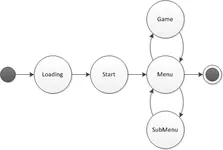
Brain Dead Simple Game States
Lately, I've realized that game state management is always vastly overcomplicated. Here's a brain dead simple system t…
Boreal

Implementing Component-Entity-Systems
This implementation works very well in the small scope of my program and can easily be extended to use more components …
Boreal Games
Discussion