
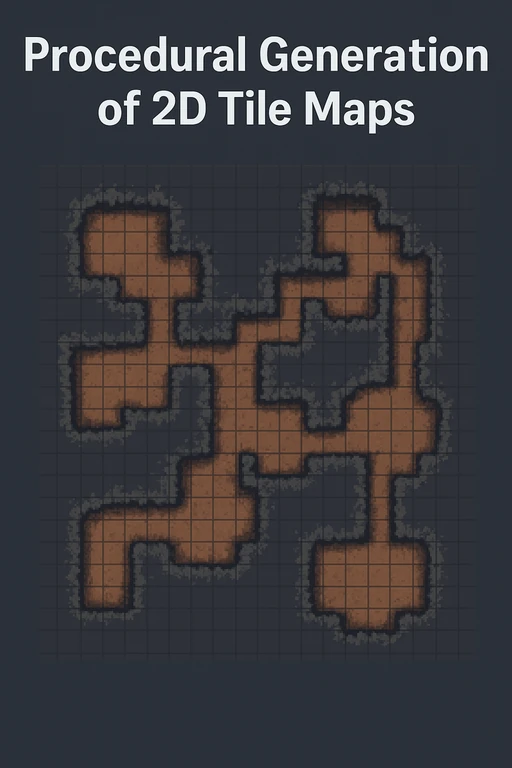
Procedural Generation of 2D Tile Maps in Games
The article explains how to build a procedural 2D cave map generator using cellular automata. It covers map representation, random seeding, smoothing, ensuring connectivity with flood fill, and rendering in engines like Unity or Godot. It also suggests extensions (rooms, biomes, streaming).
Introduction
Procedural content generation allows game developers to create diverse, replayable environments without manually designing each level. In this tutorial, we’ll cover a step-by-step method for generating a cave-like 2D map using cellular automata and show how to integrate the result into your engine of choice.
We’ll touch on:
- Representing your map in code
- Seeding and smoothing with CA
- Ensuring connectivity
- Rendering and integrating into a game loop
- Extending with variations
1. Map Representation
We’ll store tiles in a 2D array:
enum TileType { Wall, Floor }
TileType[,] map = new TileType[width, height];
// Initialize all tiles as Wall
for (int x = 0; x < width; x++)
for (int y = 0; y < height; y++)
map[x, y] = TileType.Wall;
Helper functions for bounds and neighbors:
bool InBounds(int x, int y) =>
x >= 0 && x < width && y >= 0 && y < height;
IEnumerable<(int, int)> Neighbors4(int x, int y) {
yield return (x+1, y);
yield return (x-1, y);
yield return (x, y+1);
yield return (x, y-1);
}
2. Seeding with Random Noise
Randomly seed tiles with a ratio of walls to floors.
Random rnd = new Random(seed);for (int x = 0; x < width; x++)for (int y = 0; y < height; y++) map[x, y] = (rnd.NextDouble() < 0.45) ? TileType.Wall : TileType.Floor;
This gives a noisy distribution, ready for smoothing.
3. Cellular Automata Smoothing
Iterate a few times applying neighbor-based rules:
TileType[,] newMap = new TileType[width, height];
for (int x = 0; x < width; x++)
for (int y = 0; y < height; y++) {
int wallCount = CountWallNeighbors8(x, y);
if (map[x, y] == TileType.Wall) {
newMap[x, y] = (wallCount >= 4) ? TileType.Wall : TileType.Floor;
} else {
newMap[x, y] = (wallCount >= 5) ? TileType.Wall : TileType.Floor;
}
}
map = newMap;
After 4–6 passes, blobs begin to look like caves.
4. Ensuring Connectivity
To prevent isolated pockets, run a flood fill from the player’s spawn point and remove unreachable areas.
void FloodFill(int startX, int startY) {
var visited = new bool[width, height];
var q = new Queue<(int,int)>();
q.Enqueue((startX, startY));
visited[startX, startY] = true;
while (q.Count > 0) {
var (cx, cy) = q.Dequeue();
foreach (var (nx, ny) in Neighbors4(cx, cy)) {
if (InBounds(nx, ny) && !visited[nx, ny] && map[nx, ny] == TileType.Floor) {
visited[nx, ny] = true;
q.Enqueue((nx, ny));
}
}
}
// Remove unreachable floors
for (int x = 0; x < width; x++)
for (int y = 0; y < height; y++)
if (map[x, y] == TileType.Floor && !visited[x, y])
map[x, y] = TileType.Wall;
}
5. Rendering in Engine
- Unity: Use a Tilemap component or instantiate prefabs.
- Godot: Use a
TileMapnode with cell placement. - Unreal: Render meshes on a grid or use Paper2D for 2D tilemaps.
Walls get colliders; floors are walkable. Add pathfinding using A* for a complete exploration system.
6. Extensions
- Hybridize with room-based generation for structured layouts.
- Add biomes or multiple tile types.
- Store random seeds for reproducibility.
- Stream large maps chunk-by-chunk.
Conclusion
We’ve built a simple but flexible 2D cave generator using cellular automata. You can extend this system for roguelikes, survival games, or sandbox exploration titles.
Related Tutorials
Game videos from the Game Trailer Challenge: overview and breakdown with Alconost
We introduce personal top ten videos from the Game Trailer Challenge, analyze what made each particular video awesome, …
 Alconost

Finland for Game Devs: A Little Country with Big Possibilities
Finland has become a focal point for leading gamedev companies from around the world: Ubisoft, Electronic Arts, Epic Ga…
Alconost

Join the Games Industry Roundtable and Make Your Mark on the Technology of the Future
Professional game developers can sign up today for industry insights, discussions and more.
 GameDev.net

Interview: How indie devs from a small Russian city make games for Google Play and social networks
Duck Rockets, an indie studio from Russia, shared their insights on the following: * why small local markets are more …
Alconost

RoKabium Games on Building a Game from the Ground Up
Interview with RoKabium Games on their success as a two-person indie developer studio.
 Steven Large

Interview: Game Design Careers with Byron Atkinson-Jones
In this interview, Byron discusses the best ways for young video game designers to get into the games industry.
Iain Twizzworks
Discussion