
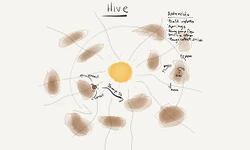
Dynamic Pathfinding
Mash up your physics engine and your pathfinding engine and what do you get? Dynamic obstacle avoidance.

The Goal
Given a dynamic moving field of objects, leverage the existing capabilities of the physics engine to allow an entity to navigate from any position to any other position while appearing to realistically avoid the objects that may collide with the entity. That is an awful lot to say. It is also a pretty tall order when you look at the video (below) and realize that there are dozens of objects all moving around all the time while the entity is plotting paths through them.Why use the physics engine?
If you take apart the pieces that you need to put a game scene together where the AI has some chops, you are going to find you need:- A way to partition the space and make queries about what is where to reduce CPU cycles.
- A way to make the bodies move about under your control and look reasonable while they do it.
- A way to tell you when collisions occur and have the involved parties take action.
What is meant by "realistically avoid"?
When Han Solo flew the Millennium Falcon through the asteroid field in The Empire Strikes Back, he makes the famous quote "Never tell me the odds!". And as we all know, the odds are not good. So maybe "realistically avoid" is a bit of an overstatement, because if the ship can do that, it's a bit more than you should expect. The effect that we are looking for is to not overtly cheat in how the ship files around the moving obstacles and have it fly around them using the physics it is endowed with (mass, momentum, finite turn torque, etc.).- The collision should not be avoided by magic such as having the rocks pass through the ship or having the ship teleport around them.
- The rocks should not have their velocity reduced to such a low speed that they are essentially fixed objects.
- The rocks should not move in predefined paths (although this is an interesting option)...if they get bumped they need to behave with the real physics of the situation.
The Big Picture
The diagram below shows the major components of the system.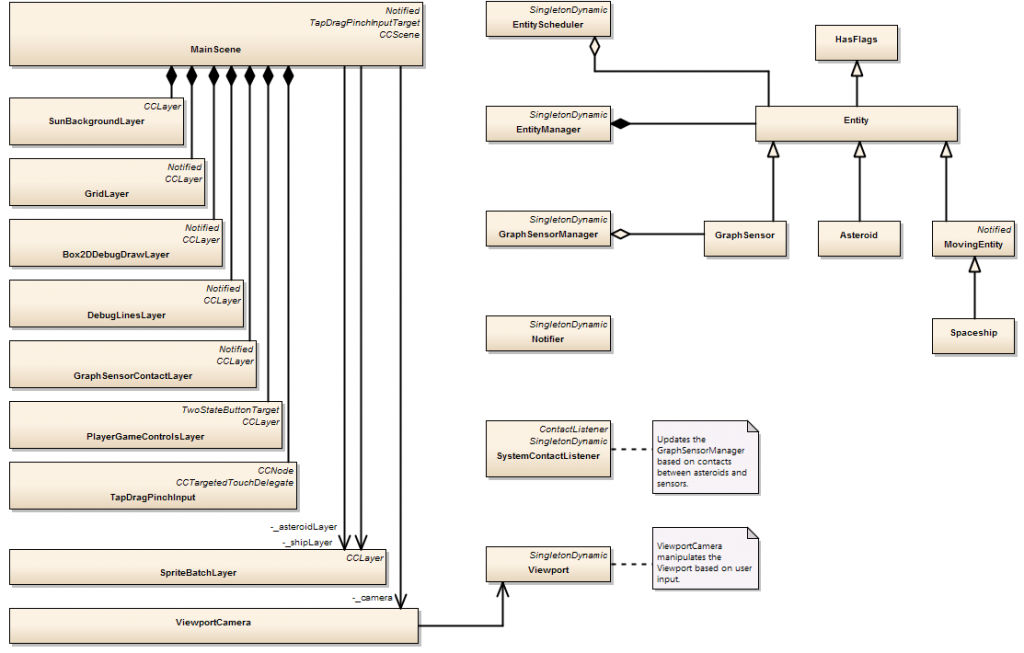
Main Scene
The Cocos2d-x framework, along with the classes on the left side of the image, make up the "View" of the Model View Controller (MVC) model for the system. The Main Scene acts as the "Controller", taking the user input and sending it directly down to the model (the stuff on right side of the image). The Viewport approach has been discussed in other blog entries. In previous versions, the Viewport was manipulated (scrolled, pinched, zoomed) inside of the Main View. In this incarnation, a "camera" was created to hide all the guts of making this work, making it more portable to other applications. We're not going to talk about the View or Controller too much more in this article.The General Approach
The Box2D engine allows for objects to be "solid" and have normal collision responses, but also allows for objects to pass through each other in various ways (see this link and this link for a good tutorial on this...yes, we reference other developers...they have good stuff). One special class of "intangibility" for Box2D are the "sensors". If you mark a fixture as a sensor, then everything will pass through it, but you will still get notified about each object that collides with it. Given the above, here is the general strategy:- Lay out an arrangement of closed convex geometrical objects that are all marked as sensors. A "grid" of squares was chosen this time, but it could be circles, hexagons, rectangles etc., They don't have to be on a grid either, they can be in any arrangement that meets your needs. What they have to do is reasonably cover the area that you want to navigate through.
- Create a special contact handler that, for each sensor, counts up when a contact begins and counts down when a contact ends. If the numbers line up (and they appear to), then the space inside the shape is "empty" if the count is 0 and "not empty" otherwise.
What the Other Pieces Do
The Model part of MVC is filled in part by the Box2D engine. On top of that are these other major components, all of which play a different part. All of these are "singletons" with a well defined responsibility in the execution model. Some of them interact with only a few of the others, some are ubiquitous. Notifier The Notifier has been used in many designs (see other blog entries). This singleton is an efficient global one-to-many event communication mechanism for the system. Register for an event and yourThe Code
Get the Source Code for this article hosted on GitHub by clicking here.Conclusion
This article presented a technique (and a video and a link where you can download the code) for using a physics engine integrated with the pathfinding system to dynamically avoid objects in a changing environment. The initial testing (and demo) is very promising for future use. One "fly in the ointment" is that the CPU load, while not intolerable, is a bit higher than I would like.Article Update Log
30 Oct 2014: Initial releaseRelated Tutorials
What To do If Your Game Received a Copyright Complaint
This tutorial explains how to respond to copyright complaints and why you shouldn't be scared of Apple's emails. It inc…
 IvanFedyanin

Video Game PR Basics
A brief guide to the very basics of video game public relations.
 Felicia McEntire
Building a Discord
Mega Cat Studios walk us through the journey the followed in setting up their Discord server.
Mega Cat Studios

Publishing 103 - What Publishers Look For in Games
A detailed look at what publishers want from a game, and the materials that you as a developer should have prepared.
Publishing 102 - How To Find The Best Publisher For You
In this article, I will be detailing the tactics you should use while you are on the search for the best publisher. It’…

A Guide to DIY Market Research for Indie Game Devs
Ah, market research. Just seeing those words probably sent shivers down your spine. Market research for indie game devs…
 Damien Yoccoz
Discussion
More from James Wucher

Visual Tools For Debugging Games
How much of your time do you spend writing code? How much of your time you spend fixing code?Which would you rather be…
James Wucher

Estimating Effort for Small Projects
How much work will it take? How much have you finished? When will it be done? If you have to answer these questions,…
James Wucher

PID Control of Physics Bodies
Once you bite the bullet and decide to use a physics engine for your game pieces, you are going to have to come to term…
James Wucher
Discussion