
Linear Interpolation Explained
This article takes a simple and practical approach to explaining linear interpolation.

Linear interpolation is everywhere. Games, 3D animation, image creation tools and much more all rely heavily on interpolation, so having a thorough understanding of linear interpolation is extremely important.
This text is somewhat geared towards game developers, however it's general enough to apply to any programming audience regardless of if you're into games or not.
What is interpolation?
In the simplest sense, interpolation is finding data in between other data. Unfortunately, this explanation is really vague, and understanding interpolation is quite difficult without real examples, so I will provide some.
Linear Interpolation, and the Number Line.
Lets explain linear interpolation by using a number line as an example.
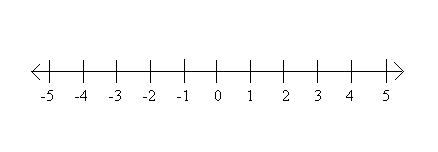
What number is halfway in between -2, and 2?
If you answered 0, you would be correct! Congratulations! You just did linear interpolation inside your head. (Yes, that's all it is!) Going back to the original definition of interpolation as "finding data between other data", this may make a bit more sense. The data we have is -2 and 2, and we interpolated (found) the number halfway in between those two points.
If you're used to programming in Unity, or using a Lerp function, this would be akin to doing:
Lerp(-2, 2, 0.5f); //Returns 0("Lerp" is just the programmer term for "linear interpolation", they mean the same thing.)
The first two parameters (-2 and 2) are the pieces of data that we want to find data between. What does that third parameter, (0.5f), mean though? Its our "t" value. You may hear it called the "interpolant" as well.
The t value is a percentage. Its a floating point number between 0 and 1 that represents where you want to interpolate between the two numbers on that number line. Here, the number is 0.5. That means 50%, or halfway between the first two numbers.
If you did 0.25 as the t value, it would give you the value 25% between -2, and 2. Can you guess what that would be by looking at the number line?
It would give you -1! Because -1 is 25% between -2 and 2. The negative numbers can also cause a bit of confusion here, so here are a few examples with positive numbers as well.
Lerp(4, 8, 0.5f); //Returns 6, because 6 is halfway in between 4 and 8

Lerp(0, 4, 0.25f); //Returns 1, because 1 is a quarter in between 0 and 4
What happens if you use 0, or 1 as the t value though? They just give you the first, or second parameter right back!
Lerp(4, 8, 1); //Returns 8

Lerp(4, 8, 0); //Returns 4
Linear Interpolation is Not Magic
Interpolation is quite literally everywhere in the realm of game development. Because of this, many beginners use the Lerp function before they even understand what it does, which causes a lot of misconceptions to form about what Lerp actually means. Lets clear some of those misconceptions up.
- Lerp does not mean something is "constantly changing".
- Lerp does not mean something is "moving".
Lerp is just a mathematical function that lets you find a piece of data in between 2 other pieces of data. The actual definition of a lerp function is actually dead simple. This is literally all it is:
\( f(a, b, t) = a + (b - a) * t \)
- a is often called the "min" value.
- b is often called the "max" value.
- t is the interpolant.
Translated to code:
float Lerp(float a, float b, float t)
{
    return a + (b - a) * t;
}
Don't believe me? Check the official source code Unity uses for Mathf.Lerp here. (They clamp the t value between 0 and 1 in their implementation, but its pretty much the same thing.)
Not so magic after all, eh?
Extrapolation
When the 't' value in your interpolation exceeds 1.0, it is no longer an interpolation. Its called an extrapolation. Like how interpolation means "finding data between two pieces of data", extrapolation means "finding data outside of two pieces of data", or "Extending beyond two pieces of data".
Going back to the number line example.
Imagine we've marked two points on this number line. 0, and 2. You can clearly see that the difference between these two numbers is 2. Following this pattern of the numbers stepping by 2, what would come next?
If you guessed 4, you would be correct. Congratulations, you just performed extrapolation!
This is akin to doing:
Lerp(0, 2, 2) This returns 4 because we're extending beyond these two points by a factor of 2 (the t value)
Here are some more examples:
Lerp(2, 4, 2); //t value is 2. Returns 6

Lerp(1, 6, 3); //t value is 3. Returns 16
The one that returns 16 is often very confusing, because its not immediately clear why. To better understand that second example, lets do the math manually, like we discussed earlier.
A = 1
B = 6
T = 3

Result = A + (B - A) * T

Result = 1 + (6 - 1) * 3

Result = 16
We're simply extending beyond the two data pieces using that t value.
Extrapolation is a concept that often is learned intuitively from understanding interpolation, so don't stress too hard if you don't understand it immediately. To help understand it, I highly recommend opening your compiler for whatever language you're using, and testing out Lerp functions on your own. Try different A, B and T values, to gain an intuitive understanding.
Closing
To sum up linear interpolation, just remember it as "Getting data between two other points of data". If the concept is still confusing, I recommend looking back at the given examples, and trying to establish a consistent link with how they work.
Try them yourself as well! If you're using a language like C++, use the std::lerp function! Just test out different parameters and see the output you receive. If the language you're using does not have a standard linear interpolation function, feel free to copy the one I wrote above!
If you have any questions, feel free to email me at westonfmcnamara@gmail.com, or leave a comment on this post with any inquiries you may have about this text.
Recommended resources
Game Engines

Unreal Engine 5 Best Practices
Amazon · Book
Written by multi-award-winning Unreal generalist Tyson J. Butler-Boschma, Founder and Creative Director of Toybox Games Studios, this book addresses common challenges you face when advancing your expertise in lighting, environment design, and cinematic storytelling.
GameDev.net may earn a commission if you purchase through these links. This helps fund the site at no extra cost to you.
Related Tutorials
Balancing Game Development and Creative Direction in Indie Production
A practical look at how indie developers can balance creative direction with hands-on game development. This article co…
 huseyin_onur
My Unreal Engine Development Process: From Core Idea to Playable Build
A practical overview of my Unreal Engine development process, covering how I move from a core game idea to a playable b…
huseyin_onur

Introducing LaneGraph: The Ultimate Road Network Solution for Unity
Discover the power of LaneGraph, a lightweight and flexible lane-based navigation system for Unity. LaneGraph makes it…
Retargeting Mixamo Characters with Root Motion In Unreal Engine 5.4.
I have always found Retargeting Mixamo Characters To have Root Motion is a serious lengthy Tast, Recently I stumbled up…

How To Make A SIMPLE Main Menu In Unity
In this tutorial for unity, i go over how to make a simple main menu for unity, it's an unlisted video because i do not…
 FlipThaSwitzh

Guide to Gameplay Balance
A perspective on competitive gameplay balance, from a background of "shooter" sandbox design.
 Tucker933
Discussion