
Learn from Irrlicht the API Mapping Between OpenGL and Direct3D
Discover from the Irrlicht source code, how to map functions between OpenGL and Direct3D.
Direct3D and OpenGL are competing application programming interfaces (APIs) which can be used in applications to render 2D and 3D computer graphics. They are the two most popular graphics APIs utilized in game development. In some cases the development team could decide to move from OpenGL to Direct3D, or from Direct3D to OpenGL or even provides a multirendering solution. And to make the task easy we need a good documentation about the API mapping between the two API. Another solution could be to discover the API mapping from an existing source code. Irrlicht 3D engine is a good candidate for this purpose. it implements both DirectX and OpenGL renders.
The Irrlicht Engine is an open-source high-performance realtime 3D engine written in C++. It is completely cross-platform, using D3D, OpenGL and its own software renderers. CppDepend and CQLinq will be used to help us to identify some code elements from the source code. The Irrlicht rendering logic is implemented in the irr::video namespace, and the base interface for material rendering is irr::video::IMaterialRender. Let's search for all the classes implementing directly the irr::video::IMaterialRender interface.

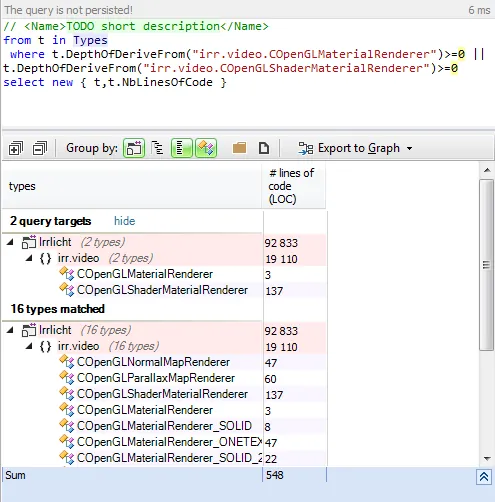
Both DirectX and OpnGL renders are implemented. the COpenGLSLMaterialRenderer, COpenGLShaderMaterialRenderer, CD3D9ShaderMaterialRenderer and CD3D9MaterialRenderer are the base classes for all the other rendering classes. OpenGL renders Let's search for all classes inheriting from COpenGLSLMaterialRenderer and COpenGLShaderMaterialRenderer directly or indirectly:
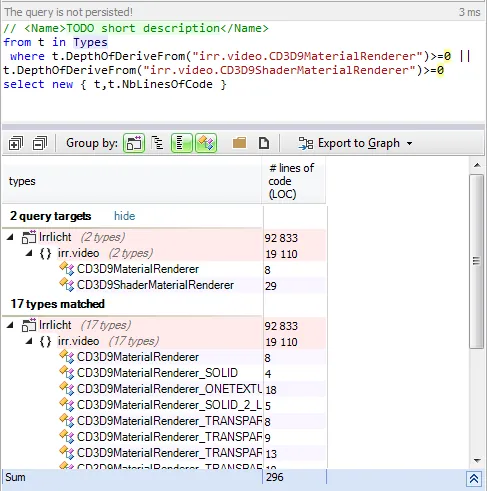
DirectX renders Let's search for all classes inheriting from CD3D9ShaderMaterialRenderer and CD3D9MaterialRenderer directly or indirectly:
How Irrlicht could help us for the mapping? Let's suppose that you need to migrate a code from OpenGL to Direct3D implementation. And in our code the function glTexEnvi is used and we want to know the equivalent in Direct3D. First Step: Search where in Irrlicht the function is used.
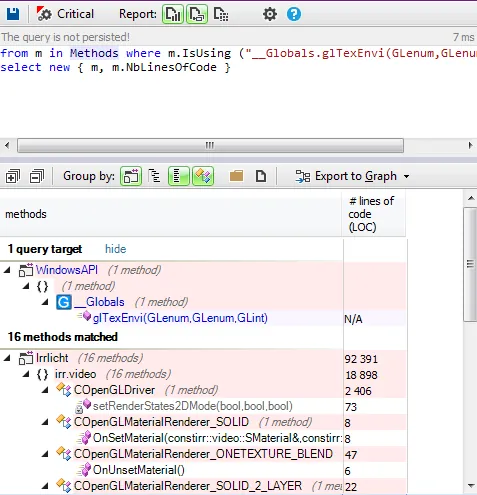
Choose one method using it. Let's take as example OnSetMaterial in COpenGLMaterialRenderer_SOLID. Here' its implementation
virtual void OnSetMaterial(const SMaterial& material, const SMaterial& lastMaterial, bool resetAllRenderstates, IMaterialRendererServices* services) _IRR_OVERRIDE_
{
	if (Driver->getFixedPipelineState() == COpenGLDriver::EOFPS_DISABLE)
		Driver->setFixedPipelineState(COpenGLDriver::EOFPS_DISABLE_TO_ENABLE);
	else
		Driver->setFixedPipelineState(COpenGLDriver::EOFPS_ENABLE);

	Driver->disableTextures(1);
	Driver->setBasicRenderStates(material, lastMaterial, resetAllRenderstates);

	if (resetAllRenderstates || (material.MaterialType != lastMaterial.MaterialType))
	{
		// thanks to Murphy, the following line removed some
		// bugs with several OpenGL implementations.
		glTexEnvi(GL_TEXTURE_ENV, GL_TEXTURE_ENV_MODE, GL_MODULATE);
	}
}
Second step: Find the equivalent in Direct3D Irrlicht implements both OpenGL and Direct3D, and for each rendering class from Direct3D, there's an equivalent for OpenGL. The equivalent of COpenGLMaterialRenderer_SOLID class is CD3D9MaterialRenderer_SOLID. Here's the implementation of OnSetMaterial from the Direct3D render:
virtual void OnSetMaterial(const SMaterial& material, const SMaterial& lastMaterial, bool resetAllRenderstates, IMaterialRendererServices* services) _IRR_OVERRIDE_
{
	services->setBasicRenderStates(material, lastMaterial, resetAllRenderstates);
	if (material.MaterialType != lastMaterial.MaterialType || resetAllRenderstates)
	{
		setTextureColorStage(pID3DDevice, 0, D3DTA_TEXTURE, D3DTOP_MODULATE, D3DTA_DIFFUSE);
	}

	pID3DDevice->SetTextureStageState(1, D3DTSS_COLOROP, D3DTOP_DISABLE);
}
Discover all the OpenGL and Direct3D functions used in Irrlicht
Fortunatly Irrlicht uses many functions from both APIs, and you will certainly find most of your Direct3D or OpenGL functions used in your code. Let's take as example irr::video::CD3D9Driver and search for the Direct3D functions used:
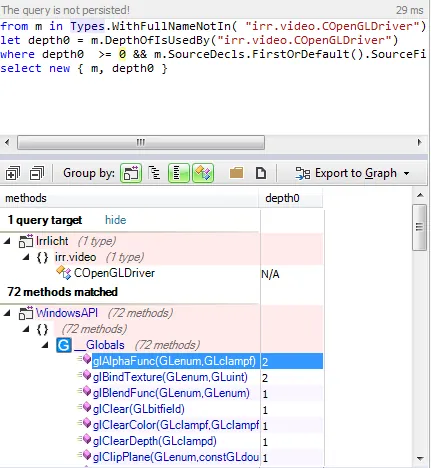
And we can do the same with the irr::video::COpenGLDriver class
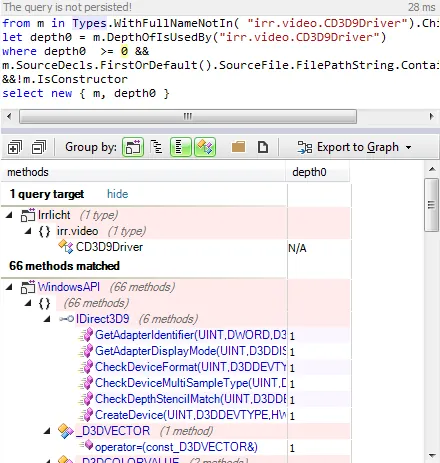
Conclusion
Irrlicht is a good candidate to discover how to map functions between the two APIs. This 3D engine is mature and very well implemented. You can easily search for an API function and find how it's implemented for the other one.
Recommended resources
Graphics Programming Resources

Real-Time Rendering, Fourth Edition
Amazon · Book
Real-Time Rendering combines fundamental principles with guidance on the latest techniques to provide a complete reference on three-dimensional interactive computer graphics. It will help you increase speed and improve image quality and learn the features and limitations of acceleration algorithms and graphics APIs. This latest fourth edition has been updated to include a chapter on virtual reality and augmented reality and covers new topics such as visual appearance, global illumination, and curves and curved surfaces. It is for anyone serious about computer graphics who wants to learn about algorithms that create synthetic images fast enough that the viewer can interact with a virtual environment.
GameDev.net may earn a commission if you purchase through these links. This helps fund the site at no extra cost to you.

Programming with wgpu in Rust
Amazon · Book
Unlock the full power of modern graphics programming with wgpu and Rust. This comprehensive guide takes you from foundational GPU concepts to advanced real-time rendering and compute techniques—equipping you to build fast, safe, and cross-platform graphics applications. Written for intermediate to advanced Rust developers, this book provides clear explanations, hands-on examples, and detailed insights into how GPUs process and render data. You’ll explore everything from the fundamentals of buffers, shaders, and pipelines to advanced topics like deferred rendering, shadow mapping, and GPU compute workloads.
GameDev.net may earn a commission if you purchase through these links. This helps fund the site at no extra cost to you.
Related Tutorials

Procedural Generation of 2D Tile Maps in Games
The article explains how to build a procedural 2D cave map generator using cellular automata. It covers map representat…

Localizing A Game Into French — Which Variant Should You Choose?
So, you’re making an awesome indie game, and now you’re thinking about localizing it into French? Great idea! There ar…
 Level Up Translation

How Long Does It Take To Localize An Indie Game?
So you’re planning on localizing your indie game, but you’re not sure how much time to schedule in. While the timing o…
Level Up Translation

Creating game videos: best practices and pitfalls to avoid
Game video production: practical tips on how to create a game trailer or teaser that you can be proud of. Give your aud…
 Alconost

Adopting CI/CD: How Midwinter Entertainment iterates at speed with the help of IMS
Game development was once like one long sprint: a huge effort until you reached the finish line — at which point you co…
 GameDev.net

5 Things to Consider When Making a Video to Promote Your App or Game
How can you show an app or game in your video in a way that attracts new users? Let’s take a look at what to go by when…
Alconost
Discussion
More from Issam Lahlali

Memory Usage Optimization Using Cache
Using a cache is a popular way to optimize your memory usage, reducing the chance of swapping memory pages from slow ha…
Spring RTS Engineering Internals
Uses an open source RTS engine to demonstrate how the CppDepend tool can be used to break down and understand a game's …
Discussion