

Making a Game Engine: Transformations
Any graphical game needs a way to place objects on the screen, move them, rotate them, and even grow or shrink them. Transformation matrices offer a very elegant solution to this problem.

Coordinate Systems
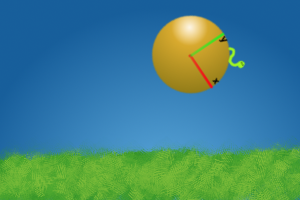
In order for a coordinate to have any meaning there needs to be a point of reference to base that coordinate off of. Imagine you have a dot on a piece of paper. The dot does not have a coordinate unless you come up with a way to measure its location. One way would be to determine the distance the point is from the left side of the page and its distance from the bottom. These two measurements give the coordinate meaning since it has a point of reference, the bottom left corner of the page. The point of reference is known as a basis and any point measured relative to the same basis are said to be in the same coordinate system. If a worm were on a ball you could devise a way to measure the location of the worm on the ball. This coordinate would be the worm's location in the ball's coordinate space.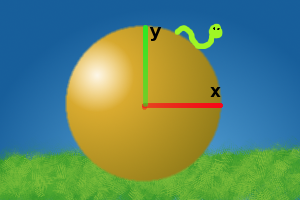
Basic Transformations
Translation A translation simply changes an object's location. The matrix used to represent this is pretty simple too.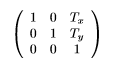 T[sub]x[/sub] and T[sub]y[/sub] is the number of units to move in the x and y directions respectively. Rotation Rotates points around the origin.
 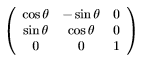 The above matrix will rotate counter clockwise by ? radians. Scaling Scaling an object changes its size. Scalar values in the range (0, 1) make objects smaller. A scale of 1 keeps it the same size, a scale greater than 1 makes it bigger. Really all the scale is doing is taking the current size and multiplying by the scale value.
 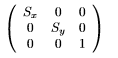 Scales along the x and y directions by S[sub]x[/sub] and S[sub]y[/sub] respectively. When S[sub]x[/sub] = S[sub]y[/sub] the size will change uniformly. If you only modify a single value then the object will stretch meaning you can make an object wider by setting S[sub]x[/sub] to a value greater than 1 and keeping y the same. You can even make a value negative which will flip the object.
 Using Matrices as Transforms
Transforming Points Now that we have a few different transformation matrices we need a way to transform points using them. To do this you simply treat the point as a 1x3 matrix padding the extra slots with a 1 and multiplying it with the transform matrix.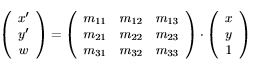 The result of that multiplication is a another 1x3 matrix. Just taking the top two elements of the resulting matrix gives a new x, y pair of the point in the new coordinate system. Transforming Directions Transforming a direction is slightly different than transforming a point. Take a look at the example below.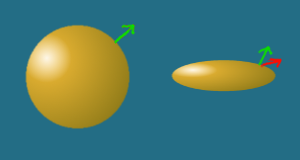
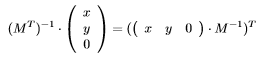 As shown above, to get the proper matrix for transforming direction you need the inverse transpose of the transform matrix. You can avoid transposing a 3x3 matrix if you simply do a row vector multiplication in front of the matrix. Also take note that the third element is a 0 instead of a 1. This makes transforming a direction uneffected by any translations. This is proper behavior for transforming a direction since directions still point the same way regaurdless of where they are moved to. Concatenating transforms The three basic tranformations listed above aren't that useful on their own. To make things interesting we want to be able to join them together allowing objects to be translated, rotated, and scaled simultaneously. To do this we simply multiply the matrices together.
  The resulting matrix, M, is a combination of scaling an object, rotating it, then translating it. Keep in mind that the order of T, R and S does matter. Since S is the right-most matrix its transformation will be applied first when transforming a point followed by R, followed by T. To see this grab some object nearby, such as a pencil, and hold it so it is pointing to the right. Now imagine that the pencil is first scaled by half in the x direction making the pencil shorter but not changing its thickness. Then the pencil is rotated 90 upward. The result is a short pencil with the same width pointing upward. Now switch the transformation order. First rotate it upward then scale. The resulting trasnform is a pencil of the same length but different width. So pay attention to the transform order.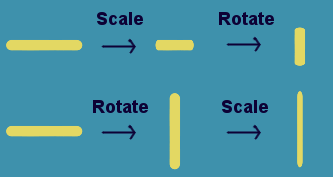
Matrix insectToWorldTransform = ballToWorldTransform * insectToBallTransform; Column Vector vs Row Vector
Before moving into the next section I should mention the difference between column vectors and row vectors. I have been using column vectors in this article. This means vectors are represented as a 3x1 matrix that is multiplied on the right of the transform. The alternative are row vectors. A row vector is a 1x3 matrix and is multiplied on the left of the matrix.  Mathematically, these two methods are the same. Either one works. Some prefer how compact column vectors are to write out on paper. Others find row vectors to be more intiuative. The important thing is to pick one and be consistent with it. However, the graphics package you are using may require matrices for row vectors or column vectors. If you are using the other method you will need to convert your matrices before passing them in. To do so, simply transpose the matrix. As an example, the translate matrix using column vectors is The same matrix for row vectors is
 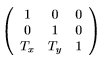 Also, keep in mind that when using row vectors the order to multiply matrices in is reversed.
  So using row vectors, the left most matrix is applied first to the point and the matrix on the far right is applied last. An easy way to remember the difference is the matrix closest to the vector is applied first. This means the order is left to right using row matrices and right to left using column matrices.
 Transform Class
Now that we have covered some basics of how transforms work let's build a transform class. Since we don't want to deal with matrices at a high level, we will allow the transform to be manipulated using a position, rotation, and scale. The transform class will also have children to allow for a heirarchy. When the parent transform moves all of the children move with it and the children's position, rotation, and scale will be defined relative to its parent. Finally the transform will extend the component class that is attached to a game object. Game objects and components are touched upon in this article. class Transform extends Component { // the parent transform of this transform // if it is null then the parent transform // is the world coordinate system private Transform parent; // all of the transforms that have this // transform set as their parent private Transform[] children; // the position relative to the parent transform private Vector2 localPosition = new Vector2(0.0f, 0.0f); // rotation relative to the parent private float localRotation = 0.0f; // scale relative to the parent private Vector2 localScale = new Vector2(1.0f, 1.0f); // specifies if the localToWorldTransform // needs to be recalulated private bool isDirty = false; // the transform that converts local coordinates // to world coordinates private Matrix localToWorldMatrix = Matrix.identity; // specifies if the worldToLocalMatrix // needs to be recalculated private bool isInverseDirty = false; // the transform that converts world cooridnates // to local coordinates private Matrix worldToLocalMatrix = Matrix.identity; /* * Whenever any change happens that changes the localToWorldMatrix * this should be called. That way the next time localToWorldMatrix * is requested it will be recalculated */ private void setDirty() { // only update dirty boolean if it isn't already dirty if (!isDirty) { isDirty = true; isInverseDirty = true; // set all children to be dirty since any modification // of a parent transform also effects its children's // localToWorldTransform foreach (Transform child in children) { child.setDirty(); } } } // change the parent transform. // setting it to null makes the // transform a child of world coordinates public void setParent(Transform value) { // remove this from the previous parent if (parent != null) { parent.children.remove(this); } // assign new parent parent = value; // add this to new parent if (parent) { parent.children.add(this); } // changes parents effects // the world position setDirty(); } public Transform getParent() { return parent; } // calculates the transform matrix that converts // from local coordinates to the coordinate space // of the parent transform public Matrix calculateLocalToParentMatrix() { // Matrix.translate creates a translation matrix // that shifts by (localPosition.x, localPosition.y) // Matrix.rotate rotates by localRotation radians // Matrix.scale scales by a factor of (localScale.x, localScale.y) // These are the basic transforms that are described previously // in this article return Matrix.translate(localPosition) * Matrix.rotate(localRotation) * Matrix.scale(localScale); } // gets the matrix that converts from local // coordinates to world coordinates public Matrix getLocalToWorldMatrix() { // if the dirty flag is set, the the // localToWorldMatrix is out of date // and needs to be reclaculated if (isDirty) { if (parent == null) { // if the parent is null then the parent is // the world so the localToWorldMatrix // is the same as local to parent matrix localToWorldMatrix = calculateLocalToParentMatrix(); } else { // if there is a parent, then the localToWorldMatrix // is calcualted recursively using the parent's localToWorldMatrix // concatenated with the local to parent matrix localToWorldMatrix = parent.getLocalToWorldMatrix() * calculateLocalToParentMatrix(); } // clear the dirty flag since the // matrix is now up to date isDirty = false; } return localToWorldMatrix; } public Matrix getWorldToLocalMatrix() { if (isInverseDirty) { // the inverse is out of date // so it needs to be updated // the worldToLocalMatrix is the inverse of // the localToWorldMatrix worldToLocalMatrix = getLocalToWorldMatrix().inverse(); // clear the dirty flag since the // matrix is now up to date isInverseDirty = false; } return worldToLocalMatrix; } // transforms a point from local coordinates to world coordinates public Vector2 transformPoint(Vector2 point) { // matrix multiply padding the extra element with a 1 Matrix1x3 transformResult = getLocalToWorldMatrix() * Matrix1x3(point.x, point.y, 1); return new Vector2(transformResult[1,1], transformResult[1,2], transformResult[1,3]); } // transforms a direction from local coordinates to world coordinates public Vector2 transformDirection(Vector2 point) { // matrix multiply padding the extra element with a 0 // notice that the worldToLocalMatrix is used here // and the point is multiplied as a row matrix before the // transform matrix. This is the proper way to transform // directions as described before in this article Matrix3x1 transformResult = Matrix3x1(point.x, point.y, 0) * getWorldToLocalMatrix(); return new Vector2(transformResult[1,1], transformResult[2,1], transformResult[3,1]); } // transforms a point from world coordinates to local coordinates public Vector2 inverseTransformPoint(Vector2 point) { // same logic as transformPoint only with the inverse matrix Matrix1x3 transformResult = getWorldToLocalMatrix() * Matrix1x3(point.x, point.y, 1); return new Vector2(transformResult[1,1], transformResult[1,2], transformResult[1,3]); } // transforms a direction from world coordinates to local coordinates public Vector2 inverseTransformDirection(Vector2 point) { // same logic as transformDirection only with the inverse of the // inverse localToWorldMatrix which is just the localToWorldMatrix Matrix3x1 transformResult = Matrix3x1(point.x, point.y, 0) * getLocalToWorldMatrix(); return new Vector2(transformResult[1,1], transformResult[2,1], transformResult[3,1]); } public Vector2 getLocalPosition() { return localPosition; } // sets the position relative to the parent // and marks the transform as dirty public void setLocalPosition(Vector2 value) { localPosition = value; // set the dirty flag since the localToWorldMatrix needs to be updated setDirty(); } /* localRoation and localScale should also have getters and setters * like the local position does. Be sure to call setDirty in the * setters for each of them */ } There is a lot of code there so let me explain the key points. First of all, I am using a dirty flag to indicate when the transform matrices are out of date. That allows the position, rotation, and scale to be changed multiple times and the matrix is only actually recalculated once it is requested, reducing the amount of uneeded recalculations. Also take note that the dirty flag is only set if the transform is not already dirty. This is to keep the setDirty call from propagating to all of the children every time the transform is modified and only setting the dirty flag when necessary. The inverse matrix is also stored in the transform to keep from having to calculate it everytime it is needed. It has its own dirty flag so it isn't calculated if it isn't needed. Using the Transform Class
Now that we have a transform class, let's see how it can be used. First of all, the localToWorldMatrix can be used in draw calls. Most drawing libraries will allow you to specify a matrix to position objects on the screen. class Renderer extends Component { void render(graphics) { graphics.setTransformMatrix(this.gameObject.transform.getLocalToWorldMatrix()); graphics.drawSprite(this.frame); } // whatever else the renderer does // would go here ... } Keep in mind the above code doesn't account for the view transform. Think of the view transform as the camera for the scene. If you wanted to be able to scroll the view of the scene you should specify a camera object and multiply all transforms by the worldToLocalMatrix from the transform of the camera. graphics.setTransformMatrix( camera.transform.getWorldToLocalMatrix() * gameObject.transform.getLocalToWorldMatrix()); The transform could be used in game logic code class Mine extends Behavoir { void update(float deltaTime, InputState input) { // transforming the zero vector gets that // transform's origin in world coordinates Vector2 playerWorldPosition = player.transform.transformPoint(new Vector2(0.0, 0.0)); // take the players world position and convert it the mine's // local coordinates Vector2 playerLocalPosition = this.transform.inverseTransformPoint(playerWorldPosition); // since playerLocalPosition is the players position relative to the mine // the magnitude of the position is the distance from the mine to the player if (playerLocalPosition.magnitudeSquared() < sensorRange * sensorRange) { this.detonate(); } } } Conclusion
Transforms may take a while to fully grasp but once understood help simplify problems that would otherwise be a huge challenge to tackle. Hopefully this article helped you understand how to use them in your games better.Article Update Log
5 Feb 2014: Initial releaseRelated Tutorials

A Day As A Game Designer
The fabled game designer. The man, the myth, the legend behind the game. An inspiration to young creatives who wish to …
 Kai Wüest

So You Want to be a Game Developer?
Battletech tools developer Chris Eck describes his journey and advice for getting a job in the industry.
 Chris Eck
A Quick Guide to Gamification and Gamification Careers
If you find yourself slightly stumped over the ever-growing buzz around gamification, and unsure whether there is any o…
Sophie Jackson

Raph Koster's Postmortems: Una Carrera
This excerpt from Raph Koster's Postmortems is an adaptation from a speech he delivered at GameDay Peru in early 2015. …
Raph Koster

Negotiating Sign-On Bonuses in the Games Industry
A quick blurb on signing bonuses in the games industry and how to approach asking for one.

A LinkedIn Profile for Job Hunting and Networking
Marc Mencher is founder and CEO of GameRecruiter and author of Get in the Game!, an instructional book on building a ca…
Discussion
More from James Lambert
Identifying Player Drawn Symbols
Identifying drawings can be difficult. This articles covers a basic algorithm that can classify symbols drawn by a play…
HappyCoder
Favor Small Components in Unity
Having small modular classes that have well defined responsibilities makes code easier to manage and gives your more ro…
James Lambert

Making a Game Engine: Core Design Principles
Games engines are large complicated pieces of software. However, if good design principles are followed the game can be…
James Lambert
Discussion