
Revisiting Terrain Collisions
.thumb.png.a9a17286792efc179caccc72c3e67c21.png)
It's been a while since my last blog entry as I haven't had much time to work on my game due to work, chores, Christmas and... err... Red Dead Redemption 2 ?. I have only managed to do little bits here and there over the past couple of months but decided to spend some time revisiting my codebase and refactoring much of it. I had a Terrain object which handled the rendering of the terrain, the ocean AND the terrain collision geometry. It was starting to feel crowded in there and I was just being lazy lumping it all into one class! So I've split out the collision geometry into a separate 'class' - TerrainCollisionBody. This also helps with what I wanted to do next...
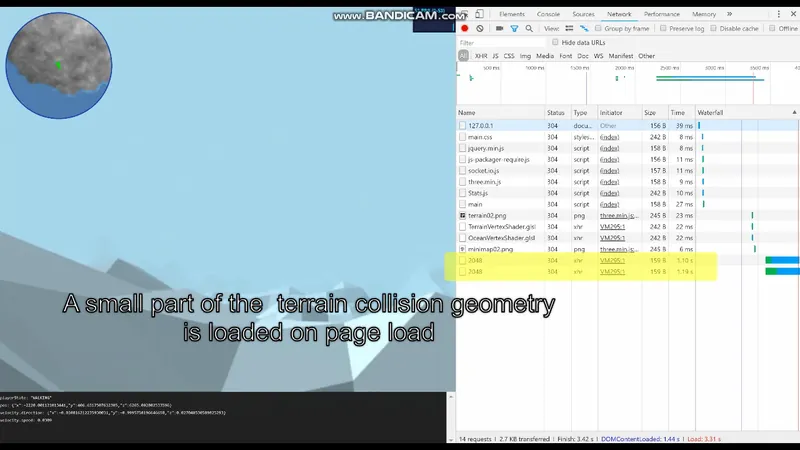
Up until now I have just been loading the collision geometry for the entire map into memory on initialisation (at this point in time it's 1,048,576 vertices but that may indeed grow considerably in the near future) which was eating up a lot of memory... at one point prior to a few optimisations it seemed to be using over 1GB of memory!! My intention was always to stream the collision geometry in from the Node.js server via a simple API; nothing amazingly clever but just loading chunks/quadrants in when the player moves towards the edge of the current quadrant and unloading any quadrants that we no longer need.
So I finally completed this feature yesterday! Yippee! The memory usage has now hugely dropped down to a far more reasonable level of just over 100MB (dependent on how many quadrants are loaded) and of course it now loads far, far faster!
The Approach
On the server side I have a simple end point that returns the collision geometry as a simple JSON object. This consists of two arrays, one for vertices and one for faces. Each element in the faces array contains three indices which point to elements in the vertices array and a Vector3 which describes the pre-calculated face normal. The end-point takes parameters for the X and Z co-ordinates of a point on the map and a 'view size' - this determines the size of a square around the player for which it should load a subset of the collision geometry.
On the client side I use the player position to determine which quadrants I need to load. This could be more than 1 quadrant since if the player is near a quadrant boundary I want to pre-load any applicable surrounding quadrants to create a seamless transition as the player steps into new quadrants.
For example, in the diagram below, if the player is in the centre of a quadrant (the red X) then I'd only need to load the quadrant the player is in (unless it's already been loaded and then I do nothing of course)...
If the player moves within a certain distance of the quadrant boundary then we could potentially need to pre-load up to 3 quadrants. e.g.
The yellow areas represent the quadrants to load. I'm sure you get the idea by now so I won't go on.
Once I've determined the quadrants I need to load all I have to do is determine the centres of each quadrant and request the collision geometry via the Node.js end-point. e.g.
/api/terrain/collisiongeometry/get/-3072/7168/2048... where -3072 and 7168 are the X and Z co-ords of the centre of a quadrant (map centre is 0,0).
The results are stored in an array of quadrants, each quadrant being an object containing all the vertices and faces for that quadrant. Any quadrants that are no longer required are deleted from the array to free up memory.
I hope this makes sense to someone other than me. ?
Anyway, the result is pretty smooth so far!
The only other thing to mention is that I only do the quadrant check once every 10 seconds since doing it every frame seemed unneccesary and the more milliseconds per frame I can free up for more frequent stuff the better.
I think for my next task I'll start adding in a few static objects to the terrain (buildings etc) to make it more interesting. Then I think I may get what I have so far on a public facing server so other people can have a play around with it (hopefully).
Recommended resources
3D Art

3D Environment Design with Blender 5
Amazon · Book
Based on Blender 5, this updated second edition simplifies the complexities by guiding you through clear, practical workflows to overcome those challenges. You’ll start by addressing common modeling and proportion mistakes, then move on to realistic texturing and unwrapping to create stunning scenes based on actual references.
GameDev.net may earn a commission if you purchase through these links. This helps fund the site at no extra cost to you.

Low Poly 3D Modeling in Blender
Amazon · Book
Step into the world of low poly 3D art with Low Poly 3D Modeling in Blender—your entry point into Blender and mastering the fundamentals of 3D art. This beginner-friendly guide ensures that you’re fully prepared for the creative adventure that follows. Through a step-by-step learning process starting with the principles of low poly art, this book gradually immerses you in the intricacies of modeling. As you progress, you’ll gain hands-on experience creating diverse projects ranging from designing a simple 3D crate to rendering complete low poly scenes. The book covers a wide spectrum of topics as you navigate Blender's interface, mastering essential modeling tools and exploring both basic and advanced modeling techniques. Advancing to the final chapters, you’ll find ways to breathe life into your models with material creation and gain practical insights into modeling a variety of low poly objects. From end-to-end scene construction to configuring Blender for rendering high-quality images, you’ll be equipped with the foundational skills to propel your career in 3D modeling and explore the boundless creative possibilities that Blender offers. By the end of this book, you'll have a solid understanding of Blender, 3D modeling, low poly methodologies, material design, 3D rendering techniques, and the broader world of 3D art.
GameDev.net may earn a commission if you purchase through these links. This helps fund the site at no extra cost to you.
Discussion