
Original Post

I am rendering position and normal from geometry to 2D textures. I do this by assigning uv-values to all vertex by an algorithm (pre-process), then the uv-coordinates transform the geometry from 3D to 2D: Output.Position.xy = vTexCoord1.xy; Output.Position.zw = float2(1.0f,1.0f);) Since I want to render all geometry I turn off clipping and culling. But there I got a problem. The polygons that lay on the seam and should be on the backside and not be seen is shining thru on part of the map. Here is a pic of the normal map of a cylinder (slightly deformed): 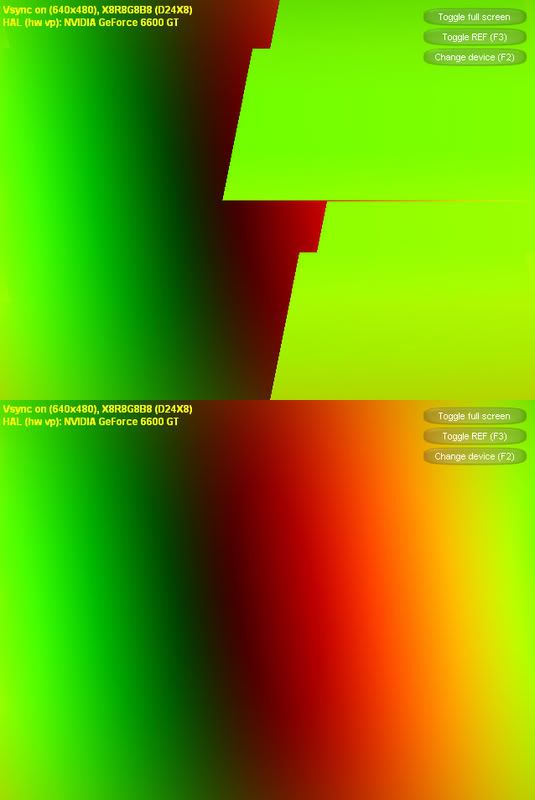 The pic at the top is errorous as you can see. The only way to come around this that I have came to think of is to have an alternative index buffer that is used when render to the textures. The alternative buffer lose the naughty polygons. I'm looking for a more convenient way to solve this problem. By the way does anyone know what this technique is caled, it is a bit similar to light mapping?
The pic at the top is errorous as you can see. The only way to come around this that I have came to think of is to have an alternative index buffer that is used when render to the textures. The alternative buffer lose the naughty polygons. I'm looking for a more convenient way to solve this problem. By the way does anyone know what this technique is caled, it is a bit similar to light mapping?