
GameDev.net gamedev.net
🔒 Locked

[C++] Class design help

Started by tasen Feb 25, 2007 at 7:10 AM 5 replies 1.6k views
Original Post
tasen
tasen
Hi all, I've been designing a framework to encapsulate graphics related tasks such as providing a window to render to and handling image loading (I'm aware there are libraries available that already do this, but this is more of a learning exercise to see how things work than anything else). Anywho, I've come across a design issue with the window part that I can't seem to work out. At the moment, I have everything inside a Graphics namespace. Further, I have a Framebuffer class that represents the display device's physical framebuffer (e.g. color bits, depth bits etc. etc.) I then have a Device class to represent the display device itself (i.e. the graphics card). The Device class contains a Framebuffer and various methods to obtain display device information (e.g. name, display monitor, refresh rate). Now I have the Window class, which at the moment, contains a Device instance as well as other standard window attributes and handles. The way I designed all this was so that I could do something similar to the following...
Graphics::Window window;

// Display is a public Device instance inside the Window class
// Configuration is a public Framebuffer instance inside the Device class
window.Display.Configuration.ColorBits(8, 8, 8, 8);

// At the momment I can't do this, see below...
std::string deviceName = window.Display.Name();

window.Size(640, 480);

// etc. etc.

window.Initialize();

// ...
As you can see I tried to make it as flexible as possible. The problem I'm having through is that the Device instance needs access to the Window class's window handle for retrieving display device information and I don't know how to expose it. If the handle is inside of the Window class the Device class can't access it directly. I considered putting the window handle inside the Device class but it didn't really make sense. This is really where I need help and my design falls to pieces :P (how can I "share" the window handle between the Device and Window, or would there be a better way to handle this?) Anyway, here are some other questions I have: 1. Is it bad design to expose public instances of the classes like this (I did this so I wouldn't be doing say window.Display().Name() [where Display() returns the instance] as it seemed easier and more logical in this case). 2. Although I'm just starting (and it might be hard to say), how do you think the overall design is looking? And would you recommend any changes? Sorry for the long winded post, and I hope it all made sense, but hopefully you read it and could offer some suggestions or design improvements which I would greatly appreciate. :)
JohnBolton
JohnBolton
1. It isn't necessarily bad design to expose member variables (though there is some disagreement).

2. A Window should not contain a Device. A device can display 0, 1, or more windows, so that won't work. It would be better if a Device were separate and a Window referenced a Device instead. I think that is the root of your problem.
John BoltonLocomotive Games (THQ)Current Project: Destroy All Humans (Wii). IN STORES NOW!
Sturm
Sturm
I can't help but feeling that you might want to move a little further. Why not abstract the handle. Not having read any code I think that you are bound to a window/form, you might want to hide this, and also expand this to be a control instead.

This means that working with your framework the developer shouldn't have to worry about handles. Just create the control he wants, either a window or a control, and pass it to the framework, should be enough.

Another thing should be to move anything platform specific into a specific namespace and create your own abstractions to encapsulate these.

It's a lot of extra work but I always find it well worth the work.
---------------------------------------------------Life after death? No thanks, I want to live NOW --- Sturm 2001
tasen
tasen
Quote:
Original post by JohnBolton
2. A Window should not contain a Device. A device can display 0, 1, or more windows, so that won't work. It would be better if a Device were separate and a Window referenced a Device instead. I think that is the root of your problem.


Actually, that does make perfect sense. Thanks for the suggestion. However, this brings me to another question:

Do you think I should handle the Device and make it global in the framework or leave it up to the user to store the Device somewhere. The former means that users don't have to worry about the Device as it's always "there", however it means I have to maintain a global object of sorts. The latter avoids the global, but means users have to keep track of the Device themselves (I think that this would be better though, thoughts?)

Another issue I didn't think of is dual display devices (i.e. SLI) and dual (or more) monitors. I'm not sure how I'm going to accommodate them yet :P

Quote:
Original post by Sturm
I can't help but feeling that you might want to move a little further. Why not abstract the handle. Not having read any code I think that you are bound to a window/form, you might want to hide this, and also expand this to be a control instead.

This means that working with your framework the developer shouldn't have to worry about handles. Just create the control he wants, either a window or a control, and pass it to the framework, should be enough.


Would you be able to elaborate a little bit? I'm not quite sure I'm understanding you here. Do you mean to hide the window handles so that users don't have to worry about them?

Quote:
Another thing should be to move anything platform specific into a specific namespace and create your own abstractions to encapsulate these.

It's a lot of extra work but I always find it well worth the work.


I do plan on doing this when I get some time. Thanks. :)
Sturm
Sturm
Quote:
Original post by tasen
Another issue I didn't think of is dual display devices (i.e. SLI) and dual (or more) monitors. I'm not sure how I'm going to accommodate them yet :P


I think that you shouldn't worry about this at this point, if you've factored the device specific code into a seperate assembly you can expand this to includee multiple monitors at a later time. There are many factors to consider when doing more than one monitor and not all games are suitet for this.

Quote:
Original post by tasen
Would you be able to elaborate a little bit? I'm not quite sure I'm understanding you here. Do you mean to hide the window handles so that users don't have to worry about them?


Yes that's exactly what I mean, also this will be different depending on the framework you are using opengl/dx/sdl so hidding this is helping application (game) developers.

I follow a simple rule which simply states that make it easy to develop a application (game) using the framework. Things like handles devices ect are a bit confusing for someone who never worked with graphics before. Also expose as few assemblies as possible as this will streamline the application development.
---------------------------------------------------Life after death? No thanks, I want to live NOW --- Sturm 2001
songho
songho
tasen,
Have you looked at MVC design (Model-View-Controller)? It is a common design framework for GUI applications. And, many OSes and GUI libraries are using this MVC paradigm, such as MFC(.NET), Qt, Java, etc.

The basic idea of MVC paradigm is to separate an application into 3 components; Model, View and Controller components, and, to minimize dependencies between them.
Model-view-controller - Wikipedia
Model-View-Controller - ootips

Here is a short description for each component;
Controller component is for receiving and handling all user events, such as keyboard and mouse inputs.
View component is for rendering the visual onto screen. Therefore, all display device properties (Device Context, colour bits, etc) go into this component.
Model component is the brain part of application, which has all states and implementations to tell how to behave the application, but, does not know about window system.

I built own MVC framework for OpenGL GUI application inspired upon the following great tutorial: Windows API Tutorial.
Please pay attention to the second tutorial, "Generic". The author explained very well how to implement MVC design without using MFC.

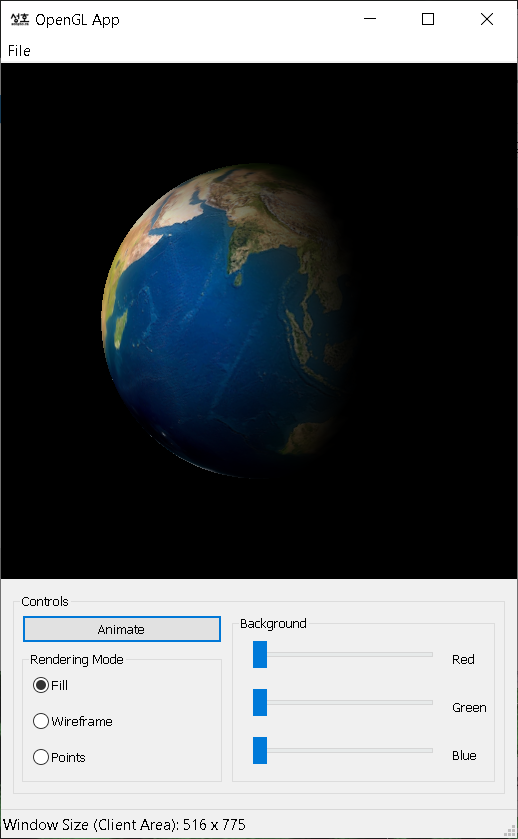
By using MVC framework, I can put all system-independent OpenGL codes into Model component, and system-dependent(Windows) rendering context parts go to View component. Here is a screen shot of an example. There are 3 windows (3 Controllers and 3 Views); a main container window with menu and statusbar, OpenGL rendering sub-window, and a dialog sub-window containing buttons and other controls. But there is only one Model component. Therefore, the Model component itself is purely platform-independent and reusable to any other operating systems.
MVC Framework for OpenGL

[Edited by - songho on February 25, 2007 9:24:17 PM]
tasen
tasen
thanks songho, that's some awesome information for me to sort through.

Topic Locked

This topic has been locked by a moderator. New replies are not allowed.

Sign in to reply to this topic.