GameDev.net gamedev.net
🔒 Locked

C++ Console APP special Characters

Started by RogerThat123 Feb 9, 2010 at 1:29 PM 16 replies 4.2k views
Original Post
RogerThat123
RogerThat123
I want to be able to use special characters in my console application because Im making a tic tac toe game, I need to see these chars - " ╔═══╦═══╦═══╗ ". I tried changing my IDE font to terminal like the console output font but it still didnt work. All that shows are question marks "????????????" Any ideas?

SiCrane
SiCrane
Which are you having a problem with, having the characters show up in your program or having the characters show up in your IDE?
RogerThat123
RogerThat123
They show in the IDE, not in my console application. The actual program..
joshuanrobinson2002
joshuanrobinson2002
If you're using windows, I think you can do something like:

#include <iostream>int main(){   std::cout << char(x); //Where x is the ASCII code of the character you want} //end f()


Google ASCII Chart or ASCII table and you should be able to come up with a list of the ASCII character codes and the character they produce.
fastcall22
fastcall22
The IDE is displaying the Unicode characters, while your console is (most likely) displaying the IBM extended ascii charset. I.e. in Unicode, ╔ is L'\x2554' whereas in a console, ╔ is '\x69'
SiCrane
SiCrane
What method are you using to display your characters?
Dragonsoulj
Dragonsoulj
To be able to display those special characters you have to type cast ints. You could make consts for each character you want displayed and then with a cout
cout << char(someInt);

I know a few IDEs that don't display the characters but the console does. And only Windows I believe, since those characters you showed are windows special characters.

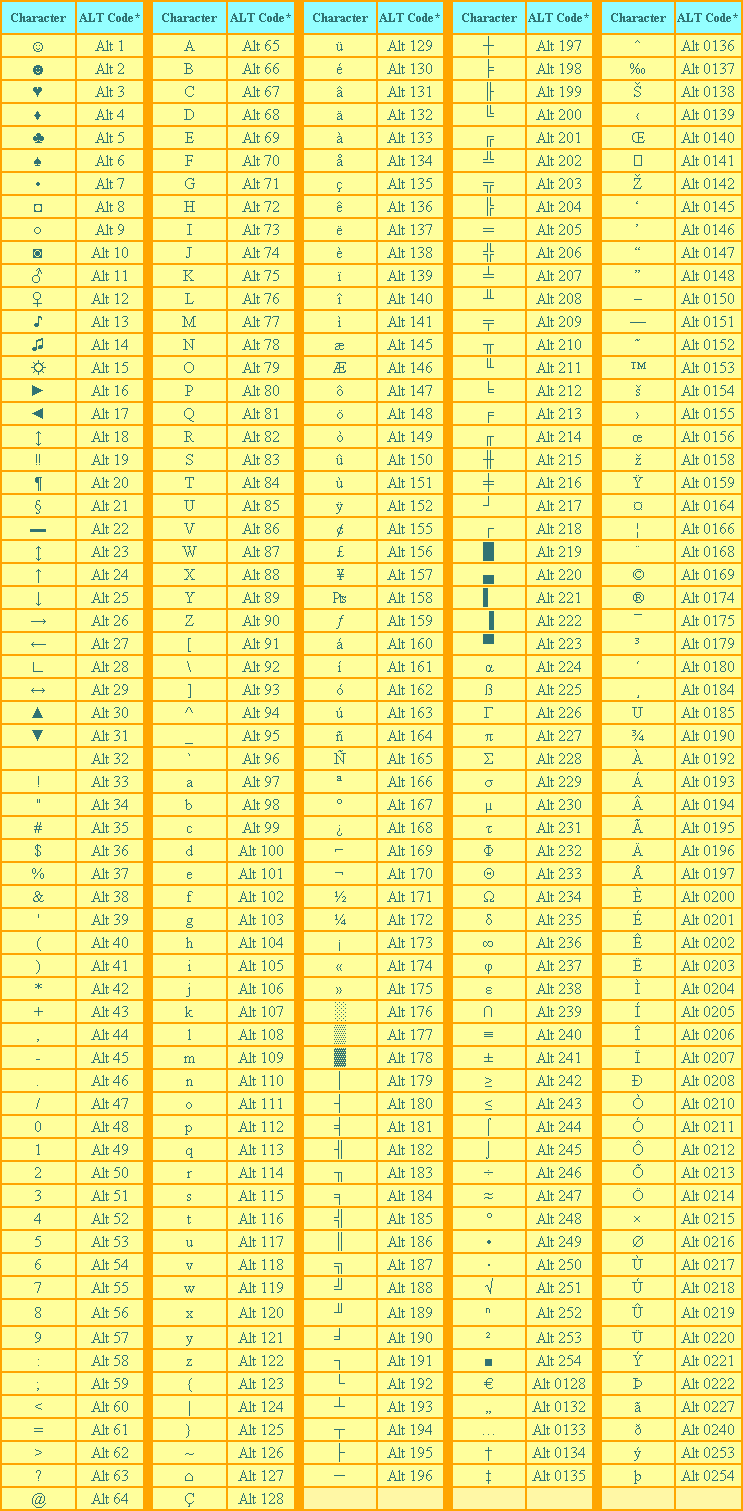
This will help. It is a list of all the numbers and their corresponding character.

This is a program I made that actually uses those characters. Doing the char(int) approach was the only way I could find to get those displayed, even copying and pasting wasn't working.
RogerThat123
RogerThat123
I have to print tons of theses characters, if possible Id like to put them into one block " " and somehow print them..
SiCrane
SiCrane
Depending on your operating system, you may be able to use system calls to display arbitrary unicode characters. For example, on Windows you should be able to do something like:
  WriteConsole(GetStdHandle(STD_OUTPUT_HANDLE), L" ╔═══╦═══╦═══╗ ", 16, 0, 0);

to dump a wide character string to the console.
Dragonsoulj
Dragonsoulj
You could use a stringstream assuming this is C++.

#include <sstream>stringstream ss;ss << char(201) << char(205) << char(205) << char(205) << char(203) << char(205) << char(205) << char(205) << char(203) << char(205) << char(205) << char(205) << char(187);string topRow = ss.str();


Then just print out the string you want. It won't work well for part of your board because you have to fill in certain characters, but you could print the top, put in the middle containing the X's and O's, then the bottom of the first row, and so on. And I haven't looked too much into it, but with stringstream you have to find someway to either clear the stream or just make a new one with stringstream someName;. Making a new one isn't a good code practice but if you make a function that makes the row and stores it somewhere, when that function ends it will get rid of the stringstream and you can use the ss name again.
RogerThat123
RogerThat123
Quote:
Original post by SiCrane
Depending on your operating system, you may be able to use system calls to display arbitrary unicode characters. For example, on Windows you should be able to do something like:
  WriteConsole(GetStdHandle(STD_OUTPUT_HANDLE), L" ╔═══╦═══╦═══╗ ", 16, 0, 0);

to dump a wide character string to the console.


outputs

T%P%P%P%f%P%P%

Windows 7.
RogerThat123
RogerThat123
Quote:
Original post by Dragonsoulj
You could use a stringstream assuming this is C++.

*** Source Snippet Removed ***

Then just print out the string you want. It won't work well for part of your board because you have to fill in certain characters, but you could print the top, put in the middle containing the X's and O's, then the bottom of the first row, and so on. And I haven't looked too much into it, but with stringstream you have to find someway to either clear the stream or just make a new one with stringstream someName;. Making a new one isn't a good code practice but if you make a function that makes the row and stores it somewhere, when that function ends it will get rid of the stringstream and you can use the ss name again.


This worked, thanks.

Where did you find a list of the numbers for the characters.
Dragonsoulj
Dragonsoulj
Look at my previous post. The first This link gives you an image with all the characters and the codes for them. I used that.
Buckeye
Buckeye
FYI
Quote:
with stringstream you have to find someway to either clear the stream

ostr.str(string());
Please don't PM me with questions. Post them in the forums for everyone's benefit, and I can embarrass myself publicly. You don't forget how to play when you grow old; you grow old when you forget how to play.
Dragonsoulj
Dragonsoulj
Didn't know you could do hex escapes. Thanks for that.
benryves
benryves
If not using Unicode output functions, make sure to set the console code page before outputting anything, else your program will produce different output on different machines (or even the same machine if someone changes the code page with the chcp command-line function before running your app).
[Website] [+++ Divide By Cucumber Error. Please Reinstall Universe And Reboot +++]

Topic Locked

This topic has been locked by a moderator. New replies are not allowed.

Sign in to reply to this topic.