GameDev.net gamedev.net
🔒 Locked

Water Reflection and Opacity

Started by HenriqueRocha Jan 26, 2012 at 4:25 AM 3 replies 4.6k views
Original Post
HenriqueRocha
HenriqueRocha
Hello again!

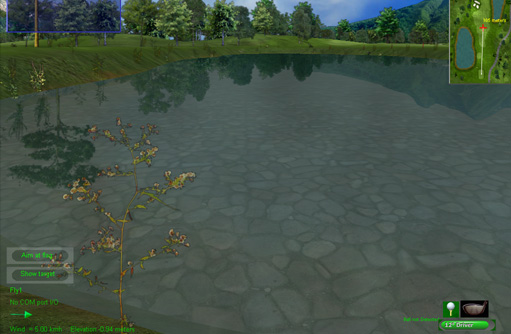
I'm having trouble with water opacity and reflection at the same time...

I can do them apart but not at the same time.


GLvoid DrawGLScene(GLvoid){
float look[3] = {0.0,0.0,0.0};

double eqr[] = {0.0f,0.0f, -1.0f, 0.0f}; // Plane Equation To Use For The Reflected Objects
glClearColor(0.0f,0.0f,0.0f,1.0f);

glClear(GL_COLOR_BUFFER_BIT | GL_DEPTH_BUFFER_BIT | GL_STENCIL_BUFFER_BIT);
glLoadIdentity();
add_vector(default_player->dir,look);
add_vector(default_player->cam,look);
gluLookAt(default_player->cam[0], default_player->cam[1], default_player->cam[2], look[0], look[1], look[2], 0, 0, 1);

glEnable(GL_STENCIL_TEST);
glColorMask(0,0,0,0);
glDisable(GL_DEPTH_TEST);
glStencilFunc(GL_ALWAYS, 1, 1);
glStencilOp(GL_KEEP, GL_KEEP, GL_REPLACE);

RenderWater();

glColorMask(1,1,1,1);
glEnable(GL_DEPTH_TEST);
glStencilFunc(GL_EQUAL, 1, 1);
glStencilOp(GL_KEEP, GL_KEEP, GL_KEEP);
/* DRAW */

glEnable(GL_CLIP_PLANE0);
glClipPlane(GL_CLIP_PLANE0, eqr);
glPushMatrix();
glScalef(1.0f, 1.0f, -1.0f);
glLightfv(GL_LIGHT1, GL_POSITION,default_player->light_pos);
gl_all_textures(hash_tex, default_player,map,1); /* terrain */
glPopMatrix();
glDisable(GL_CLIP_PLANE0);
glDisable(GL_STENCIL_TEST);
glLightfv(GL_LIGHT1, GL_POSITION,default_player->light_pos);

RenderSky();
RenderText();

RenderWater(); /* reflection working but no opactity */
gl_all_textures(hash_tex, default_player,map,0); /* terrain */
// RenderWater(); /* opacity working but no reflection */

glutSwapBuffers();
}


capturadeecr26012012041.png

my goal is something like this:
pondbed.jpg
MiguelMartin
MiguelMartin
Well, I'm not sure if this will work or not, but assuming that you're using alpha values for the Water (or maybe you need alpha values for the reflection?), you should be enabling blending. Usually you use it like so, you can however use it many different ways though:


glEnable(GL_BLEND); // Enables blending for OpenGL


glBlendFunc(GL_SRC_ALPHA, GL_ONE_MINUS_SRC_ALPHA); // Set the Blending function


There's a lot more OpenGL blending functions, but this might do the job, ask Google if you don't like it. smile.png

FAQ on Transperancy:
http://www.opengl.or...ransparency.htm

Sorry if you already know this, it just doesn't seem like your enabling blending o:
HenriqueRocha
HenriqueRocha

void RenderWater(){
static float wx=0, wy=0;

glBindTexture(GL_TEXTURE_2D, 5);
glColor4f(0.3, 0.3, 0.3, 0.6);
glEnable(GL_BLEND);
glDisable(GL_LIGHTING);
if(default_player->lines==0){
glBegin(GL_QUADS);
glTexCoord2f(-map->size+wx, -map->size+wy); glVertex3f (-map->size*0.5,-map->size*0.5,0.0);
glTexCoord2f(+map->size+wx, -map->size+wy); glVertex3f (map->size*0.5,-map->size*0.5,0.0);
glTexCoord2f(+map->size+wx, +map->size+wy); glVertex3f (map->size*0.5,map->size*0.5,0.0);
glTexCoord2f(-map->size+wx, +map->size+wy); glVertex3f (-map->size*0.5,map->size*0.5,0.0);
map->water_level+=0.002;
if(map->water_level>2*PI)
map->water_level-=2*PI;
glEnd();
wx+=0.002;
wy+=0.002;
if(wx>8) wx-=8;
if(wy>8) wy-=8;
}
glDisable(GL_BLEND);
glDisable(GL_LIGHTING);
}


I enabled blend in RenderWater().
Hodgman
Hodgman
The technique that you're using (where you use the stencil buffer to render the regular scene and the "mirrored" scene into the same render-target) is pretty old school.
To achieve robust transparency, I would recommend rendering the "mirrored" scene into a separate render-target, and then compositing the result on top of the regular scene.

Topic Locked

This topic has been locked by a moderator. New replies are not allowed.

Sign in to reply to this topic.