GameDev.net gamedev.net
🔒 Locked 🎮 Unity

BoundingBox Collision Is Always True

Started by mitko29 Feb 8, 2012 at 6:11 PM 12 replies 4.2k views
Original Post
mitko29
mitko29
Hi all , I am trying to make boundingbox collision for my 3D models instead using Sphere because is more accurate, but collision is always true here,how am I drawing the box:


BoundingBox sbox;
private Vector3 min = new Vector3(float.MaxValue,float.MaxValue,float.MaxValue);
private Vector3 max = new Vector3(float.MinValue,float.MinValue,float.MinValue);
foreach (ModelMesh meshh in texture.Meshes)
{
foreach (ModelMeshPart meshPart in meshh.MeshParts)
{
int vertexStride = meshPart.VertexBuffer.VertexDeclaration.VertexStride;
int vertexBufferSize = meshPart.NumVertices * vertexStride;
float[] vertexData = new float[vertexBufferSize / sizeof(float)];
meshPart.VertexBuffer.GetData<float>(vertexData);

for (int i = 0; i < vertexBufferSize / sizeof(float); i += vertexStride / sizeof(float))
{
Vector3 transformedPosition = Vector3.Transform(new Vector3(vertexData, vertexData[i + 1], vertexData[i + 2]), enemymat);
min = Vector3.Min(min, transformedPosition);
max = Vector3.Max(max, transformedPosition);
}
}
sbox = new BoundingBox(min,max);


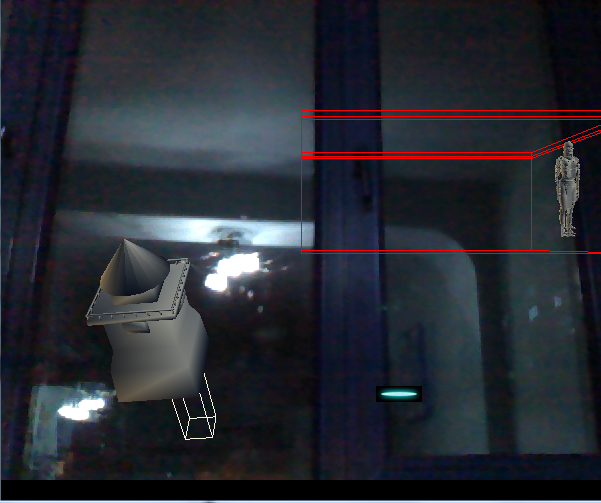
Result:

fd319f203b887046.png
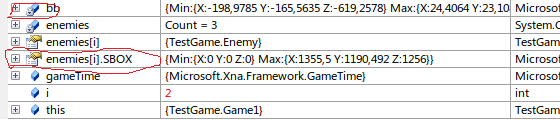
and when I debug the bounding box , here what I see:
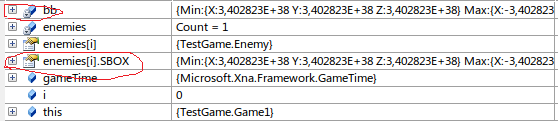
c4cc565babf3d727.png
clb
clb
Have you stepped through the code in the debugger? Have you printed out the values of the boxes you generate? Note that the value 3,402823E+38 equals http://msdn.microsoft.com/en-us/library/system.single.maxvalue.aspx , and your bounding box comes out degenerate to large negative values, as you initialize in the code before running the inner loop. That suggests that for some model, the inner loop of your AABB extrude algorithm is not run even once, leaving the box degenerate.
mitko29
mitko29

Have you stepped through the code in the debugger? Have you printed out the values of the boxes you generate? Note that the value 3,402823E+38 equals http://msdn.microsof...e.maxvalue.aspx , and your bounding box comes out degenerate to large negative values, as you initialize in the code before running the inner loop. That suggests that for some model, the inner loop of your AABB extrude algorithm is not run even once, leaving the box degenerate.

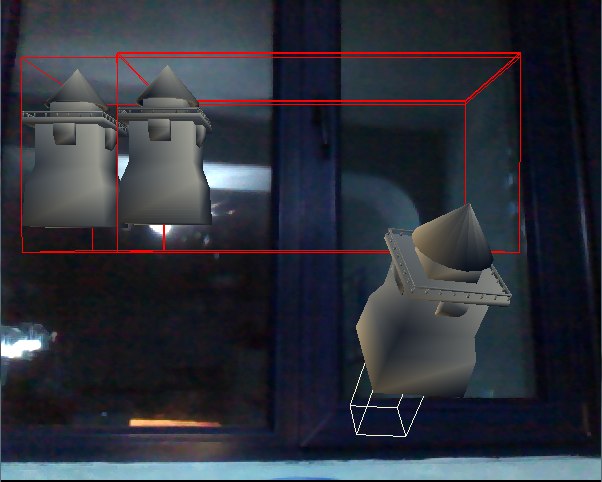
oh, sorry for my stupidity,now I put the code inside the Update method and debuget again now the result are great:

c1b3f0fab2ac4d3a.png

but the problem is that when enemy initialize on screen and I check for collision it's always true and the values of position.X don't change (I understand that the problem come from the collision , because when I remove the code for collision the problem disappear).
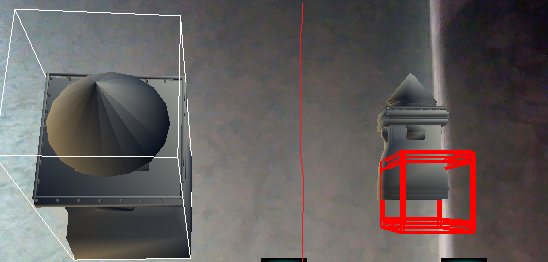
and the second problem I am now seeing is that the box become to big while the model is moving maybe I have to calculate the old and the new position and then redraw the center of the box ?
f8b9967aee59e88e.png
mitko29
mitko29
Someone..... ?
programci_84
programci_84
Can we see your BB testing function code? Also, when checking collisions with bounding volumes, I think it's very important to take model transformations into account (i.e. checking with transformed bounding boxes).
There's no "hard", and "the impossible" takes just a little time.
mitko29
mitko29
Well I upgrade the code above a little bit:

protected BoundingBox CalculateBox()
{
Matrix worldTransform = Matrix.CreateTranslation(Vector3.Zero);
Vector3 min = new Vector3(float.MaxValue, float.MaxValue, float.MaxValue);
Vector3 max = new Vector3(float.MinValue, float.MinValue, float.MinValue);
ModelMesh mesh = myModel.Meshes[0];
foreach (ModelMeshPart meshPart in mesh.MeshParts)
{
// Vertex buffer parameters
int vertexStride = meshPart.VertexBuffer.VertexDeclaration.VertexStride;
int vertexBufferSize = meshPart.NumVertices * vertexStride;
// Get vertex data as float
float[] vertexData = new float[vertexBufferSize / sizeof(float)];
meshPart.VertexBuffer.GetData<float>(vertexData);
// Iterate through vertices (possibly) growing bounding box, all calculations are done in world space
for (int i = 0; i < vertexBufferSize / sizeof(float); i += vertexStride / sizeof(float))
{
Vector3 transformedPosition = Vector3.Transform(new Vector3(vertexData, vertexData[i + 1], vertexData[i + 2]), worldTransform);
min = Vector3.Min(min, transformedPosition);
max = Vector3.Max(max, transformedPosition);
}
}
// Create and return bounding box
return new BoundingBox(min, max);

Now I get better bounding box around my model,but I am not sure how WorldTransform is changing the transformation .

So I am drawing my player this way:

foreach (ModelMesh mesh in myModel.Meshes)
{
foreach (BasicEffect effect in mesh.Effects)
{
if (effect is BasicEffect)
{
(effect).EnableDefaultLighting();
}
effect.World = transforms[mesh.ParentBone.Index] *
Matrix.CreateScale(1 / mesh.BoundingSphere.Radius)
* scaling * rotation * translation;

effect.View = Matrix.CreateLookAt(
new Microsoft.Xna.Framework.Vector3(0, 0, 3),
Microsoft.Xna.Framework.Vector3.Zero,
Microsoft.Xna.Framework.Vector3.Up);
effect.Projection = Matrix.CreatePerspective(
1, 1 / GraphicsDevice.Viewport.AspectRatio, 1f, 10000);
}
mesh.Draw();
}
}

and I am drawing enemy this way:

Matrix[] transforms = new Matrix[texture.Bones.Count];
texture.CopyAbsoluteBoneTransformsTo(transforms);
foreach (ModelMesh meshh in texture.Meshes)
{
foreach (BasicEffect effect in meshh.Effects)
{
if (effect is BasicEffect)
{
(effect).EnableDefaultLighting();
}
effect.World = transforms[meshh.ParentBone.Index] *
Matrix.CreateRotationY(modelRotation)
* Matrix.CreateTranslation(position) ;

effect.View = Matrix.CreateLookAt(new Vector3(0.0f, 50.0f, 5000.0f),
Vector3.Zero, Vector3.Up);
effect.Projection = Matrix.CreatePerspectiveFieldOfView(
MathHelper.ToRadians(45.0f), aspectRatio,
1.0f, 10000.0f);
}
meshh.Draw();
}

and check for collision this way:

for (int i = enemies.Count - 1; i >= 0; i--)
{
enemies.Update(gameTime);
if (enemies.Sbox.Intersects(bb))
{
enemies.Alive = false;
}
}

Where enemies is List.
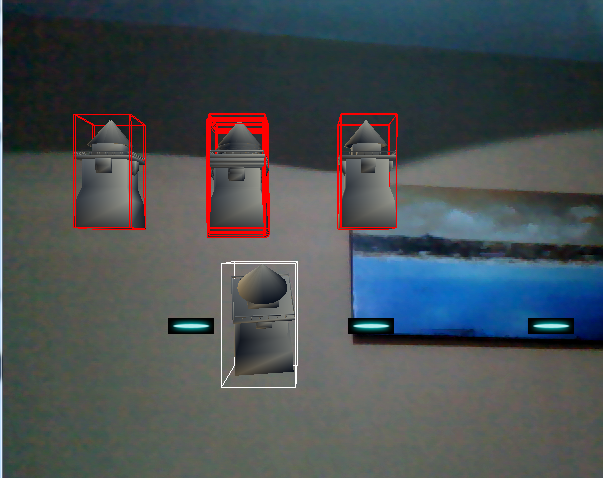
The result is :
0be8e8103ee5002b.png

The white bounding box is the player and the red is the enemy.
but no matter where the player is the enemy always stop at this red line in the middle.
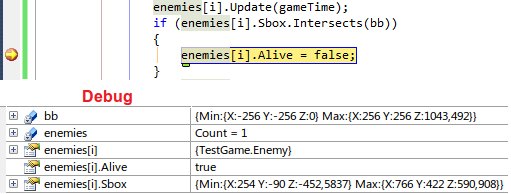
When I debug the collision code I receive this :
b690d3867a80ffc5.png
I hope this is enough , if you need something else just say
programci_84
programci_84
I don't know C#, so I'll suggest you something in C++. Hope you can understand and convert them for your needs.

First, a bounding box can be defined by minimum and maximum points. These points' components are retrieved from minimum and maximum values from all vertices' components, respectively. So, calculation is easy:
loop throug all vertices
{
min_x = the smallest x component of all vertices,
min_y = the smallest y component of all vertices,
min_z = the smallest z component of all vertices,

max_x = the biggest x component of all vertices,
max_y = the biggest y component of all vertices,
max_z = the biggest z component of all vertices,
}

Try this snippet to calculate your bounding box:
float _min = FLT_MIN; //in your code, this would be float.MinValue
float _max = FLT_MAX; //float.MaxValue

float min_x, min_y, min_z;
float max_x, max_y, max_z;
min_x = min_y = min_z = _max;
max_x = max_y = max_z = _min;
for (v = 0; v < numVertices; v++)
{
float x = vertices[v].x, y = vertices[v].y, z = vertices[v].z;
min_x = min (min_x, x);
min_y = min (min_y, y);
min_z = min (min_z, z);

max_x = max (max_x, x);
max_y = max (max_y, y);
max_z = max (max_z, z);
}


While checking for AABB collisions, I recommend you to check "transformed AABBs". Here a snippet from my engine to calculate "transformed AABB":

const AABB
AABB::Transform (const matrix4x4& objectWorldMatrix) const
{
AABB aabb;

vector3 c = this->CenterPt(), //CenterPt() returns (minPt + maxPt) / 2.0f;
e = .5f * this->Extents(); //Extents() returns (maxPt - minPt);

c = c.TransformCoord (objectWorldMatrix); //coord

matrix4x4 mat;
mat.Identity();

mat(0, 0) = objectWorldMatrix(0, 0);
mat(1, 0) = objectWorldMatrix(1, 0);
mat(2, 0) = objectWorldMatrix(2, 0);
mat(0, 1) = objectWorldMatrix(0, 1);
mat(1, 1) = objectWorldMatrix(1, 1);
mat(2, 1) = objectWorldMatrix(2, 1);
mat(0, 2) = objectWorldMatrix(0, 2);
mat(1, 2) = objectWorldMatrix(1, 2);
mat(2, 2) = objectWorldMatrix(2, 2);
e = e.TransformNormal (mat); //normal

aabb.MinPt = (m - e);
aabb.MaxPt = (m + e);

return aabb;
}

Note that the keypoint here is this: Don't even touch min and max points of an aabb, just build another one with transformed points and return it. So, before checking, don't touch your model mesh's original AABB (calculated once after loading/creating) and calculate a transformed one from this original "in every frame".

Now you got a transformed bounding box, and you can check collisions.

Try these. And tell us the results.

hth.
-R
There's no "hard", and "the impossible" takes just a little time.
mitko29
mitko29
Well I build your snipped code and i find out that the above I post do the same,but I am not able to understand the c++ collision code and what is AABB ?
When however the result now is this, but I still can detect collision , simply using the Intersect method :
09552167d47a5c0f.png
programci_84
programci_84
AABB means "Axis Aligned Bounding Box" (i.e. transformed bounding box).

I didn't gave you any collision code. I gave bounding box calculation and transformation. So intersection/collision is up to you.

Transformation is the keypoint here because checking transformed bounding boxes (AABBs) is the only, the best and the most accurate way. Note that a bounding box must be calculated once after model creating/loading. And you must check the collisions/intersections between transformed bounding boxes.

So, in every frame:
1) Process Input: Get input from mouse, keyboard, joystick etc. and process them if you're using'em (e.g. to rotate and/or move a model or camera).
2) Update your models' transformations: Calculate world matrix for all your models. Calculate view and projection matrices if you need.
2-a) Update your models' bounding boxes: This is the keypoint. I talked about transforming bounding boxes in my previous post. Use world matrices to update bounding boxes. I say again: Don't even touch a model's original bounding box. Create a transformed one instead. And store it.
NOTE: I think you're something wrong in this step. For example, I think you're checking original (i.e. calculated after model creating) bounding boxes. They're always placed at world-space origin so they always instersects each other. Above code gives you how they are transformed.
3) Update physics: This means checking collisions/intersections for you. Don't forget: Don't update original bounding boxes. Create another ones over the originals but with transformed parameters. So, don't use original bounding boxes for checking collisions, use the transformed ones calculated in previous step instead.
4) Render: Whatever you like.

hth.
-R
There's no "hard", and "the impossible" takes just a little time.
mitko29
mitko29

AABB means "Axis Aligned Bounding Box" (i.e. transformed bounding box).

I didn't gave you any collision code. I gave bounding box calculation and transformation. So intersection/collision is up to you.

Transformation is the keypoint here because checking transformed bounding boxes (AABBs) is the only, the best and the most accurate way. Note that a bounding box must be calculated once after model creating/loading. And you must check the collisions/intersections between transformed bounding boxes.

So, in every frame:
1) Process Input: Get input from mouse, keyboard, joystick etc. and process them if you're using'em (e.g. to rotate and/or move a model or camera).
2) Update your models' transformations: Calculate world matrix for all your models. Calculate view and projection matrices if you need.
2-a) Update your models' bounding boxes: This is the keypoint. I talked about transforming bounding boxes in my previous post. Use world matrices to update bounding boxes. I say again: Don't even touch a model's original bounding box. Create a transformed one instead. And store it.
NOTE: I think you're something wrong in this step. For example, I think you're checking original (i.e. calculated after model creating) bounding boxes. They're always placed at world-space origin so they always instersects each other. Above code gives you how they are transformed.
3) Update physics: This means checking collisions/intersections for you. Don't forget: Don't update original bounding boxes. Create another ones over the originals but with transformed parameters. So, don't use original bounding boxes for checking collisions, use the transformed ones calculated in previous step instead.
4) Render: Whatever you like.

hth.
-R

Well thanks for explanation , but I was able to do it after I wrote my own Intersect method

Now I am trying to shoot a projectile were mouse click in different angle,I apply a picture for better understanding:
the red box is the enemy,the black box is the player,green dot is where mouse clicked and the brown is the projectile.
So my question is how to transform the mouse click into 3D world coordinate ?
How to calculate the angle and draw the projectile in that direction ?
ab0aa612e5292466.png
programci_84
programci_84
So my question is how to transform the mouse click into 3D world coordinate ?
How to calculate the angle and draw the projectile in that direction ?


It's quite easy smile.png

Well, you can suppose your "projectile" as a ray which has an origin (eye) and a direction vector. The main task is to calculate direction vector. We suppose that direction vector is directed to far plane. This makes our calculation easier.

Here the whole code I'm using:

ray Projectile;

POINT s;
GetCursorPos (&s);
ScreenToClient (hWnd_of_your_game_window, &s);

float w = (float)your_backbuffer_width;
float h = (float)your_backbuffer_height;

matrix4x4 mProj = YourProjectionMatrix;

float _x = ( 2 * s.x / w - 1) / mProj(0, 0);
float _y = (-2 * s.y / h + 1) / mProj (1, 1);

Projectile.origin = vector3 (0, 0, 0);
Projectile.direction = vector3 (_x, _y, 1);


EDIT: Code mistake fixed.

Note that this ray is in view space.

hth.
-R
There's no "hard", and "the impossible" takes just a little time.
mitko29
mitko29
Ok I convert it to c# , but in xna framework I don't see a Matrix4x4 only Matrix and the problem comes , because I can't get Matrix.M00 , because it's start from M11:

void TransformMouseCoordinatesInto3D(GraphicsDevice m,Vector2 cursorPosition,Matrix projectionMatrix)
{
Matrix mProj = projectionMatrix;
float w = (float)m.PresentationParameters.BackBufferWidth;
float h = (float)m.PresentationParameters.BackBufferHeight;
float X = (2 * cursorPosition.X / w - 1) * mProj.M00;
float Y = (-2 * cursorPosition.Y / h + 1) * mProj.M11;
projection.Position = new Microsoft.Xna.Framework.Vector3(0, 0, 0);
projection.Direction = new Microsoft.Xna.Framework.Vector3(X, Y, 1);
}
programci_84
programci_84
Well, I don't use XNA framework, so I don't know what structures it has. Matrix4x4 structure is defined in my engine. I wrote my code here as I could remember and I hoped you could understand it.

Anyway, In my code above, mProj(0, 0) is the value in row 1 column 1 of the mProj matrix. It becomes Matrix::M11 in your code.

NOTE: There was a mistake in calculation of X and Y values. Because I couldn't remember my code, so I couldn't copy'em. Anyway, they must be " / mProj (0, 0)" and " / mProj (1, 1)" instead of " * mProj (0, 0)" and " * mProj (1, 1)". Sorry for that. Fixed!

So, your corrected code looks like:

void TransformMouseCoordinatesInto3D (GraphicsDevice m, Vector2 cursorPos, Matrix projectionMatrix)
{
Matrix mProj = projectionMatrix;
float w = (float)m.PresentationParameters.BackBufferWidth;
float h = (float)m.PresentationParameters.BackBufferHeight;
float X = ( 2 * cursorPos.X / w - 1) / mProj.M11;
float Y = (-2 * cursorPos.Y / h + 1) / mProj.M22;

projection.Position = new Microsoft.Xna.Framework.Vector3 (0, 0, 0);
projection.Direction = new Microsoft.Xna.Framework.Vector3 (X, Y, 1);
}


NOTE 2: This "projection" element is in View Space. If you want to get it in World Space, try following:

ray projection_in_world_space;
projection.Position.Transform (projection.Position, inverse_of_your_view_matrix, projection_in_world_space.Position);
projection.Direction.TransformNormal (projection.Direction, inverse_of_your_view_matrix, projection_in_world_space.Direction);
projection_in_world_space.Direction.Normalize();

//I'm not changing "projection" element, just creating a transformed one. Of course, you can change if you want.


hth.
-R
There's no "hard", and "the impossible" takes just a little time.
mitko29
mitko29
Thanks it's working now

Topic Locked

This topic has been locked by a moderator. New replies are not allowed.

Sign in to reply to this topic.