GameDev.net gamedev.net
🔒 Locked

2D sprites and ambient light

Started by DemonLord Apr 21, 2012 at 3:00 PM 2 replies 3.3k views
Original Post
DemonLord
DemonLord
Hi.

I want to make all sprites that are not in my spot light to be hardly visible.
Only when I come near enough to light them up with my spot light should
they be fully visible.

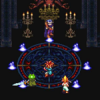
This is how it looks:
[media]
[/media]

Question is: How do I make sprites less visible when not in my spot light?

Thanx for help.
DemonLord
DemonLord
I have a question about BlendState.

Is it possible to make sprites outside of my spot light blend into dark ambient light with BlendState?

alpha.png

I kinda made sprites in my spot light translucent and those far away normal but I don't really know if I can make them blend with the ambient light sad.png

This is what I use to make the effect on the screenschot:


private Color _ambientLight = new Color(.1f, .1f, .1f, .1f); // for HLSL

public static BlendState BlendBlack = new BlendState
{
ColorBlendFunction = BlendFunction.Add,
ColorSourceBlend = Blend.One,
ColorDestinationBlend = Blend.One,

AlphaBlendFunction = BlendFunction.Add,
AlphaSourceBlend = Blend.SourceAlpha,
AlphaDestinationBlend = Blend.One
};


Any help or tip would be helpful.
Thanx
FalconDragoon
FalconDragoon
Well, for one, I don't think you want to toy with the Alpha (bringing that down is what'll make them translucent).

Additionally, if that's a 3d light (as I assume it is) you could just render the sprites on textured quads. Could be more effort up front, but give you the visual effect you're after.
My Games -- My Music  Come join us for some friendly game dev discussions over in XNA Chat!
Nokame
Nokame
It looks like your drawing the lighting fx then the sprites on top of it. Play with the order of what you're drawing, if you haven't.

Topic Locked

This topic has been locked by a moderator. New replies are not allowed.

Sign in to reply to this topic.