GameDev.net gamedev.net
🔒 Locked

GLSL Per-Pixel Lighting Issue

Started by polyfrag Oct 25, 2012 at 11:17 AM 8 replies 2.3k views
Original Post
polyfrag
polyfrag
How do I fix the lighting here so that the squares are lit uniformly instead of each having a corner lit?
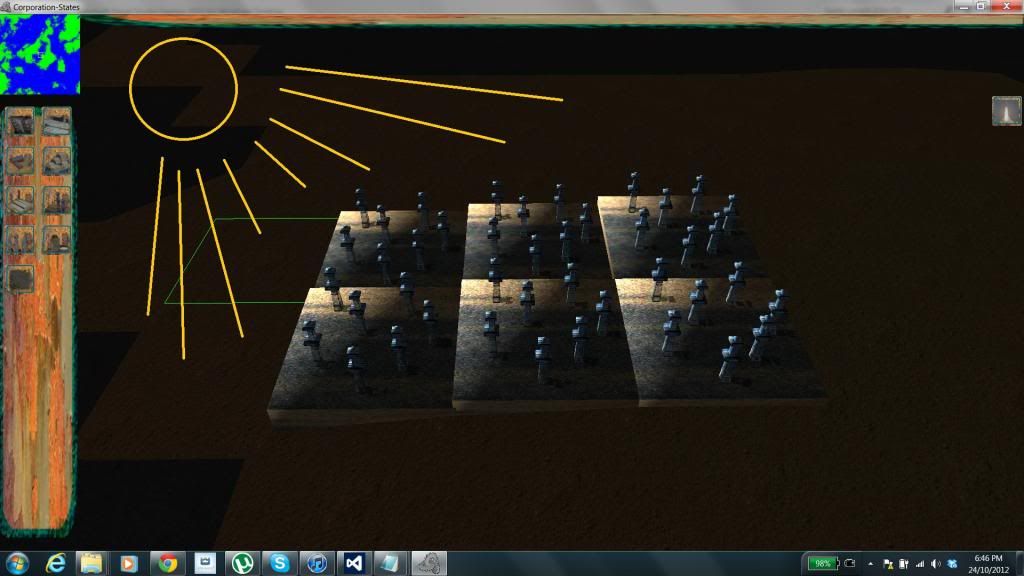
lightwrong.jpg

Do I have to use per-vertex lighting? How do I do that in GLSL?

Ashaman73
Ashaman73

Do I have to use per-vertex lighting? How do I do that in GLSL?

No, you don't need to use per vertex lighting, this would be a step backward.

From your image I would guess, that the vertex normals of your tiles are invalid, this happens i.e when using a cube and the smooth function. I this case the upper left corner corner would point to the sun (receives a lot of light) and the right buttom corner would point away (shadow). Check your model and add either hard edges or turn off surface smooth for the tile base.
Hodgman
Hodgman
Show us your lighting code.
It looks like every tile has the same lighting result? Which suggests you're doing the lighting in model space (instead of world or view space) and using the same (model-relative) sun position for each model.
Kaptein
Kaptein
your normals are fine
you are using the internal vertex coordinates, ie. in_vertex.xyz instead of camera-world coordinates
polyfrag
polyfrag
Fragment shader
#version 120
uniform sampler2D texture1;
uniform sampler2D texture2;
uniform sampler2D shadowMap;
varying vec4 lpos;
varying vec3 normal;
varying vec3 light_vec;
varying vec3 light_dir;

void main (void)
{
vec3 smcoord = lpos.xyz / lpos.w;
float shadow = max(0.5, float(smcoord.z <= texture2D(shadowMap, smcoord.xy).x));
vec3 lvec = normalize(light_vec);
float diffuse = max(dot(-lvec, normal), 0.0);
vec4 texColor = texture2D(texture1, gl_TexCoord[0].st) * texture2D(texture2, gl_TexCoord[1].st);
gl_FragColor = vec4(gl_Color.xyz * texColor.xyz * shadow * diffuse * 2.0, texColor.w);
}


Vertex shader

uniform mat4 lightMatrix;
uniform vec3 lightPos;
uniform vec3 lightDir;
varying vec4 lpos;
varying vec3 normal;
varying vec3 light_vec;
varying vec3 light_dir;

void main(void)
{
gl_TexCoord[0] = gl_MultiTexCoord0;
gl_TexCoord[1] = gl_MultiTexCoord1;
vec4 vpos = gl_ModelViewMatrix * gl_Vertex;
lpos = lightMatrix * vpos;
gl_Position = gl_ModelViewProjectionMatrix * gl_Vertex;
light_vec = vpos.xyz - lightPos;
light_dir = gl_NormalMatrix * lightDir;
normal = normalize(gl_NormalMatrix * gl_Normal);
gl_FrontColor = gl_Color;
}
web383
web383
I think the problem is in this line:

light_vec = vpos.xyz - lightPos;

vpos is in camera (view) space, while lightPos is probably in world space. If you want to do your lighting calculations in view space, then you may need to transform lightPos into view space first.

I haven't tested this, but this is my first suggestion from glancing at your shaders. I could be wrong, but give it a try.
polyfrag
polyfrag
What's view space and how do I do that? (I copied the shader code from an example.)
lauris71
lauris71
View space is the local coordinate system of camera. I.e. the one where 0,0,0 is at the center of camera and Z axis points "into" the camera.
You can transform a vector from world space to view space by multiplying it with the inverse of camera matrix. I.e.

lightpos_v = viewmatrix[sup]-1[/sup] * lightpos_w
polyfrag
polyfrag
I think it already does that


void InverseMatrix(float dst[16], float src[16])
{
dst[0] = src[0];
dst[1] = src[4];
dst[2] = src[8];
dst[3] = 0.0;
dst[4] = src[1];
dst[5] = src[5];
dst[6] = src[9];
dst[7] = 0.0;
dst[8] = src[2];
dst[9] = src[6];
dst[10] = src[10];
dst[11] = 0.0;
dst[12] = -(src[12] * src[0]) - (src[13] * src[1]) - (src[14] * src[2]);
dst[13] = -(src[12] * src[4]) - (src[13] * src[5]) - (src[14] * src[6]);
dst[14] = -(src[12] * src[8]) - (src[13] * src[9]) - (src[14] * src[10]);
dst[15] = 1.0;
}


glGetFloatv(GL_PROJECTION_MATRIX, cameraProjectionMatrix);
glGetFloatv(GL_MODELVIEW_MATRIX, cameraModelViewMatrix);
InverseMatrix(cameraInverseModelViewMatrix, cameraModelViewMatrix);

glPushMatrix();
glLoadIdentity();
glTranslatef(0.5, 0.5, 0.5); // + 0.5
glScalef(0.5, 0.5, 0.5); // * 0.5
glMultMatrixf(lightProjectionMatrix);
glMultMatrixf(lightModelViewMatrix);
glMultMatrixf(cameraInverseModelViewMatrix);
glGetFloatv(GL_MODELVIEW_MATRIX, lightMatrix);
glPopMatrix();

glUniformMatrix4fvARB(uniformShadow_lightMatrix, 1, false, lightMatrix);
float mvLightPos[3];
mvLightPos[0] = cameraModelViewMatrix[0] * lightPos[0] + cameraModelViewMatrix[4] * lightPos[1] +
cameraModelViewMatrix[8] * lightPos[2] + cameraModelViewMatrix[12];
mvLightPos[1] = cameraModelViewMatrix[1] * lightPos[0] + cameraModelViewMatrix[5] * lightPos[1] +
cameraModelViewMatrix[9] * lightPos[2] + cameraModelViewMatrix[13];
mvLightPos[2] = cameraModelViewMatrix[2] * lightPos[0] + cameraModelViewMatrix[6] * lightPos[1] +
cameraModelViewMatrix[10] * lightPos[2] + cameraModelViewMatrix[14];
glUniform3fARB(uniformShadow_lightPos, mvLightPos[0], mvLightPos[1], mvLightPos[2]);
polyfrag
polyfrag
I found out what the problem was. MilkShape 3D was exporting the normals incorrectly.

Topic Locked

This topic has been locked by a moderator. New replies are not allowed.

Sign in to reply to this topic.