GameDev.net gamedev.net
🔒 Locked

Pre-rendered Backdrop with 3d Character

Started by zamiel Dec 29, 2012 at 10:38 PM 9 replies 3.7k views
Original Post
zamiel
zamiel

Hi I'm new here.

I'm a programmer who know C#, JavaScript, AS & a little bit of C++.
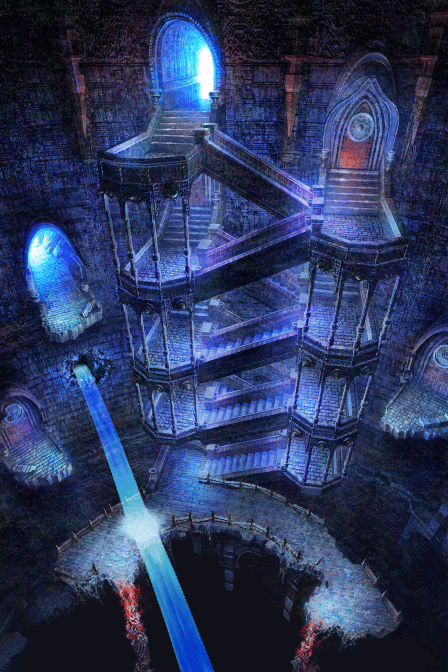
I'm using actually Unity (C#) for recreating a map in Chrono Cross.


http://www.youtube.com/watch?feature=player_detailpage&v=0eZ4TIVMTv8#t=323s


http://chronocompendium.com/images/wiki/e/ef/Terra_tower_stairway.png

1# Is it A good think to recreate it on Unity?

2# If yes how can I easily put in layer my Background?

*Because I use perspective and with the frustum placing each 2d layer is hard.

*When I move the camera with perspective the layer are offset.


3# How Can I make my player look like smaller when the image is clearly a optical effect?

Thank you everyone in advance & please excuse my English.

Paradigm Shifter
Paradigm Shifter
That looks like a resident evil 1 style system, but with 2d scrolling. You just need to render the Z value of each pixel when you render the background (they are all pre-rendered, right, rather than drawn in 2d)? And use that to fill the Z buffer before doing 3d rendering as usual.
"Most people think, great God will come from the sky, take away everything, and make everybody feel high" - Bob Marley
zamiel
zamiel

[quote name='Paradigm Shifter' timestamp='1356821251' post='5015557']
(they are all pre-rendered, right, rather than drawn in 2d)?
[/quote]

They are plane with texture.

Paradigm Shifter
Paradigm Shifter
Is that like Gangnam Style? ;) Assuming it is billboard planes at a set Z then... just render the layered textures with Z writes and do the 3d characters as normal.
"Most people think, great God will come from the sky, take away everything, and make everybody feel high" - Bob Marley
zamiel
zamiel

[quote name='Paradigm Shifter' timestamp='1356821741' post='5015560']
Is that like Gangnam Style?
[/quote]
Unity Style XD ... it's because Unity is not really good with 2D. This is why I question myself if it's the good engine to do that.

[quote name='Paradigm Shifter' timestamp='1356821741' post='5015560']
just render the layered textures with Z writes and do the 3d characters as normal.
[/quote]
With perspective camera it's just lame of placing the plane. & when the camera with perspective move the plane are offset with each other. We need it if we want perspective with the 3D character. But even there the player don't go smaller when we go down.

Aeramor
Aeramor

Render the character directly to a texture on a completely different frustum that gives the desired look and then place him on screen as a billboard. Otherwise you are unlikely to get the two to line up perfectly without rendering the character orthographically. Speaking of: to prevent artifacts to the image you will want to render it in screen space not world space. Use parallax scrolling to achieve the effect you want with multiple layers. This also has the added benefit of making the placement of the 2d layers near trivial.

-Aeramor CTO at Conjecture, Inc.
zamiel
zamiel

[quote name='Aeramor' timestamp='1356829767' post='5015588']
Aeramor

[/quote]
Hummm sorry I'm a little lost right now ^^", I don't think it's possible on Unity. :\

Daaark
Daaark
You need Unity Pro to render to texture.

If you know where your camera is going to be, and the FOV you can just set up the same camera, and then render the picture WITH the depth values possibly stored in the alpha channel. You can write a shader to do this.

As long as the FOV and camera position is the same, it's pretty much the same as having rendered it out in 3D to begin with, because you have the exact same frame buffer data. Then anything else you render will be the same, because the depth is there to test against.
Daaark
Daaark

As long as the FOV and camera position is the same


If I need to do translation like this http://www.youtube.com/watch?feature=player_detailpage&v=0eZ4TIVMTv8#t=323s ?


Not 100% sure about that.

The camera never changes position or distance in these games, or it would invalidate the pre-rendered point of view. It only pans. So there must be a formula to line up the camera panning and the image panning. I forget the term. It may be called match moving.

You're still in a 3D world, and in that video you posted, the characters are walking and climbing on slopes and planes. So you need a good function to determine where to center the picture based on where the camera is centered.

Topic Locked

This topic has been locked by a moderator. New replies are not allowed.

Sign in to reply to this topic.