
Original Post

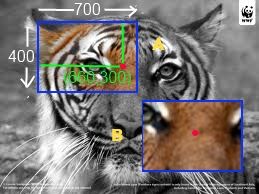
Hello, I need some help with this math. I've been at this for hours now.
I have a large surface (the whole tiger) and a view in blue that is 700,400. Right now, i have it zooming and panning with bounds checking fine, but can't figure out how to zoom to the mouse cursor (red dots).
Say, im at 660, 300 local coordinates of view A and zoom in, how do I get what appears in view B? Currently, it just zooms into 0,0 and would get a close up of the ear instead. Basically, I want the functionality of Paint, or Paint.NET or any image editor.
This is all 2D math btw
    // x, and y are local coordinates
    void Canvas::setScale(float s, int x, int y)
    {
        // m_x and m_y are are coordinates into the full canvas
        // the view treats them as 0,0
        // in view marked A, these would something like 200,100 and would be at the tip of the ear
        // after this function i want them to point right above the eye like in the view B example

        float oldscale = m_scale;
        m_scale = s;

        // TODO add the math

        CheckBounds();
    }
Right now, i have some math filled in but it only kinda working.. Its more of a hack and is definately not fluid or percise.
I know there most be a standard way of doing this.
Thanks