GameDev.net gamedev.net
🔒 Locked 🎮 Unity

Improving 2D raycasting performance

Started by Kercyn Jul 6, 2017 at 8:46 PM 6 replies 6.3k views
Original Post
Kercyn
Kercyn

Hello everybody.

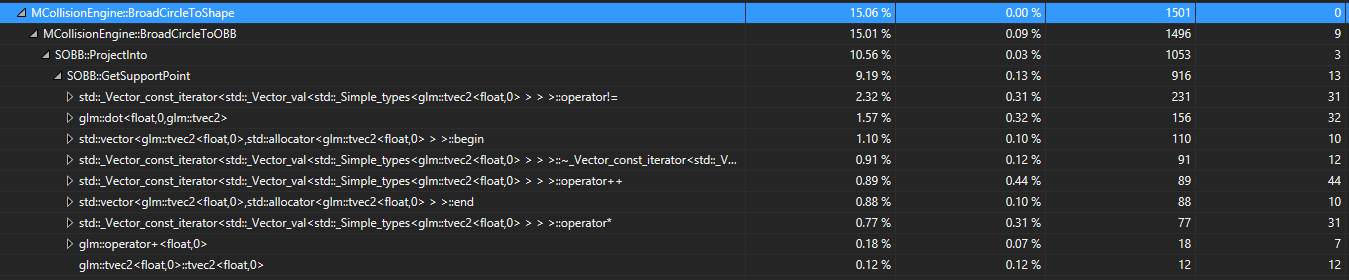
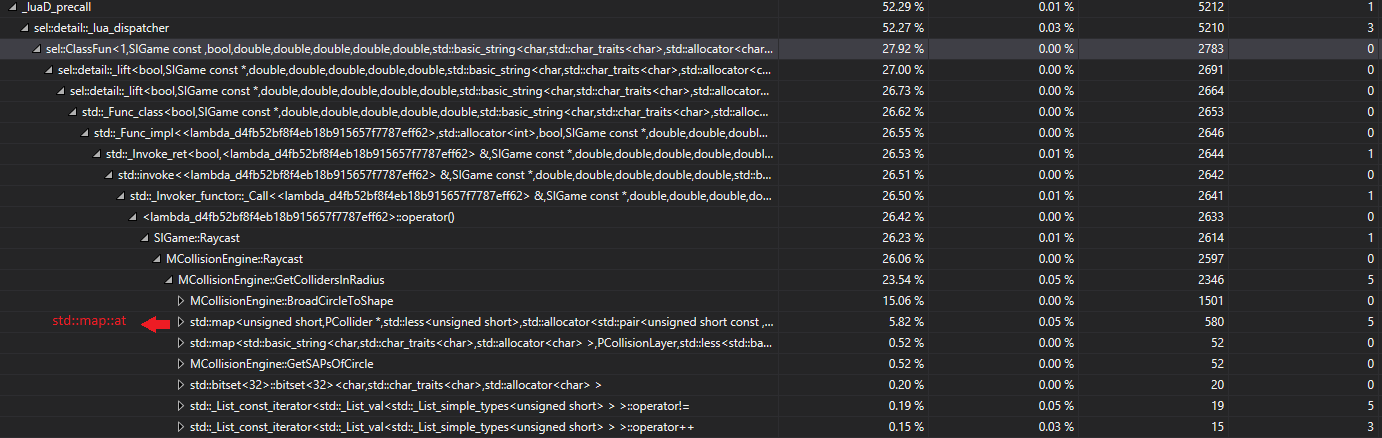
I have implemented a 2D raycasting algorithm in my game engine but I must be doing something very wrong, since my game is pretty much unplayable if I cast around 10 rays each frame (it runs fine at around 5-6 casts per frame). I tried profiling but, as you can see from the two pictures, I ended up on STL territory, which tells me that the performance issues arise from my approach to the problem.

I'm using the Sweep-and-Prune algorithm for my broadphase detection, which divides my entire map into sections, and colliders inside a section are only checked for collisions with other colliders from that section. This approach is used in my raycasting algorithm as well. Initially, I get a list of all colliders inside the raycast's radius and then I check the ray against every collider in that list. As far as I understand it the problem lies not in the Ray vs. Shape checks, but in the preparation work before that. Any tips or guidelines on how to correct my approach, or specifics of the algorithms, are most welcome.

Thank you in advance.

Raycast


bool MCollisionEngine::Raycast(const glm::vec2& Origin, const glm::vec2& Direction, float MaxDistance, std::string LayerMask, bool bHitTriggers) const
{
	std::vector<PCollider*> PossibleColliders = GetCollidersInRadius(Origin, MaxDistance, LayerMask, bHitTriggers);
	const std::bitset<32> CollisionMask = std::bitset<32>(LayerMask);

	for (PCollider* const Collider : PossibleColliders)
	{
		const PCollisionLayer& ColliderLayer = Layers.at(Collider->LayerKey);

		if (CollisionMask.test(ColliderLayer.Index))
		{
			SShape* Shape = Collider->Shape.get();
			switch (Shape->GetType())
			{
				case EShapeType::AABB:
					if (RayIntersectsAABB(Origin, Direction, MaxDistance, static_cast<SAABB*>(Shape)))
					{
						return true;
					}
					break;

				case EShapeType::Circle:
					if (RayIntersectsCircle(Origin, Direction, MaxDistance, static_cast<SCircle*>(Shape)))
					{
						return true;
					}
					break;

				case EShapeType::OBB:
					if (RayIntersectsOBB(Origin, Direction, MaxDistance, static_cast<SOBB*>(Shape)))
					{
						return true;
					}
					break;
			}
		}
	}

	return false;
}


BroadCircleToOBB


bool MCollisionEngine::BroadCircleToOBB(const SCircle& Circle, const SOBB* const OBB)
{
	const std::vector<glm::vec2>& Normals = OBB->GetNormals();

	for (int i = 0; i < 2; i++)
	{
		const glm::vec2& Normal = Normals[i];

		Line CircleProj = Circle.ProjectInto(Normal);
		Line OBBProj = OBB->ProjectInto(Normal);

		if (glm::length(CircleProj.CalculatePenetrationVector(OBBProj)) < Utils::EPSILON)
		{
			return false;
		}
	}

	return true;
}


SOBB::GetSupportPoint


glm::vec2 SOBB::GetSupportPoint(const glm::vec2& Direction) const
{
	const std::vector<glm::vec2>& Vertices = GetVertices();

	float BestProjection = -std::numeric_limits<float>::max();
	glm::vec2 BestVertex;

	for (const glm::vec2& Vertex : Vertices)
	{
		float Projection = glm::dot(Vertex, Direction);

		if (Projection > BestProjection)
		{
			BestProjection = Projection;
			BestVertex = Vertex;
		}
	}

	return BestVertex + Position;
}

1.png

2.png

Randy Gaul
Randy Gaul

You should click on that button top right of the profiling results that says something like "generate detailed report". Then you can click around the hot path and see which lines of code are hot. Anyways, just from the call stack it looks like your function GetCollidersInRadius is super slow.


Edit: Also because you keep using "const auto&" I have no clue what your code is doing. It's completely unreadable for me personally.

Kercyn
Kercyn
16 hours ago, Randy Gaul said:

You should click on that button top right of the profiling results that says something like "generate detailed report". Then you can click around the hot path and see which lines of code are hot. Anyways, just from the call stack it looks like your function GetCollidersInRadius is super slow.


Edit: Also because you keep using "const auto&" I have no clue what your code is doing. It's completely unreadable for me personally.


Thanks for the reply. It's too late right now to check your suggestion so I'll do it tomorrow. For the const auto& issue, I replaced all autos in the first post with their actual type. I'm also including the headers used in the snippets above, just in case.

PCollisionLayer


class PCollisionLayer final
{
	public:
		PCollisionLayer() = default;
		PCollisionLayer(std::size_t Index_, std::bitset<32> CollisionMask_)
			: Index(Index_), CollisionMask(CollisionMask_)
		{}
		~PCollisionLayer() = default;

		//! The layer's index in the collision mask.
		std::size_t Index;

		std::bitset<32> CollisionMask;
};

Line


class Line final
{
	public:
		Line() = default;
		Line(glm::vec2 a_, glm::vec2 b_);
		~Line() = default;

		glm::vec2 a;
		glm::vec2 b;

		//! Calculates the penetration vector between this and Other.
		// http://www.metanetsoftware.com/technique/tutorialA.html
		glm::vec2 CalculatePenetrationVector(const Line& Other) const;

		Line ProjectInto(const glm::vec2& Axis) const;
		bool IsPointInside(const glm::vec2& Point) const;

		float GetLength() const;
		
		bool operator<(const Line& lhs) const;
		bool operator>(const Line& lhs) const;
		bool operator<=(const Line& lhs) const;
		bool operator>=(const Line& lhs) const;

		bool operator==(const Line& lhs) const;
		bool operator!=(const Line& lhs) const;
};


EDIT: I tried what you suggested but unfortunately all I got was a fancier way of viewing what already existed in the call stack table. My main concern is that my entire approach is wrong, since the "hottest" line ends up being a range-based for.

Randy Gaul
Randy Gaul
On 7/6/2017 at 4:12 PM, Kercyn said:

EDIT: I tried what you suggested but unfortunately all I got was a fancier way of viewing what already existed in the call stack table. My main concern is that my entire approach is wrong, since the "hottest" line ends up being a range-based for.

Try posting that image so others can see the hot path in your code, if you still wanted advice on this stuff.

Kercyn
Kercyn

I was struggling with this for a couple of days, but I finally decided to replace my algorithm with a much simpler one that runs way more efficiently. Thanks for the guidelines!

Andrew Feng
Andrew Feng
On 7/15/2017 at 5:22 AM, Kercyn said:

I was struggling with this for a couple of days, but I finally decided to replace my algorithm with a much simpler one that runs way more efficiently. Thanks for the guidelines!

can you please tell me about the better algorithm?

Kercyn
Kercyn
14 hours ago, Andrew Feng said:

can you please tell me about the better algorithm?

You can find the source code here.

What I'm doing is applying a reverse-rotation to the ray, so that I can treat the problem as a ray vs AABB collision. Then I'm implementing the algorithm described here. It may not be the fastest or most efficient implementation, but for my current needs, it's "good enough".

Topic Locked

This topic has been locked by a moderator. New replies are not allowed.

Sign in to reply to this topic.