GameDev.net gamedev.net
🔒 Locked 🎮 Unity

Pixelshader does not run - invalid SV_POSITION coordinates

Started by IonThrust Mar 1, 2018 at 1:52 PM 18 replies 6.2k views
Original Post
IonThrust
IonThrust

Hello,

I'm currently working on a visualisation program which should render a low-poly car model in real-time and highlight some elements based on data I get from a database. So far no difficulty here. So far I managed to set up my UWP project so that I have a working DirectX 11 device and real-time swapchain-based output.

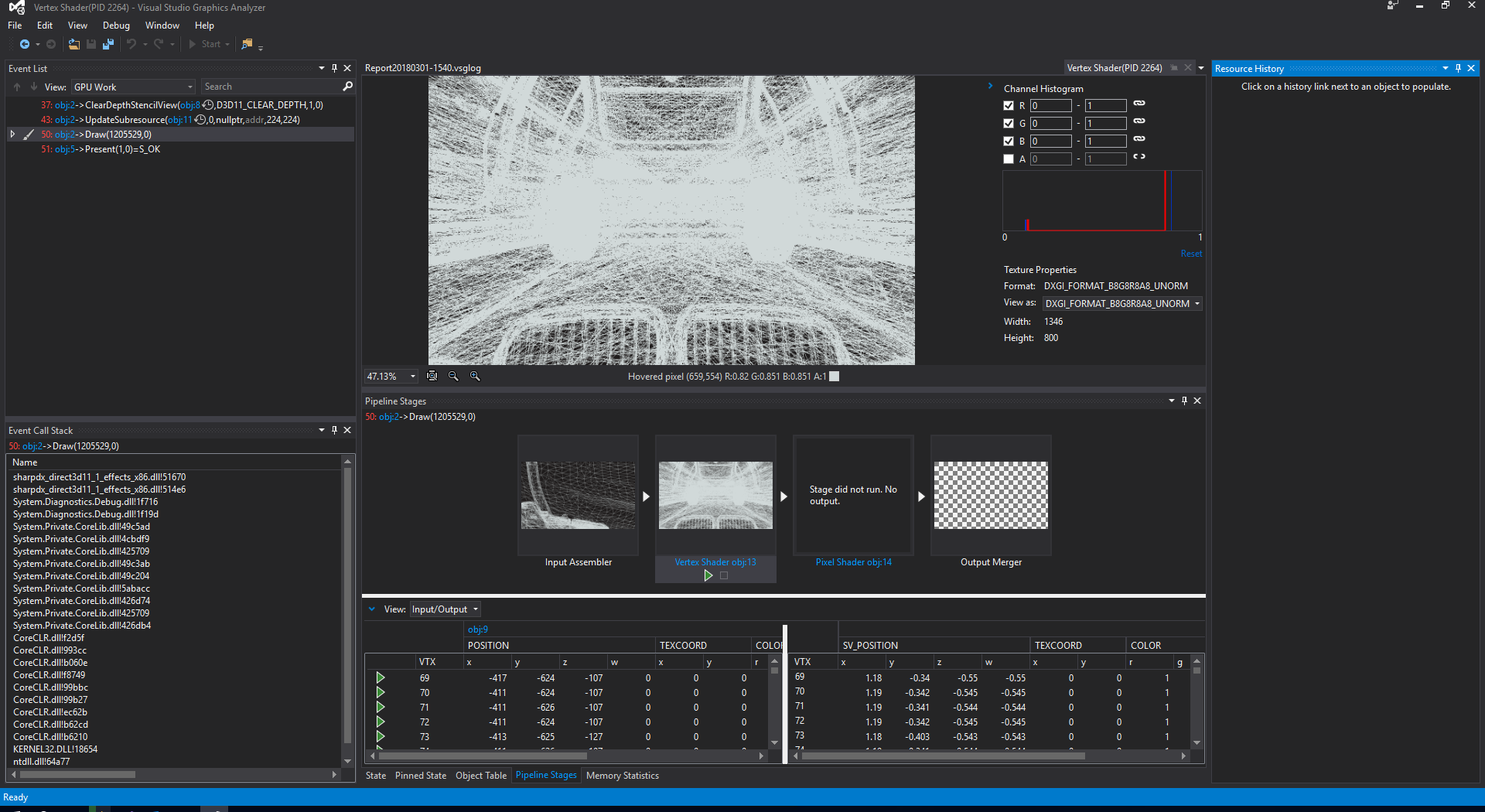
When I debug my Input Assembler stage shows a valid model - the whole thing is correctly rendered in the VS Graphics Analyzer. The Vertex Shader output seems okay, too - but it's likely that the camera view-matrix is a bit wrong (too close, maybe the world matrix is rotated wrong as well) but the VS-GA does show some output there. Now the Pixel Shader does not run, though. My assumption is, that the coordinates I get from the Vertex Shader are bad (high values which I guess should actually be between -1.0f and 1.0f). So obviously the Rasterizer clips all vertices and nothing ends up rendered.

I've been struggling with this for days now and since I really need to get this working soon I hoped someone here has the knowledge to help me fix this.

Here's a screenshot of the debugger:
VSGA.thumb.png.00cb03758d8e94c254087c707a86c273.png

I'm currently just using a simple ambient light shader (see here).

And that's my code for rendering. The model class I'm using simply loads the vertices from a STL-file and creates the vertex buffer for it. It sets it and renders the model indexed or not (right now I don't have a index buffer since I haven't figured out how I calculate the indices for the model ... but that'll do for now).


public override void Render()
{
    Device.Clear(Colors.CornflowerBlue, DepthStencilClearFlags.Depth, 1, 0);

    _camera.Update();

    ViewportF[] viewports = Device.Device.ImmediateContext.Rasterizer.GetViewports<ViewportF>();
    _projection = Matrix.PerspectiveFovRH((float) Math.PI / 4.0f, viewports[0].Width / viewports[0].Height,
        0.1f, 5000f);
    _worldMatrix.SetMatrix(Matrix.RotationX(MathUtil.DegreesToRadians(-90f)));
    _viewMatrix.SetMatrix(_camera.View);
    _projectionMatrix.SetMatrix(_projection);

    Device.Context.InputAssembler.InputLayout = _inputLayout;
    Device.Context.InputAssembler.PrimitiveTopology = PrimitiveTopology.TriangleList;

    EffectTechnique tech = _shadingEffect.GetTechniqueByName("Ambient");
    for (int i = 0; i < tech.Description.PassCount; i++)
    {
        EffectPass pass = tech.GetPassByIndex(i);
        pass.Apply(Device.Context);
                
        _model.Render();
    }
}

The world is rotated around the X-axis since the model coordinate system is actually a right-handed CS where X+ is depth and Y is the horizontal and Z the vertical coordinate. Couldn't figure out if it was right that way, but should be theoretically.


public void Update()
{
    _rotation = Quaternion.RotationYawPitchRoll(Yaw, Pitch, Roll);
    Vector3.Transform(ref _target, ref _rotation, out _target);

    Vector3 up = _up;
    Vector3.Transform(ref up, ref _rotation, out up);

    _view = Matrix.LookAtRH(Position, _target, up);
}

The whole camera setup (static since no input has been implemented) is for now:


_camera = new Camera(Vector3.UnitZ);
_camera.SetView(new Vector3(0, 0, 5000f), new Vector3(0, 0, 0), MathUtil.DegreesToRadians(-90f));

So I tried to place the camera above the origin, looking down (thus the UnitZ as up-vector).


So can anybody explain me why the vertex shader ouput is so wrong and obviously all vertices get clipped?

Thank you very much!

turanszkij
turanszkij

There are a few places where you could check.

  • Are you setting a correct viewport? A zero size viewport will result in non invoking the pixel shader.
  • Is your rasterizer state set up correctly? Double check especially cullmodes, try with CULL_NONE.
  • Are you using any scissor rectangles? Double check that they are correctly set.
  • Is your vertex shader actually correct? Does it output vertices in z range [0,1]?
  • Does enabling the debug layer warn you about anything?

Good luck!

IonThrust
IonThrust
Quote

Are you setting a correct viewport? A zero size viewport will result in non invoking the pixel shader.

I did as one of the first things. But I can ensure that the viewport is correct. It's about 1400x800.


11 minutes ago, turanszkij said:

Is your rasterizer state set up correctly? Double check especially cullmodes, try with CULL_NONE.

Yes, I checked this. Moreover it's set in the pass of the effect shader explicitly.


11 minutes ago, turanszkij said:

Are you using any scissor rectangles? Double check that they are correctly set.

I do not. Don't need them in this scenario and I know this "trap" so I disabled them from the start of.


11 minutes ago, turanszkij said:

Is your vertex shader actually correct? Does it output vertices in z range [0,1]?

Not really - as you can see in the image I attached. All components of the SV_Position output are >1. But the vertex shader only does the basic matrix multiplication. So there can't be much wrong unless the matrices themselves are wrong. This is my number one thing, but I don't get what could be wrong ...


11 minutes ago, turanszkij said:

Does enabling the debug layer warn you about anything?

Nope, everything clear.


Just tried to manually create the view matrix with fixed values. Now I do get values clamped between 0 and 1 for z and w but 1.14 and -0.5 for x and y... Still no pixel shader running.


_viewMatrix.SetMatrix(Matrix.LookAtRH(new Vector3(500f, 500f, -1000f), new Vector3(500f, 500f, 0f), Vector3.Up));


IonThrust
IonThrust

I already disabled depth-stencil because I initially thought this would be the problem. But it seems like the rasterizer still clips them... the mysterious thing is I can't even find any source on the internet stating why "State did not run. No output." shows up at the Pixel Shader Stage. This is rather unusual.

So far I've managed to move the camera so that I actually see the whole (correctly rendered) model in the preview of the vertex shader stage. So now I really am confused why the pixel shader won't run...

turanszkij
turanszkij

Note that I didn't mean depth testing, but RASTERIZER_DESC::DepthClipEnable = FALSE actually means bypassing the check 0<=fragmentZ<=1. But turning off depth stencil was also a good idea by the way.

swiftcoder
swiftcoder
23 minutes ago, IonThrust said:

So there can't be much wrong unless the matrices themselves are wrong. This is my number one thing, but I don't get what could be wrong

Have you checked the matrix by hand?

Tristam MacDonald. Ex-BigTech Software Engineer. Future farmer. [https://trist.am]
IonThrust
IonThrust
8 minutes ago, turanszkij said:

Note that I didn't mean depth testing, but RASTERIZER_DESC::DepthClipEnable = FALSE

Ah sorry. Misunderstood that. I forgot and disabled it now, but the PS stage still won't run.

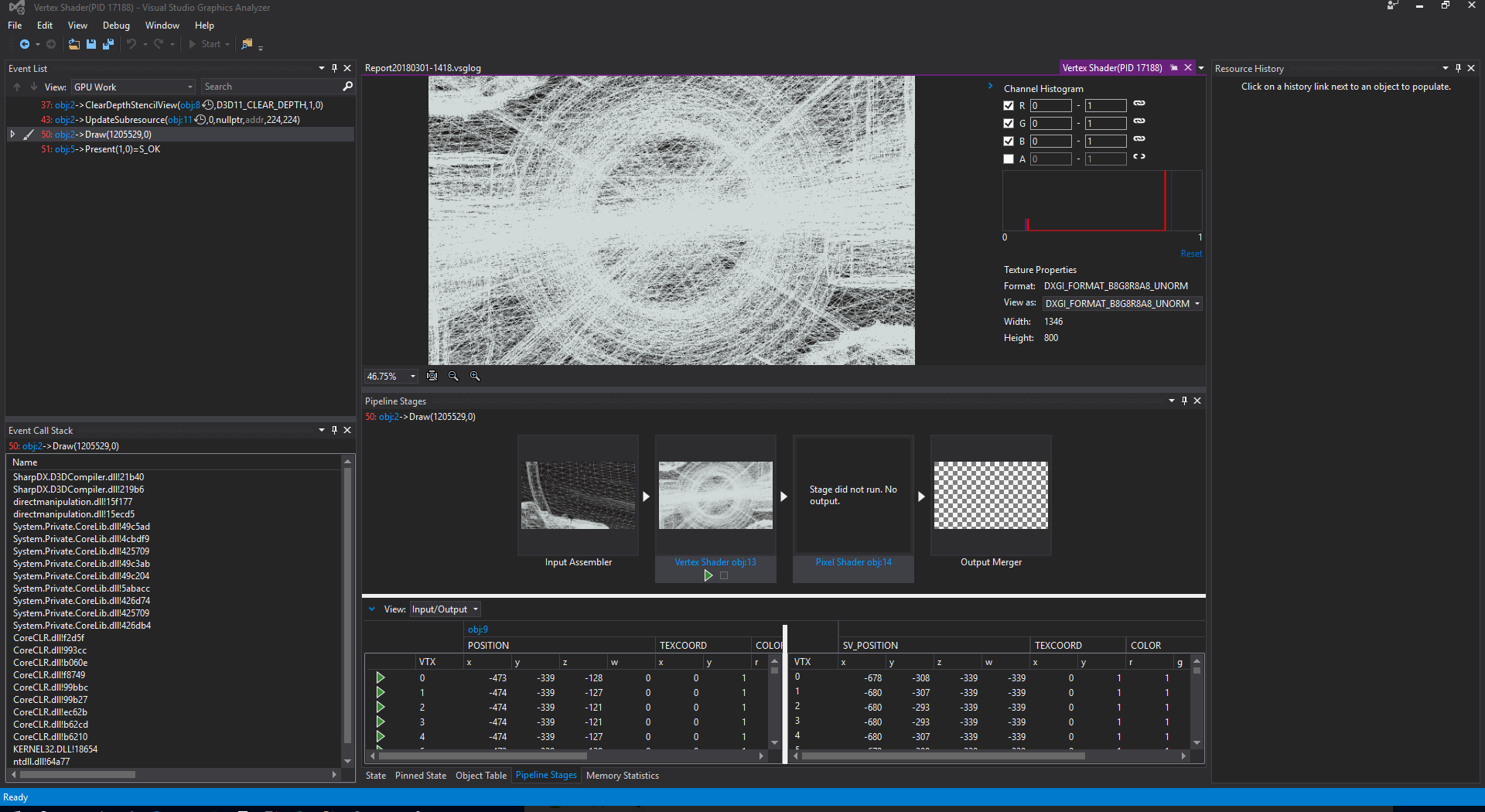
Meanwhile I do get the following result in the debugger (at least something):VSGA2.thumb.png.c5078373299e9510b2bf897f5f7ad915.png

Based on the view I can ensure that the view would be absolutely correct. It was intentional to render the front of the car. But somehow no matter if I set the X position to -1000f or -1000f I do get the same result, like this was the maxmimum I can move away from the car ... I expected it to be fully visible (even small) with -10000f. Nonetheless the World-View seems correct. Question is: Why is there still no PS stage running?

I'm absolutely lost here...

World:


    Row1: {X:1 Y:0 Z:0 W:0}
    Row2: {X:0 Y:-4,371139E-08 Z:-1 W:0}
    Row3: {X:0 Y:1 Z:-4,371139E-08 W:0}
    Row4: {X:0 Y:0 Z:0 W:1}

View:


    Row1: {X:0 Y:0 Z:-1 W:0}
    Row2: {X:0 Y:1 Z:0 W:0}
    Row3: {X:1 Y:0 Z:0 W:0}
    Row4: {X:-250 Y:0 Z:-10000 W:1}

Projection


    Row1: {X:1,434897 Y:0 Z:0 W:0}
    Row2: {X:0 Y:2,414213 Z:0 W:0}
    Row3: {X:0 Y:0 Z:-1,00002 W:-1}
    Row4: {X:0 Y:0 Z:-0,100002 W:0}

I'm not sure if this is correct. I'm lacking the background knowledge for this to validate... And it's been years since I actively worked with DirectX / game dev, so I'm a bit rusty. But I'm doing everything rather standard-ish, so it shouldn't be so hard...

turanszkij
turanszkij

Well, in the world-matrix, are there supposed to be such low values as -4,371139E-08? Seems like some error to me. Also, is your pixel shader the simplest it can be? I mean that it shouldn't have any discard or clip operations and output a simple float4(1,0,0,1) color to SV_Target0?

IonThrust
IonThrust

Just take a look at the shader (relatively at the start of the post I linked it on pastebin). Not the most simple one, but it basically just outputs the input color. At least it would output something, but since it never even runs it doesn't matter anyway.

For the world matrix: All I do is using Matrix.RotationX(MathUtil.DegreesToRadians(-90f)); so it should be correct. Else it would be a bug on SharpDX's side which I doubt. And as you can see in the debugger: It seems to be the right matrix, or why else would it render it correctly positioned and rotated?

EDIT: I just tried setting the X-position of the view matrix to 0f: Everything's black in the VS output. Set to 500f: A closer shot than in the screenshot above but everything upside-down. Set to 1000f it's a bit further away and not upside-down.

Hell, I'm not good at maths but what the heck is going on here? Why does the view matrix swap when I change the X coordinate of the camera? It just doesn't make any sense to me...

swiftcoder
swiftcoder

Your matrices looks fine enough. But how big is this model that you need the camera to be 250 units back from it, and 10,000 units sideways? Especially since the world matrix seems to place this model at the origin...

Tristam MacDonald. Ex-BigTech Software Engineer. Future farmer. [https://trist.am]
IonThrust
IonThrust

The model was exported from a CAD program with metric units. Would it help to normalize the model? I do need a preserved coordinate system since I need to highlight certain points which I only have in the original scale.

Auskennfuchs
Auskennfuchs

You are using a float4 as Position in VertexShaderInput. Are you sure your vertex buffer contains vertices with 4 coordinates?
In most cases only vector3 (x,y,z) are stored and you use float4(input.Position,1.0f) as input at the matrix multiplication.
Just guessing, but the vertexshader output in your debug view looks good at first sight.

One more note:

float4 AmbientColor = float4(1, 1, 1, 1);
float AmbientIntensity = 0.1;
return mul(input.Color, AmbientColor * AmbientIntensity);

this will result in a barely visible output because you basically doing input.Color.rgba*0.1 and this will also effect the alpha channel (transparency)

IonThrust
IonThrust

I set the FieldOffset in my vertex-struct explicitly so it should actually map the Vector3 into a float4 without misaligning the following ones. Nonetheless the VS stage output does look correct and meanwhile me and our mathematician checked the matrices. It does seem to be correct. Weird thing though is that I can't move further away than ~1000f from the car. It just clamps to that.

Yeah I already figured so. But as long as the PS won't even run it doesn't matter anyway ...

EDIT: I changed it to Vector3 but it doesn't change anything at all. Moreover ever since I placed the camera behind the car model looking at it, I don't get any values anymore. EVERYTHING output by the VS is now 0 (except passed through values for color and texture). Debugging it I only see that it completely skips the matrix multiplication. Allocates the output structure and jumps right down to where I pass through the PS-required values and that's it... Seriously. Whats wrong with it all?! That's beyond weird behavior...

Auskennfuchs
Auskennfuchs

Mmh that's really strange. I would try to replace this complex model to a simple cube, so it's easier to see and debug. Than maybe try to switch from RH to LH, because default on DirectX is the left handed coordinate system. I can't see how you update the matrices but are you transposing them first or have you loaded the shaders with the row/column-major flag (can't remember exactly right now).

IonThrust
IonThrust

Well, I initially tried to render a quad which resulted in the same behavior: No PS ran but I could see the result in the IA and VS stages when debugging.

25 minutes ago, Auskennfuchs said:

are you transposing them first or have you loaded the shaders with the row/column-major flag (can't remember exactly right now).

Nope I forgot about that initially but did randomly try it with transposed matrices. I've read only recently that HLSL uses a different alignment by default - so now I do use "SetMatrixTranspose()" on the effect parameters. But it does not change anything.

I still don't understand why the vertex shader now skips the transformations ... I run over it with a debugger and it exactly skips the three transformations. This since I changed the input layout from float4 to float3.

My guess now is that this is some strange issue with Intel Integrated Graphics. I'm currently installing VS 17 and NVidia NSight on our CAD laptop which has a Nvidia Quadro in it. Maybe I'll find out more with that. Moreover I'm not sure what could possibly be the source of the issue since the Visual Studio Graphics Debugger is so incredibly instable. Exceptions and crashes on and on.

Alternatively it might be a problem with SharpDX and UWP. It's rather unusual since the codebase should be the same, but that's my only guess so far... UWP support in SharpDX seems to be rather untested and might have some issues nonetheless. Probably my last resort to contact xoofx directly ...


EDIT: Major break-through! The non-existing output was my own fault. I set local variables for each transformation step as test yesterday. I forgot to set the last position value into the output, though. And now I even see the PS running!


PixelShaderInput VS_Ambient(VertexShaderInput input)
{
	PixelShaderInput i;
	
	// Normalize first
	float4 world = mul(input.Position, World);
	float4 worldView = mul(world, View);
	float4 worldViewProj = mul(worldView, Projection);

	i.Position = worldViewProj;
	i.Texture = input.Texture;
	i.Color = input.Color;

	return i;
}

Can it be that HLSL does not support writing into the input struct's fields? Since I explicitly set world, worldView and worldViewProj it works ...

The result is still some weird mix of random lines but it's something.

EDIT2: Nope. Works, too. Okay. I'm highly confused... that's something im my 13 years of programming: Randomly fixing an issue that took me days and then trying to revert it to find out what the problem was...

EDIT3: I think I know the issue. It was some mapping issue from the vertex struct to the actual buffer. It's obviously not enough to have a Vector3 field and explicitly setting a offset. My guess is that the graphics card does not set the w-coordinate to 0 by default but uses the value that is currently at that memory location. Thus the w-value was invalid and the whole thing broke. Now I do set a Vector3 by constructor and create a Vector4 out of it with w set to 1.

turanszkij
turanszkij
18 minutes ago, IonThrust said:

Can it be that HLSL does not support writing into the input struct's fields? Since I explicitly set world, worldView and worldViewProj it works ...

No way, I use that all the time. Very strange that this would fix it for you...

Auskennfuchs
Auskennfuchs
26 minutes ago, IonThrust said:

float4 world = mul(input.Position, World);

float4x4 is the output of a matrix multiplication. At least there should be a warning when compiling the shader with implicit truncation or something.

IonThrust
IonThrust
1 minute ago, Auskennfuchs said:

float4x4 is the output of a matrix multiplication. At least there should be a warning when compiling the shader with implicit truncation or something.

Since it's a vector-translation it's okay that way. There are plenty of samples which show this exact approach. And it does work fine. Like I said, it was most likely a mapping issue - the w-coordinate had the value that was currently at this memory location.

Topic Locked

This topic has been locked by a moderator. New replies are not allowed.

Sign in to reply to this topic.