GameDev.net gamedev.net
🔒 Locked 🎮 Unity

Simple trig problem driving me crazy

Started by Catch_0x16 Jul 13, 2018 at 8:46 PM 13 replies 8.5k views
Original Post
Catch_0x16
Catch_0x16

Hello folks,

I am fighting with a really simple problem that has been driving me nuts. I'm usually fairly confident with trigonometry and I'm pretty sure the issue here is not the math but in some behavior behind the scenes.

A bit of background - basically I'm developing my own little 2D game engine using C++, in my free-time for fun. I work with game technology and simulation products IRL so for the most part this has been plain sailing. I am using Box2D for physics, and SFML for rendering.

My game at current has a few space ships flying around via keyboard and AI input. These space ships need exhausts! So I'm currently in the process of getting a 'component' system in place, however my problem is that the animated exhaust sprites are not going where I want them to.

When the base GameObject class runs it's update method, it does the following:

  1. Queries the physics object for a position
  2. Converts the physics position to a pixel position (x10 scale factor)
  3. Moves the sprite to the new position
  4. Passes new position to all 'component' objects into their 'UpdateComponent' method
  5. Components move their sprite to the correct position

However the exhaust sprites seem to wander around all over the place, in no way representing where I actually want them to be! This should have been a simple case of:

  • newPosition = (sin(rotationRadians) * offsetX, cos(rotationRadians) * offsetY) + oldPosition

Here is the current code:


void Exhaust::UpdateComponent(const Vec2f & position, float rotationDegrees, float deltaTime)
{
	float angleRad = DEGREES_TO_RADIANS(rotationDegrees);
	float offsetX = sin(angleRad) * mOffset.x;
	float offsetY = cos(angleRad) * mOffset.y;

	sf::Vector2f newPos(position.x + offsetX, position.y + offsetY);

	mSprite->SetRotation(rotationDegrees);
	mSprite->SetPosition(newPos);
	mSprite->Update(deltaTime);

#ifdef _DEBUG
	sf::Vector2f p(position.x, position.y);
	stringstream ss;
	ss << rotationDegrees;
	DebugUtils::DrawCross(p, 8, sf::Color::Green, ss.str());
	DebugUtils::DrawCross(newPos, 8, sf::Color::Green);
	DebugUtils::DrawLine(p, newPos, sf::Color::Green);
	cout << rotationDegrees << endl;

	DebugUtils::DrawSpriteOutline(*mSprite->GetGraphic(), sf::Color::Green);
#endif // _DEBUG
}


And here is a gif of it all going wrong! (link below)

Gif of game engine problem

Any help would be much appreciated, even if it is just a thought of where the problem might be originating from!

Thanks!

Oberon_Command
Oberon_Command
1 minute ago, Guy Leonard Thomas said:

newPosition = (sin(rotationRadians) * offsetX, cos(rotationRadians) * offsetY) + oldPosition

Shouldn't sin and cos be reversed there? Ie.


newPosition = (cos(rotationRadians) * offsetX, sin(rotationRadians) * offsetY) + oldPosition


Catch_0x16
Catch_0x16

Hah, Thanks! yeah I think you're right. Problem still persists though sadly.

Still wonky but better!

Anyone else have any ideas what might be causing this?

gaxio
gaxio

I haven't dug into this problem but I think you should look into using Transforms. This is what Transforms do, transform a local coordinate space into another space like the global, camera or viewport space. You're going to be doing trig everywhere if you don't use transforms and it just seems like there's a super-simple solution already done for you in the library you're already using and you're not using it.

Catch_0x16
Catch_0x16
5 minutes ago, gaxio said:

I haven't dug into this problem but I think you should look into using Transforms. This is what Transforms do, transform a local coordinate space into another space like the global, camera or viewport space. You're going to be doing trig everywhere if you don't use transforms and it just seems like there's a super-simple solution already done for you in the library you're already using and you're not using it.

This sounds entirely like a good idea, I'll look into transforms, thanks!

Michael LaserBlade Scoggin

The captures don't load for me, but I am wondering why the rotation would be impacting the position.

I assume mOffset are members, but you aren't setting them with this method that is already taking an offset in.

This math would make since if you passing a rotation and a speed:

Velocity.y=sin(angle)*speed

Velocity.x=cos(angle)*speed

Newpos=oldpos+velocity.

Perhaps we need more context to understand what you are trying to do, but I don't see why you are doing this particular math.

Catch_0x16
Catch_0x16
3 minutes ago, Michael LaserBlade Scoggin said:

The captures don't load for me, but I am wondering why the rotation would be impacting the position.

I assume mOffset are members, but you aren't setting them with this method that is already taking an offset in.

This math would make since if you passing a rotation and a speed:

Velocity.y=sin(angle)*speed

Velocity.x=cos(angle)*speed

Newpos=oldpos+velocity.

Perhaps we need more context to understand what you are trying to do, but I don't see why you are doing this particular math.

Hey mate,

No probs, I should've explained. So basically the offset parameters are supplied via a config file, and describe the offset in pixels, from the centre of the sprite, that the component sprite(s) should be rendered. So for example, the exhaust jet for this particular sprite is at offset (-50,-14) from the center of the sprite.

When the sprite rotates, the sub-sprite should too

Michael LaserBlade Scoggin

Ahh, that is definitely what transform matrices are for. You multiply the hierarchy together to get your final transformation. But without them you want

The math you want is a vector rotation:


 x' = x cos θ − y sin θ
 y' = x sin θ + y cos θ

Where theta is the rotation of the parent.

x' and y' will be rotated versions of x and y.

You also have to translate by adding your parents position to yours.

There can be a scaling as well.

All of these can be represented as a matrix individualy and multiplied to get to make a 'transform'.

Order matters.

It might worth noting that exhaust is the type of thing your ship would 'drop' and only it's spawn would be relative to the ship and it's position would become fixed or at least detached from the ship imeddiately. You could add some drift to it though for a cool effect.

Catch_0x16
Catch_0x16

Yeah I feel like I really should've been using transforms from the beginning - didn't know SFML had them! (Didn't look for them to be fair). Oh well silly me :D

Thanks for the input folks, will post a working image once I've fixed it

Michael LaserBlade Scoggin

No problem. I do recommend studying up on vector transforms. Knowing how they work will make it easier to spot what is going on when things aren't quite working.

Scouting Ninja
Scouting Ninja

Assuming you want to rotate a point around another point, it is hard to tell from this snipped what you are doing: The problem with your math is that you are using the vector instead of the magnitude of the vector.

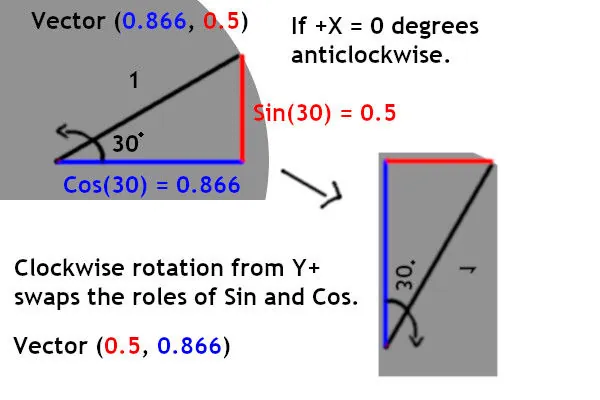
First, sin and cos depends on the rotation direction, so if you are using clockwise rotation then you were correct from the start. If not you need to reverse it.

RotationFlip.jpg.1e77fbec19bc0471c4146888c89e02ea.jpg

So this part:


	float angleRad = DEGREES_TO_RADIANS(rotationDegrees);
	float offsetX = sin(angleRad) * mOffset.x;
	float offsetY = cos(angleRad) * mOffset.y;

// This is what it should be
	float angleRad = DEGREES_TO_RADIANS(rotationDegrees);
	float offsetX = sin(angleRad) * mOffset.magnitude;
	float offsetY = cos(angleRad) * mOffset.magnitude;


To calculate magnitude you can use pythagoras theorem. https://en.wikipedia.org/wiki/Pythagorean_theorem It is just Root((A*A) + (B*B))

Note: @Michael LaserBlade Scoggin method should be better on performance if it works for you , because calculating root is slow-ish.


Tried and tested Unity script:

Spoiler


using System.Collections;
using System.Collections.Generic;
using UnityEngine;

public class RotateAround : MonoBehaviour {

    public GameObject Target;
    public float RotationInDegree = 30f;

    Vector3 Offset = Vector3.zero;
	// Use this for initialization
	void Start () {
        Offset = Target.transform.position - this.transform.position;//This should be captured once
	}
	
	// Update is called once per frame
	void Update () {
        this.transform.position =
            (new Vector3(Mathf.Sin(RotationInDegree*Mathf.Deg2Rad), Mathf.Cos(RotationInDegree * Mathf.Deg2Rad), 0f)* Offset.magnitude);
    }
}


Catch_0x16
Catch_0x16

Thanks all, as promised a working gif.

I ended up using transforms in the end, I didn't realize they were implemented so well in SFML (doh!)

Thanks also to @Scouting Ninja for a great response :)

gaxio
gaxio
2 hours ago, Guy Leonard Thomas said:

Thanks all, as promised a working gif.

I ended up using transforms in the end, I didn't realize they were implemented so well in SFML (doh!)

Thanks also to @Scouting Ninja for a great response :)

I'm glad it worked out for you. Trig is one of those things that I have to draw out or I don't understand and if your head is not in that space often then it's easy to get things backwards or just forget how it works, causing issues like this that just leave you scratching your head. Thankfully, this is where abstractions come in.

You're one step away from a transform hierarchy now, a general form of having "game object" with local positions, rotations and scales and a parent game object that has all of the same including a partent game object. All the way up to a root node. This allows you to just take entire parts of your scene and move them around naturally.

Catch_0x16
Catch_0x16

I agree, this is actually what I'm doing. I was previous passing down the position and rotation of the parent object, and moving the sub-objects around to suit the new position.

Having a proper transformation matrix makes this really easy now as I simply pass a reference to the parent transform, far fewer lines of code!

Topic Locked

This topic has been locked by a moderator. New replies are not allowed.

Sign in to reply to this topic.