GameDev.net gamedev.net
🔒 Locked

Huge memory leaks when I load textures

Started by theScore Mar 3, 2020 at 3:35 PM 19 replies 15.2k views
Original Post
theScore
theScore

Hi !

I have memory leaks in this code, but I don't know how I could fix them.

Can you help me ?

DWORD WINAPI D3D11Rendering::texturesLoading(LPVOID lpParam)

{


LoadingThreadsParameters* parameters = (LoadingThreadsParameters*)lpParam;


for (unsigned short i = parameters->beginning; i <= parameters->end; i++)

{

 string textureName(objectsData[i].textureName);


 //_ASSERT(i != 236);


 if (textureName.length() > 1)

 {


  string textureDirectory("./Assets/Textures/");


  textureName.replace(textureName.length() - 4, 4, ".jpg");


  string textureFilePath = textureDirectory + textureName;


  // Load the texture and initialize an ID3D11Texture2D object.

  HRESULT result = D3DX11CreateTextureFromFile(deviceDX11, textureFilePath.c_str(), NULL, NULL, (ID3D11Resource **)&textureData[i], NULL);


  D3D11_SHADER_RESOURCE_VIEW_DESC shaderResourceViewDesc;


  // Fill in the D3D11_SHADER_RESOURCE_VIEW_DESC structure.

  shaderResourceViewDesc.Format = DXGI_FORMAT_R8G8B8A8_UNORM;// textureDesc.Format;

  shaderResourceViewDesc.ViewDimension = D3D11_SRV_DIMENSION_TEXTURE2D;

  shaderResourceViewDesc.Texture2D.MostDetailedMip = 0;

  shaderResourceViewDesc.Texture2D.MipLevels = 1;


  textureSRV.resize(Loader3ds::nbObj+1);

  normalMapSRV.resize(Loader3ds::nbObj + 1);


  // Create the shader resource view.

  HRESULT hResult = deviceDX11->CreateShaderResourceView((ID3D11Resource*)textureData[i], &shaderResourceViewDesc, &textureSRV[i]);


  textureData[i]->Release();

  textureData[i] = NULL;


  if (strstr(objectsData[i].textureName, "SKY")!=0)

   backgroundIndex = i;


  //Loading of the normal maps

  if ( ( strstr(textureFilePath.c_str(), "backgroun") == 0 ) /*|| (strstr(textureFilePath.c_str(), "badTree") == 0 )*/)

  {

   string textureDirectory("./Assets/Textures/");


   textureName.replace(textureName.length() - 4, 4, "");


   string textureFilePath = textureDirectory + textureName;


   textureFilePath += string("_NormalMap.png");


   // Load the texture and initialize an ID3D11Texture2D object.

   HRESULT result = D3DX11CreateTextureFromFile(deviceDX11, textureFilePath.c_str(), NULL, NULL, (ID3D11Resource**)&normalMapTexture[i], NULL);


   D3D11_SHADER_RESOURCE_VIEW_DESC shaderResourceViewDesc;


   // Fill in the D3D11_SHADER_RESOURCE_VIEW_DESC structure.

   shaderResourceViewDesc.Format = DXGI_FORMAT_R8G8B8A8_UNORM;// textureDesc.Format;

   shaderResourceViewDesc.ViewDimension = D3D11_SRV_DIMENSION_TEXTURE2D;

   shaderResourceViewDesc.Texture2D.MostDetailedMip = 0;

   shaderResourceViewDesc.Texture2D.MipLevels = 1;


   //textureSRV.resize(Loader3ds::nbObj + 1);

   //normalMapSRV.resize(Loader3ds::nbObj + 1);


   // Create the shader resource view.

   HRESULT hResult = deviceDX11->CreateShaderResourceView((ID3D11Resource*)normalMapTexture[i], &shaderResourceViewDesc, &normalMapSRV[i]);


//     normalMapTexture[i]->Release();

//     normalMapTexture[i] = NULL;

   MemoryUtilities::SafeDeleteD3Dobject(normalMapTexture[i]);

  }


 }

}

_CrtDumpMemoryLeaks();

/*MemoryUtilities::SafeDelete(lpParam);

MemoryUtilities::SafeDelete(parameters);*/

return 0;

}


void D3D11Rendering::parallelizeTextureLoading()

{

LoadingThreadsParameters loadingThreadsParameters0;

LoadingThreadsParameters loadingThreadsParameters1;

LoadingThreadsParameters loadingThreadsParameters2;

LoadingThreadsParameters loadingThreadsParameters3;

LoadingThreadsParameters loadingThreadsParameters4;

LoadingThreadsParameters loadingThreadsParameters5;

LoadingThreadsParameters loadingThreadsParameters6;

LoadingThreadsParameters loadingThreadsParameters7;


SetThreadPriority(handleLoadingTexturesThread[0], THREAD_PRIORITY_TIME_CRITICAL);


SetThreadPriority(handleLoadingTexturesThread[1], THREAD_PRIORITY_TIME_CRITICAL);


SetThreadPriority(handleLoadingTexturesThread[2], THREAD_PRIORITY_TIME_CRITICAL);


SetThreadPriority(handleLoadingTexturesThread[3], THREAD_PRIORITY_TIME_CRITICAL);


SetThreadPriority(handleLoadingTexturesThread[4], THREAD_PRIORITY_TIME_CRITICAL);


SetThreadPriority(handleLoadingTexturesThread[5], THREAD_PRIORITY_TIME_CRITICAL);


SetThreadPriority(handleLoadingTexturesThread[6], THREAD_PRIORITY_TIME_CRITICAL);


SetThreadPriority(handleLoadingTexturesThread[7], THREAD_PRIORITY_TIME_CRITICAL);


loadingThreadsParameters0.beginning = 0;

loadingThreadsParameters0.end = nbObj / 8;


handleLoadingTexturesThread[0] = CreateThread(

 NULL,                   // default security attributes

 0,                      // use default stack size  

 &D3D11Rendering::texturesLoading,       // thread function name

 &loadingThreadsParameters0,          // argument to thread function  

 0,                      // use default creation flags  

 0);


loadingThreadsParameters1.beginning = (nbObj / 8)+1;

loadingThreadsParameters1.end = (nbObj/8)*2;


handleLoadingTexturesThread[1] = CreateThread(

 NULL,                   // default security attributes

 0,                      // use default stack size  

 &D3D11Rendering::texturesLoading,       // thread function name

 &loadingThreadsParameters1,          // argument to thread function  

 0,                      // use default creation flags  

 0);


loadingThreadsParameters2.beginning = ((nbObj / 8) * 2)+1;

loadingThreadsParameters2.end = (nbObj / 8) * 3;


handleLoadingTexturesThread[2] = CreateThread(

 NULL,                   // default security attributes

 0,                      // use default stack size  

 &D3D11Rendering::texturesLoading,       // thread function name

 &loadingThreadsParameters2,          // argument to thread function  

 0,                      // use default creation flags  

 0);


loadingThreadsParameters3.beginning = ((nbObj / 8) * 3) +1 ;

loadingThreadsParameters3.end = (nbObj / 8) * 4;


handleLoadingTexturesThread[3] = CreateThread(

 NULL,                   // default security attributes

 0,                      // use default stack size  

 &D3D11Rendering::texturesLoading,       // thread function name

 &loadingThreadsParameters3,          // argument to thread function  

 0,                      // use default creation flags  

 0);


loadingThreadsParameters4.beginning = ((nbObj / 8) * 4)+1;

loadingThreadsParameters4.end = (nbObj / 8) * 5;


handleLoadingTexturesThread[4] = CreateThread(

 NULL,                   // default security attributes

 0,                      // use default stack size  

 &D3D11Rendering::texturesLoading,       // thread function name

 &loadingThreadsParameters4,          // argument to thread function  

 0,                      // use default creation flags  

 0);


loadingThreadsParameters5.beginning = ((nbObj / 8) * 5)+1;

loadingThreadsParameters5.end = (nbObj / 8) * 6;


handleLoadingTexturesThread[5] = CreateThread(

 NULL,                   // default security attributes

 0,                      // use default stack size  

 &D3D11Rendering::texturesLoading,       // thread function name

 &loadingThreadsParameters5,          // argument to thread function  

 0,                      // use default creation flags  

 0);


loadingThreadsParameters6.beginning = ((nbObj / 8) * 6)+1;

loadingThreadsParameters6.end = (nbObj / 8) * 7;


handleLoadingTexturesThread[6] = CreateThread(

 NULL,                   // default security attributes

 0,                      // use default stack size  

 &D3D11Rendering::texturesLoading,       // thread function name

 &loadingThreadsParameters6,          // argument to thread function  

 0,                      // use default creation flags  

 0);


loadingThreadsParameters7.beginning = ((nbObj / 8) * 7)+1;

loadingThreadsParameters7.end = (nbObj);


handleLoadingTexturesThread[7] = CreateThread(

 NULL,                   // default security attributes

 0,                      // use default stack size  

 &D3D11Rendering::texturesLoading,       // thread function name

 &loadingThreadsParameters7,          // argument to thread function  

 0,                      // use default creation flags  

 0);


WaitForMultipleObjects(8, handleLoadingTexturesThread, TRUE, INFINITE);


CloseHandle(handleLoadingTexturesThread[0]);

CloseHandle(handleLoadingTexturesThread[1]);

CloseHandle(handleLoadingTexturesThread[2]);

CloseHandle(handleLoadingTexturesThread[3]);

CloseHandle(handleLoadingTexturesThread[4]);

CloseHandle(handleLoadingTexturesThread[5]);

CloseHandle(handleLoadingTexturesThread[6]);

CloseHandle(handleLoadingTexturesThread[7]);

}

To free memory, I use this :

template <typename C>
    static void SafeDeleteD3Dobject(C& pointer)
    {
        if (pointer > 0x0000000000000000)
        {
            pointer->Release();
            pointer = nullptr;
        }
    }

cozzie
cozzie

Not sure if it helps, but if you want to prevent manual refcounting/ releasing issues, you could use CComPtr for the texture objects.

Crealysm game & engine development: http://www.crealysm.com

Looking for a passionate, disciplined and structured producer? PM me
SyncViews
SyncViews

What exactly is the object that leaks?

Do you get the leak without the threads (just call the 8 thread functions sequentially)? The CRT leak report should tell you the allocation that leaked, which you can set as a breakpoint.

You can also use the MSVC diagnostic tools to take a heap snapshot before and after your code. This will let you see all the objects allocated including a stack trace to that allocation.

For D3D resources themselves, the D3D11 debug will tell you which references leaked with D3D11_CREATE_DEVICE_DEBUG (you can also name objects for easier debugging with resource->SetPrivateData(WKPDID_D3DDebugObjectName, name_len, name).

Definitely use some form of RAII smart "pointer" for all resources (regular pointers, ref counted COM/D3D, handles, etc.).

You shouldn't use if (pointer > 0x0000000000000000) to check a pointer, use if (pointer) or if (pointer != nullptr).

theScore
theScore

The problem is that I don't know from which variable(s) come the leak even with the CRT leak report, it does not indicate any variable except textureDirectory which leaks, I don't know why.

The smart pointers work with D3D variables ? ( it is just to be sure )

If yes, which one is the best between unique_ptr and CComPtr ( which I know less ) ?

SyncViews
SyncViews

textureDirectory is an std::string, I think it is highly unlikely that leaks, unless you are breaking further C++ rules in code not being shown (e.g. you don't want any “goto” or “jump” or "TerminateThread", “__endthread”, “ExitThread”, etc., that can bypass destructors, don't try and recover from access violations or similar exceptions).

theScore said:
The problem is that I don't know from which variable(s) come the leak even with the CRT leak report

That is what the breakpoint is for or the MSVC memory diagnostics.

https://docs.microsoft.com/en-us/visualstudio/debugger/finding-memory-leaks-using-the-crt-library?view=vs-2019

int main()
{
    _CrtSetDbgFlag(_CRTDBG_ALLOC_MEM_DF | _CRTDBG_LEAK_CHECK_DF);
    std::vector<int> *not_leaky = new std::vector<int>();
    std::vector<int> *leaky = new std::vector<int>();
    for (int i = 0; i < 10; ++i)
    {
        not_leaky->push_back(i);
        leaky->push_back(i);
    }
    delete not_leaky;
}

Detected memory leaks!

Dumping objects ->

{188} normal block at 0x0000020F7B615890, 52 bytes long.

Data: < > 00 00 00 00 01 00 00 00 02 00 00 00 03 00 00 00

{174} normal block at 0x0000020F7B613180, 16 bytes long.

Data: <@Ra{ > 40 52 61 7B 0F 02 00 00 00 00 00 00 00 00 00 00

{173} normal block at 0x0000020F7B615240, 32 bytes long.

Data: < 1a{ Xa{ > 80 31 61 7B 0F 02 00 00 90 58 61 7B 0F 02 00 00

Object dump complete.

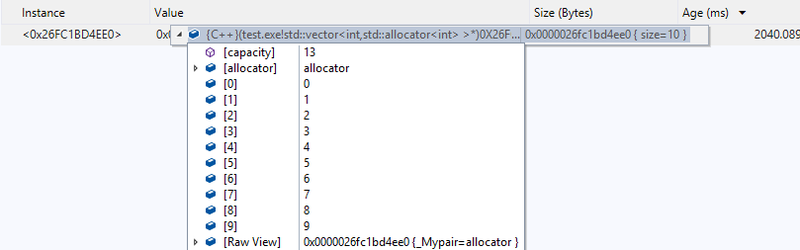
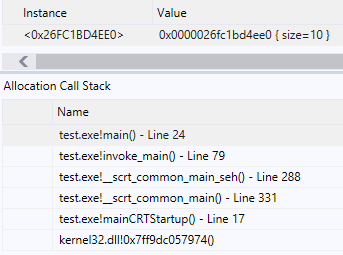
So taking the first one {188} here, so add “_crtBreakAlloc = 188;” or set it directly in the debugger (useful if you want to note down what all 3 are without restarting, 173,174,188). Then MSVC will stop on a breakpoint inside “ucrtbase.dll”, looking up the stack frames will see “std::vector>::push_back(const int & _Val)” and just above that the line for “leaky->push_back(i);".

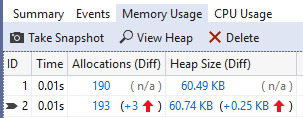
Running with the “memory usage” MSVC tools you can visually inspect snapshots during the program looking for things you don't expect to be there, e.g. take a snapshot before and after a function using line breakpoints.

theScore said:
If yes, which one is the best between unique_ptr and CComPtr ( which I know less ) ?

Well largely for different purposes, unique_ptr for general memory (new/delete), CComPtr for COM objects (AddRef and Release). It is possible to use unique_ptr with COM types (or “handles” and other resources), you have to create a “deleter” that calls “p->Release()” instead of “delete p”, and in some cases provide a “pointer” type (where “T*” is not wanted). Worth knowing the pattern to make these incase need a custom one (ref counting with a different API, a resource where “0” is a valid ID (like INVALID_HANDLE_VALUE, INVALID_SOCKET being -1).

No other code outside a RAII class should ever need to call a “free” function.

theScore
theScore

Thank you your answer, I am going to try your suggestions, I 'll come back if I have questions.

theScore
theScore

I took a snapshot of the memory usage with visual studio and the heap is allocated at about 150 MBytes whereas the app occupies 3 GByte in memory.

The variables allocated on the heap at this time seem to be correct and don't explain why the app is so big in memory.

If I launch the app ( which is a game ) the first time it occupies about 300 MBytes in memory.Then when the level is reloaded ( just after going in the destructor ), my app occupies 3 GBytes in the RAM, and a third time when the level is loaded ( so 3 loads in a row ), my app takes about 6 GBytes in memory.

My question would be : am I not in the case of memory fragmentation ? What do you think about it ?

SyncViews
SyncViews

At what point should the level be “unloaded”? Take a snapshot from before the level, and from after, there shouldn't be a major increase over the 150MB after the level is unloaded.

Remember to check for Direct3D leaks separately (which may use RAM/virtual-memory to store various things internally) with the debug device.

Also are you doing any manual “VirtualAlloc” calls yourself then with a custom allocator? Those will also bypass the debug features as you are calling the OS directly so it won't know the types, and it won't know how you split the memory up.

I never saw memory fragmentation like that, espiecally not in 64bit. You would need a pretty bad allocator (Windows I believe will now always default to low fragmentation heap) and an allocation pattern almost designed to cause fragmentation (although leaks could make fragmentation worse, as you now have long-lived bits scattered around you shouldn't have).

EDIT: If you are using custom allocators, this document describes how they can be integrated with the tools. https://docs.microsoft.com/en-us/visualstudio/profiling/custom-native-etw-heap-events?view=vs-2019

theScore
theScore

I took a snapshot before and after the next level loading and some variables have doubled or tripled compared to the moment before the level loading. But it does not explain why the app takes 300 MBytes before and 2 GBytes after the loading of the level.

The heap size before is at 70 MB and at 156 MB after.

cozzie
cozzie

CcomPtr works perfect for d3d9 (texture) objects

Crealysm game & engine development: http://www.crealysm.com

Looking for a passionate, disciplined and structured producer? PM me
SyncViews
SyncViews

theScore said:

I took a snapshot before and after the next level loading and some variables have doubled or tripled compared to the moment before the level loading. But it does not explain why the app takes 300 MBytes before and 2 GBytes after the loading of the level.

The heap size before is at 70 MB and at 156 MB after.

Did you check for Direct3D11 leaks? For example it seems certain textures/objects will take up virtual memory, but not even RAM (mapping to VRAM or something internally? I never investigated how this works in modern OS/GPU/Driver/D3D).

e.g. if I create 10x 32bit 496x4096 textures, in Task Manager

And so that commit size change is not seen in MSVC (although in this case it does see my "d3d11::Texture" wrapper object allocations):

However Direct3D11 lets me know I did that even if I didn't have the “d3d11::Texture” to find (or otherwise leaked the COM reference itself).

D3D11 WARNING: Live ID3D11Device at 0x000001D877519320, Refcount: 42 [ STATE_CREATION WARNING #441: LIVE_DEVICE]
D3D11 WARNING: Live ID3D11Context at 0x000001D87751DF40, Refcount: 0, IntRef: 1 [ STATE_CREATION WARNING #2097226: LIVE_CONTEXT]

D3D11 WARNING: Live ID3D11Texture2D at 0x000001D877644350, Refcount: 1, IntRef: 1 [ STATE_CREATION WARNING #425: LIVE_TEXTURE2D]
D3D11 WARNING: Live ID3D11ShaderResourceView at 0x000001D877644760, Refcount: 1, IntRef: 0 [ STATE_CREATION WARNING #427: LIVE_SHADERRESOURCEVIEW]

“IntRef” is a bunch of stuff being kept for internal reasons (except ID3D11Device itself, which seems to only have 1 count for some reason), but I can see if I go down the object list a bunch of ID3D11Texture2D and ID3D11ShaderResourceView with actual references, the extra textures I created.

And you can name objects for easier reporting / diagnostics.

d3dtex->SetPrivateData(WKPDID_D3DDebugObjectName, (UINT)str.size(), str.data());

D3D11 WARNING: Live ID3D11Texture2D at 0x000001DF47E47090, Name: Test Texture 1, Refcount: 1, IntRef: 1 [ STATE_CREATION WARNING #425: LIVE_TEXTURE2D]
D3D11 WARNING: Live ID3D11Texture2D at 0x000001DF47E3E5A0, Name: Test Texture 2, Refcount: 1, IntRef: 1 [ STATE_CREATION WARNING #425: LIVE_TEXTURE2D]
D3D11 WARNING: Live ID3D11Texture2D at 0x000001DF47E3E9B0, Name: Test Texture 3, Refcount: 1, IntRef: 1 [ STATE_CREATION WARNING #425: LIVE_TEXTURE2D]

theScore
theScore

I am trying several solutions, I tried ComPtr instead of CComPtr, the first one seems not to resolve the problem, do you think it is a mistake to use ComPtr instead of CComPtr ?

theScore
theScore

I have found the source of the leak, it comes from the normal map texture.

I have put the normal maps allocation in commentary, and I have no memory leak.

The problem is now to know how I can release the memory of the variable “normalMapTexture”.

I tried the Release method, I tried the Reset() method and I am using ComPtr, nothing of these works.

Would you have an idea ?

SyncViews
SyncViews

If it's an actual leak (that ComPtr can solve), like I said, you will see it in the Direct3D diagnostics like my example.

It is possible you have kind of a "leak" in that you still have an actual reference you forgot about. Are you storing it (or the normalMapSRV that refers to it!) in some sort of container (vector, map, unordered_map, etc.), they might be keeping it “alive" much longer than you think, but it still gets cleaned up properly when you finish and clear such a container object.

theScore
theScore

I tried like in your example the Direct3D diagnostics but I got nothing about textures.

I am going to try what you said for the container.

theScore
theScore

Just a question : if normalMapSRV is a reference and created from normalMapTexture, does it mean that I have to release normalMapSRV first and normalMapTexture after ?

SyncViews
SyncViews

No, such references are maintained by D3D11 internally (the "IntRef" count in the leak report).

theScore
theScore

I am using a thread for the rendering infinite loop, but I don't manage to exit that thread.

I know that this thread is using variables I try to free in the destructor.

Do you think that it is this thread which prevent from freeing the textures and other variable ?

SyncViews
SyncViews

Hmm, if you have thread issues things can get seriously more complex. You should ensure that you can properly end (letting all stack variables, especially smart pointers and containers, run their destructors) and join any threads you spawn. But if it was a thread just not stopping, you should see the resource leak report, maybe even an occasional crash on-exit. And it wouldn't really explain your level reload memory change thing.

Can you check that you have both the D3D11 and CRT resource leak enabled properly by adding an intentional leak to your startup code (create a say 4K ID3D11Texture2D and never call Release, and say a plain new int[4096] with no delete/smart-pointer), and then exit your program immediately after startup, and that you do see both leaks reported in the VS debug output and nothing else reported?

Topic Locked

This topic has been locked by a moderator. New replies are not allowed.

Sign in to reply to this topic.