Original Post

Hey. I am new to ImGui and I wanted to know how to make a button with it. Thanks a lot.
Hey. I am new to ImGui and I wanted to know how to make a button with it. Thanks a lot.
I had it working in no time by watching this video.
Here is some basic code:
https://gist.github.com/sjhalayka/6cd70980ce38e2cb0aa64a46c4abc8b0
I run the first ImGUI example in my life a few minutes later. Thanks to video above (The Cerno). I set up ImGUI in QtCreator IDE and MinGW 32-bit. I use QtCreater just like IDE for pure C++. I create the window using the GLFW library. I met a few simple problems but I solved them using Google very quickly. For example, I added the #define IMGUI_IMPL_OPENGL_LOADER_GLAD line in the imgui_impl_opengl3.cpp file. Now I can add GUI to my OpenGL 3 (GLFW and SDL2) projects in QtCreator. I need to try SDL2 because it has a built-in sound library that is good for simple 2D games and applications because it is easy to use and you need to add another library for sounds/music, but I think it will work too. ImGUI is cool library. I'm GUI. I'm Nigan ?
I compiled the example to Release: FirstExampleImGUI_win32.zip (490KB in archive and 1.30MB (unzipped state) with glfw3.dll)

@8Observer8 How did you add the button icon it didn't say in the video. Is it in any other vid of his
Shaanveer said:
@8Observer8 How did you add the button icon it didn't say in the video. Is it in any other vid of his
I just copypasta the official “hello, world” example for GLFW: https://github.com/ocornut/imgui/blob/master/examples/example_glfw_opengl3/main.cpp
I use the QtCreator IDE and the MinGW compiler. You can create an empty C++ project in QtCreator like this: “File” > “New File or Project…” > “Other Project” > “Empty qmake Project”
Just copy the ImGUI files to your project. You can see my .pro file below. If you want that your apps and games works on laptops then add this code to the beginning of your main.cpp:
#ifdef _WIN32
#include <windows.h>
extern "C" __declspec(dllexport) DWORD NvOptimusEnablement = 0x00000001;
extern "C" __declspec(dllexport) DWORD AmdPowerXpressRequestHighPerformance = 0x00000001;
#endif
HelloImGuiQtCreator.pro
INCLUDEPATH += "E:\Libs\glad-0.1.33-mingw-32bit\include"
LIBS += -L"E:\Libs\glad-0.1.33-mingw-32bit\lib"
LIBS += -lglad

INCLUDEPATH += "E:\Libs\glfw-3.3.2-mingw-32bit\include"
LIBS += -L"E:\Libs\glfw-3.3.2-mingw-32bit\lib"
LIBS += -lglfw3

LIBS += -lopengl32 -lgdi32

HEADERS += \
    imconfig.h \
    imgui.h \
    imgui_impl_glfw.h \
    imgui_impl_opengl3.h \
    imgui_internal.h \
    imstb_rectpack.h \
    imstb_textedit.h \
    imstb_truetype.h

SOURCES += \
    imgui.cpp \
    imgui_demo.cpp \
    imgui_draw.cpp \
    imgui_impl_glfw.cpp \
    imgui_impl_opengl3.cpp \
    imgui_widgets.cpp \
    main.cpp
@8Observer8 This is all great but I saw all of the chernos vids and they all showed how to make icons on the imgui window not opengl did this happen to you too?
Also with yours the button is on the imgui window the not the opengl window
ImGUI uses OpenGL to draw gui's elements. ImGUI uses GLFW (and SDL2) for window. You can add your glDrawArrays/glDrawElements command to this example: https://github.com/ocornut/imgui/blob/master/examples/example_glfw_opengl3/main.cpp
Box2D 2.4.0 was released 12 days ago. Testbed uses ImGUI, GLFW, GLAD and OpenGL 3.3. It is great because previous release was in on Apr 6, 2014. I built it today using CMake and MinGW 8.1.0 32-bit. Now Box2D has unit tests that your can run by yourself. We can study how ImGUI is used in Testbed.
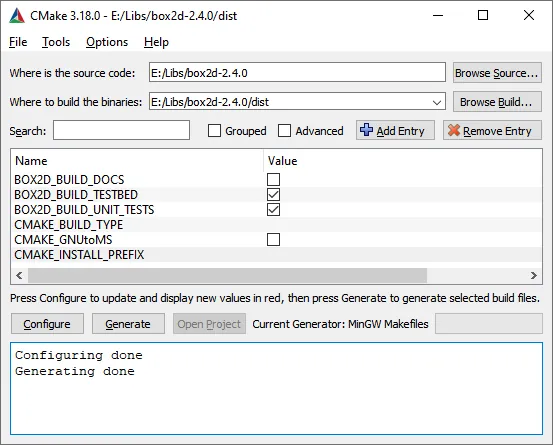
If you want to run Testbed on laptop you need to run “E:\Libs\box2d-2.4.0\dist\testbed\testbed.exe” using “High performance graphics processor” (instead of “Integrated graphics processor” because Testbed requires OpenGL 3.3. You should to click by RMB on "testbed.exe" and choose “Run with graphics processor” → “High performance graphics processor”

8Observer8 said:
ImGUI uses … SDL2 for window.
Not necessarily, in a Qt environment perhaps you are, though…
SuperVGA said:
Not necessarily, in a Qt environment perhaps you are, though…
Sometimes I use QtCreator IDE for pure C++ (GLFW and SDL2) but Qt GUI (QtWidgets and QML) has more priority for me because it allows to make GUI apps with 3D OpenGL graphics very easy (Qt has a lot of helper classes). I think the topic starter does not uses Qt framework. But I showed above how to setup ImGUI in QtCreator without Qt Framework. I think it is possible to install QtCreator + MinGW without Qt. I deleted Visual Studio 2019 because it is require a lot of space on my laptop. I think it is ~20 GB. QtCreator+MinGW require 1GB. Whole Qt SDK (+QtCreate+MinGW) requires 2.22 GB (without Android and iOS). But a lot of books and tutorials use GLFW. SDL2 supports 2D audio very easy. I like to study a few technologies to choose what is better for current task.
@8Observer8 Thanks guys. I just found out that the imgui window is inside of the opengl window and it is not movable
Edit: Is the imgui window allow to place buttons on x,y positions. I know it allows me to place buttons but does it also allow the window positions
@undefined Like if we click on a app on a phone we just load in. We dont have to go to iPhone imgui screen. So I wanted to make a buttons on the opengl screen
Shaanveer said:
@undefined Like if we click on a app on a phone we just load in. We dont have to go to iPhone imgui screen. So I wanted to make a buttons on the opengl screen
Could you please provide a visual mockup of what you're trying to do (upload an image via imgur.com, for instance, and post the link here)
There is a lot of terms in software development, and you have chosen to dive right into the deep end. You're not going to learn it all overnight, and it's understandable that it can be difficult to do what you want. Visuals help convey this.
Again, and this has nothing to do with visuals, I must advise that you drop C++ and opengl for now, and use Godot. You're 11, you'll get into the advanced stuff eventually.
I don't understand this fixation on positions. Any GUI library will have ways to position and size things. Many will do a lot of the layout for you to avoid having to manually enter x,y positions and sizes, which keeping consistent alignment, padding etc., but you can generally still “force” a position/size of some element if you really need to for some reason.
Shaanveer said:
@8Observer8 Thanks guys. I just found out that the imgui window is inside of the opengl window and it is not movable
As for Windows being movable, that is generally an option in most UI libraries to allow moving by dragging a title bar or such (EDIT: Infact, it should be default in ImGui, ImGuiWindowFlags_NoMove optionally disables a window from being movable).
SuperVGA said:
Could you please provide a visual mockup of what you're trying to do (upload an image via imgur.com, for instance, and post the link here)
You can attach images directly on the forum, both by pasting from the clipboard into the post, or by the “insert image” button.

@SuperVGA https://nklein.com/2009/11/playing-with-sheeple-based-gui-atop-cl-opengl/
Check the picture out. Example for this would be a calculator. Buttons and answer on same screen not different windows
This topic has been locked by a moderator. New replies are not allowed.
GameDev.net uses cookies to ensure you have the best experience on our platform. Learn more