

Hi, people!
So, here is the scenario:
I'm creating two resources (let's call them rA and rB).
Their D3D12_HEAP_PROPERTIES and D3D12_RESOURCE_DESC are identical.
I create one SRV for each of them in a SRV descriptor heap and I create a RTV for rA in a RTV descriptor heap.
I have two render passes.
In the first pass I clear rA's RTV (with orange) and render a colored triangle on it.
Between the passes I copy rA in rB (with ID3D12GraphicsCommandList::CopyResource).
In the second pass I use either rA's or rB's SRV as a texture and render it in a rectangle.
Here are the results:
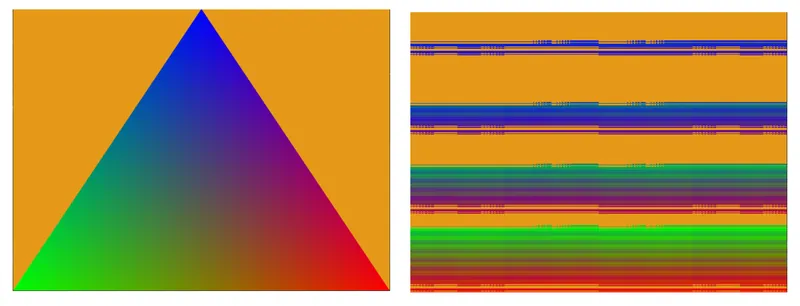
My question is: Why is this happening?
My theory is that rA and rB have different data layouts and when the information is copied from rA and placed in rB it is placed in the wrong order and that's why it appears scrambled.
(I have set the layout to both resources to D3D12_TEXTURE_LAYOUT_UNKNOWN if that helps)